
Static Routing


In this post, I want to demonstrate static routing and how it can be used.
A static route is a configuration on a router that specifies how to reach a particular network. We manually specify the path packets must take to reach their destination.
Let me demonstrate this with a topology:
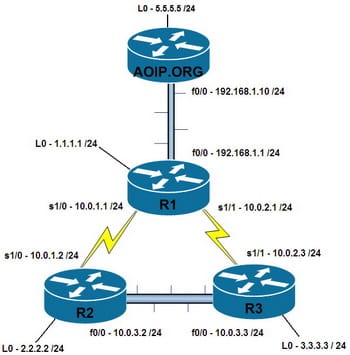
In this topology, we have three routers:
- R1 has network
192.168.1.0/24on the left - R2 in the middle
- R3 has network
192.168.3.0/24on the right
Between R1 and R2 we have network 10.0.0.0/30 and between R2 and R3 we have network 10.0.0.4/30.
Let's configure the interfaces first:
R1 Configuration:
Router(config)# interface FastEthernet0/0
Router(config-if)# ip address 192.168.1.1 255.255.255.0
Router(config-if)# no shutdown

Router(config)# interface Serial0/0
Router(config-if)# ip address 10.0.0.1 255.255.255.252
Router(config-if)# no shutdown
R2 Configuration:
Router(config)# interface Serial0/0
Router(config-if)# ip address 10.0.0.2 255.255.255.252
Router(config-if)# no shutdown

Router(config)# interface Serial0/1
Router(config-if)# ip address 10.0.0.5 255.255.255.252
Router(config-if)# no shutdown
R3 Configuration:
Router(config)# interface Serial0/1
Router(config-if)# ip address 10.0.0.6 255.255.255.252
Router(config-if)# no shutdown

Router(config)# interface FastEthernet0/0
Router(config-if)# ip address 192.168.3.1 255.255.255.0
Router(config-if)# no shutdown
Now that our interfaces are configured, let's check the routing tables:
R1 Routing Table:
R1# show ip route
Codes: C - connected, S - static, R - RIP, M - mobile, B - BGP
       D - EIGRP, EX - EIGRP external, O - OSPF, IA - OSPF inter area
       N1 - OSPF NSSA external type 1, N2 - OSPF NSSA external type 2
       E1 - OSPF external type 1, E2 - OSPF external type 2
       i - IS-IS, su - IS-IS summary, L1 - IS-IS level-1, L2 - IS-IS level-2
       ia - IS-IS inter area, * - candidate default, U - per-user static route
       o - ODR, P - periodic downloaded static route

Gateway of last resort is not set.

     10.0.0.0/30 is subnetted, 1 subnets
C       10.0.0.0 is directly connected, Serial0/0
C    192.168.1.0/24 is directly connected, FastEthernet0/0
As we can see, R1 only knows about its directly connected networks. It doesn't know how to reach 192.168.3.0/24 or the 10.0.0.4/30 network.
Let's configure static routes to fix this. On R1, we need to tell it how to reach 192.168.3.0/24:
R1(config)# ip route 192.168.3.0 255.255.255.0 10.0.0.2This command tells R1: "To reach network 192.168.3.0/24, send packets to 10.0.0.2 (which is R2)".
Similarly, on R3, we need to tell it how to reach 192.168.1.0/24:
R3(config)# ip route 192.168.1.0 255.255.255.0 10.0.0.5Now let's check our routing tables again:
R1 Routing Table After Static Route:
R1# show ip route
Gateway of last resort is not set.

     10.0.0.0/30 is subnetted, 1 subnets
C       10.0.0.0 is directly connected, Serial0/0
C    192.168.1.0/24 is directly connected, FastEthernet0/0
S    192.168.3.0/24 [1/0] via 10.0.0.2
Perfect! Now R1 has a static route (marked with 'S') to reach 192.168.3.0/24.
But there's still one problem - R2 needs to know about both end networks. Let's configure R2:
R2(config)# ip route 192.168.1.0 255.255.255.0 10.0.0.1
R2(config)# ip route 192.168.3.0 255.255.255.0 10.0.0.6
Now let's test connectivity with a ping from R1 to 192.168.3.1:
R1# ping 192.168.3.1

Type escape sequence to abort.
Sending 5, 100-byte ICMP Echos to 192.168.3.1, timeout is 2 seconds:
!!!!!
Success rate is 100 percent (5/5), round-trip min/avg/max = 64/67/68 ms
Excellent! Our static routes are working.
Default Static Routes
We can also configure a default static route, which is used when the router doesn't have a specific route to a destination. This is often called a "gateway of last resort".
The syntax for a default route is:
Router(config)# ip route 0.0.0.0 0.0.0.0 [next-hop-ip]For example, if we wanted R1 to send all unknown traffic to R2:
R1(config)# ip route 0.0.0.0 0.0.0.0 10.0.0.2Administrative Distance
Static routes have an administrative distance of 1 by default (directly connected routes have 0). You can change this if needed:
Router(config)# ip route 192.168.3.0 255.255.255.0 10.0.0.2 5This gives the static route an administrative distance of 5.
Summary
Static routing is useful in small networks where you want full control over the path packets take. The key points to remember:
- Static routes must be configured manually on each router
- Use the
ip routecommand followed by destination network, subnet mask, and next hop - Don't forget to configure routes in both directions
- Static routes appear in the routing table with an 'S'
- Default routes use
0.0.0.0 0.0.0.0as the destination
Static routing works well for small, stable networks, but becomes impractical in larger networks where dynamic routing protocols like OSPF or EIGRP are more suitable.