
JavaScript For...of and For...in Loops
This post covers the JavaScript for...of and for...in loops, explaining what each one iterates over, when to use them, and how to avoid the common mistake of using the wrong loop for the wrong data structure. Practical code examples show both loops in action, including a combined use case.

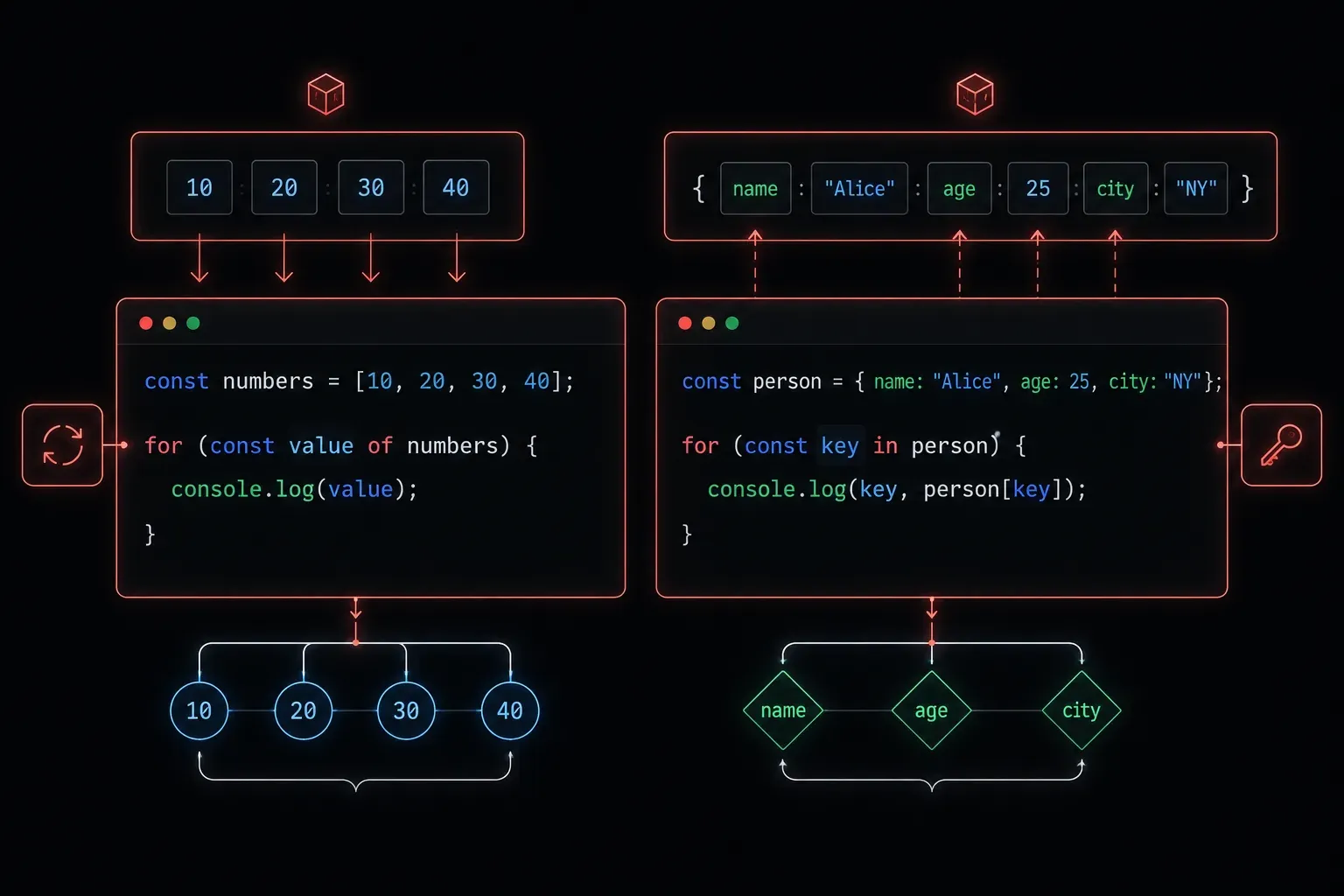
If you've been writing JavaScript for a little while, you've probably used a standard for loop to iterate over arrays. But JavaScript gives you two more elegant options: the for...of loop and the for...in loop. They look similar, but they serve very different purposes, and mixing them up is one of the most common mistakes beginners make.
Let's break down exactly what each one does, when to use it, and when to avoid it.
The For...of Loop
The for...of loop is designed for iterating over iterable objects. Think of iterables as anything you can step through value by value: arrays, strings, maps, and sets all qualify.
Here's the most common use case, looping over an array:
const fruits = ["apple", "banana", "cherry"];

for (const fruit of fruits) {
  console.log(fruit);
}

// Output:
// apple
// banana
// cherry
On each iteration, fruit is assigned the actual value of the current element. Clean, readable, and does exactly what you'd expect.
You can also use for...of on a string, which iterates over each individual character:
const word = "hello";

for (const char of word) {
  console.log(char);
}

// Output:
// h
// e
// l
// l
// o
This comes in handy more often than you'd think, particularly when parsing or validating user input character by character.
The For...in Loop
The for...in loop is designed for iterating over the enumerable properties (keys) of an object. Where for...of gives you values, for...in gives you keys.
const router = {
  hostname: "R1",
  model: "ISR4331",
  location: "Sydney DC"
};

for (const key in router) {
  console.log(key + ": " + router[key]);
}

// Output:
// hostname: R1
// model: ISR4331
// location: Sydney DC
On each iteration, key holds the name of the property (like "hostname"), and you use bracket notation router[key] to access the corresponding value.
The Critical Difference
Here's where beginners run into trouble. If you accidentally use for...in on an array, you get the indexes, not the values:
const scores = [95, 87, 72];

for (const item in scores) {
  console.log(item);
}

// Output:
// 0
// 1
// 2
That's probably not what you wanted. Arrays are technically objects in JavaScript, so for...in treats the numeric indexes as enumerable keys. It works, but it's not the right tool. Use for...of for arrays, and for...in for plain objects.
A simple mental model to keep them straight:
- for...of gives you the values. Use it with arrays, strings, maps, and sets.
- for...in gives you the keys. Use it with plain objects.
A Practical Combined Example
Here's a scenario you'll see in real code: an array of objects, where you might use both loops together or choose between them deliberately.
const devices = [
  { name: "Switch1", type: "L2" },
  { name: "Router1", type: "L3" }
];

for (const device of devices) {
  console.log("Device properties:");
  for (const key in device) {
    console.log("  " + key + ": " + device[key]);
  }
}

// Output:
// Device properties:
//   name: Switch1
//   type: L2
// Device properties:
//   name: Router1
//   type: L3
for...of steps through each device in the array, and for...in steps through each property on the individual device object. They work together naturally when you understand what each one is actually iterating over.
Quick Reference
- Use
for...ofwhen you need each value from an array, string, or other iterable - Use
for...inwhen you need each key from a plain object - Avoid using
for...inon arrays unless you specifically need the index numbers - Both loops support
breakandcontinuejust like a standardforloop
What's Next
Now that you understand how to iterate with for...of and for...in, the next step is learning about JavaScript's built-in array methods like forEach, map, filter, and reduce. These methods give you even more expressive ways to work with collections of data and are used constantly in modern JavaScript. We'll cover those in the next post.