
Route Poisoning: Effective Configuration Strategies
This post covers route poisoning configuration in depth for CCNP ENARSI exam domain 1.3, focusing on RIP and EIGRP behavior, split horizon interaction, poison reverse, hold-down timer tuning, and verification commands. It includes CLI examples for simulating failures and confirming loop-prevention

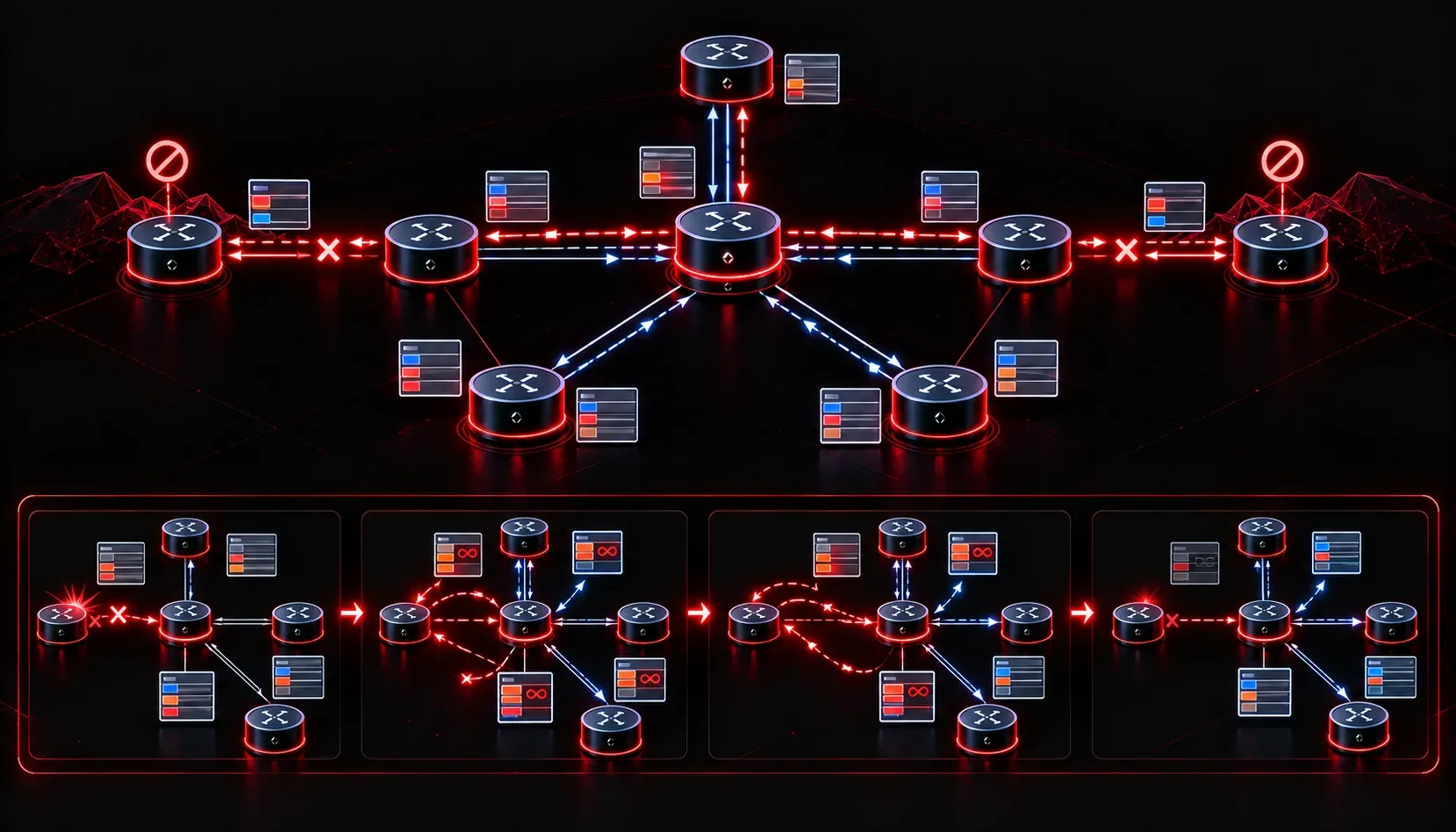
Route poisoning is one of the foundational loop-prevention mechanisms in distance-vector routing, but understanding it conceptually and deploying it correctly in an enterprise environment are two different disciplines. This post focuses on the configuration depth, behavioral nuances, and verification techniques you need for both production deployments and the ENARSI exam.
How Route Poisoning Works in Practice
When a distance-vector router detects that a directly connected or learned route has failed, instead of simply withdrawing the route from updates, it advertises the route with an infinite metric. In RIP, that metric is 16 hops. This "poison" advertisement propagates through the network, causing all routers to immediately mark the route as unreachable rather than waiting for hold-down timers to expire or relying on routes learned from downstream neighbors that may still be advertising stale paths.
The key behavioral point: route poisoning works in conjunction with poison reverse. When a router receives a poisoned route, it responds by sending a poison reverse back to the advertising router. This overrides split horizon temporarily and accelerates convergence. Without poison reverse, split horizon would suppress that update on the same interface it was received, which would leave upstream neighbors in an ambiguous state.
RIP Route Poisoning Configuration
RIPv2 is the most common protocol context for route poisoning on the ENARSI exam. The relevant configuration lives under the RIP process and the interface level.
R1(config)# router rip
R1(config-router)# version 2
R1(config-router)# network 10.0.0.0
R1(config-router)# no auto-summary
Split horizon with poison reverse is the default behavior on most Cisco interfaces running RIP. Verify the interface-level state with:
R1# show ip interface GigabitEthernet0/0
  Split horizon is enabled
  ICMP redirects are always sent
To explicitly enable or disable split horizon (and poison reverse behavior) on an interface:
R1(config)# interface GigabitEthernet0/0
R1(config-if)# ip split-horizon
Disabling split horizon on a hub-and-spoke Frame Relay or DMVPN topology is a common enterprise scenario. When you disable it, the router sends full routing tables out every interface, which is necessary for spokes to learn routes from other spokes via the hub. However, this increases exposure to routing loops, making route poisoning behavior even more critical to understand:
R1(config-if)# no ip split-horizonEIGRP and Route Poisoning Behavior
EIGRP handles route poisoning differently from RIP. It uses a metric of 0xFFFFFFFF (effectively infinite) in the EIGRP update when advertising an unreachable route. This is part of EIGRP's Diffusing Update Algorithm (DUAL) and is triggered when a route loses its feasible successor and no other feasible successor exists in the topology table.
You can verify that EIGRP is advertising poison routes during a convergence event by examining the topology table and enabling debug selectively:
R1# show ip eigrp topology all-links
R1# debug ip eigrp notifications
EIGRP split horizon is configured per-interface and defaults to enabled on physical interfaces but is disabled by default on multipoint subinterfaces:
R1(config-if)# no ip split-horizon eigrp 100The EIGRP autonomous system number must be specified. Omitting it is a common configuration mistake that results in split horizon remaining at its default, causing route advertisement issues on hub-and-spoke topologies.
Verifying Route Poisoning During Convergence
One of the most effective ways to validate your route poisoning configuration is to simulate a link failure and observe the update behavior. Use a controlled shutdown rather than pulling a cable in a lab environment:
R2(config)# interface GigabitEthernet0/1
R2(config-if)# shutdown
Immediately capture RIP update behavior:
R1# debug ip rip
RIP: sending v2 update to 224.0.0.9 via GigabitEthernet0/0 (10.1.1.1)
RIP: build update entries
      10.2.2.0/24 via 0.0.0.0, metric 16, tag 0
A metric of 16 in a RIP update is your confirmation that route poisoning is functioning. The route is being advertised as unreachable rather than silently withdrawn.
For EIGRP, watch the topology table transition:
R1# show ip eigrp topology 10.2.2.0/24
EIGRP-IPv4 Topology Entry for AS(100)/ID(10.1.1.1) for 10.2.2.0/24
  State is Passive, Query origin flag is 1, 0 Successor(s), FD is Inaccessible
An "Inaccessible" state in the EIGRP topology table, combined with an active DUAL diffusing computation, indicates that route poisoning and DUAL are working in concert to prevent a routing loop from forming.
Network Efficiency Considerations
Route poisoning improves convergence speed but introduces a temporary increase in routing update traffic. In large-scale RIP deployments, poisoned routes flowing through the network can cause a burst of updates across all routers simultaneously. This is manageable in modern networks, but in environments with high route counts, consider the interaction with hold-down timers.
The RIP hold-down timer (default 180 seconds) prevents a router from accepting new information about a poisoned route until the timer expires or a higher-metric route is received. This interacts with route poisoning as follows:
- Route goes down: Router advertises metric 16 (poison).
- Neighbors receive poison: They enter hold-down state for that prefix.
- Hold-down active: Routers ignore updates advertising that prefix with equal or worse metric.
- Hold-down expires or better path received: Route can re-enter the routing table.
Tuning these timers requires careful consideration. Aggressive timer reduction increases network efficiency during convergence but may cause premature hold-down expiration:
R1(config-router)# timers basic 5 15 15 30This sets update/invalid/holddown/flush timers to 5/15/15/30 seconds respectively. These values must be consistent across all routers in the RIP domain. Mismatched timers are a frequent source of intermittent route flapping in production environments.
Exam-Level Troubleshooting: Common Failure Scenarios
Several specific scenarios appear repeatedly in ENARSI exam questions and production troubleshooting around route poisoning configuration techniques:
- Counting to infinity: Occurs when route poisoning is delayed or when split horizon is disabled without proper poison reverse. Routes increment hop-by-hop to the maximum metric before being declared unreachable.
- Suppressed poison reverse: When access lists filter outbound RIP updates, they may inadvertently block poison reverse advertisements, allowing the receiving router to continue believing a dead route is reachable.
- EIGRP stuck-in-active (SIA): If a query for a failed route is not answered within the active timer (default 3 minutes), the neighbor relationship is torn down. This is EIGRP's analog to counting-to-infinity and is prevented by proper stub router configuration and summarization.
To identify SIA conditions:
R1# show ip eigrp topology active
R1# debug eigrp fsm
What's Next
Now that you have a working understanding of route poisoning configuration and how it interacts with split horizon, hold-down timers, and poison reverse, the logical next step is mastering the full suite of EIGRP loop-prevention tools. That includes feasibility condition verification, stub router configuration for DMVPN environments, and how summarization boundaries affect DUAL query scope. These topics build directly on the convergence behavior you've seen here and are heavily tested across the loop-prevention and EIGRP sections of the ENARSI blueprint.
Tools and resources for this topic
- CCNP ENARSI 300-410 Official Cert Guide — The definitive ENARSI study resource by Raymond Lacoste. Covers advanced routing, services, and troubleshooting.