
Understanding Throughput: How It Affects Your Internet Experience
Throughput measures actual data transfer rates in networks, differing from theoretical bandwidth capacity. Understanding throughput helps explain real-world internet performance issues like buffering and slow downloads.


When you're streaming a video and it suddenly starts buffering, or when a file download crawls to a halt, you're experiencing the real-world impact of throughput. Understanding throughput is essential for anyone working with networks, as it directly affects how users experience internet services and applications.
What Is Throughput?
Throughput refers to the actual amount of data successfully transmitted over a network connection in a given time period. It's typically measured in bits per second (bps), kilobits per second (Kbps), megabits per second (Mbps), or gigabits per second (Gbps).
Think of throughput as the actual data transfer rate you're getting right now, not what you're theoretically supposed to get. It's the real-world performance metric that matters most to end users.
Throughput vs. Bandwidth: The Highway Analogy
Many people confuse throughput with bandwidth, but they're different concepts. Here's a helpful analogy:
- Bandwidth is like the number of lanes on a highway; it represents the maximum capacity
- Throughput is like the actual number of cars passing through per hour, the real traffic flow
You might have a 100 Mbps internet connection (bandwidth), but if network congestion, packet loss, or other factors are present, your actual throughput might only be 45 Mbps. The highway has the capacity for more traffic, but current conditions are limiting the flow.
What Affects Throughput?
Several factors can impact your actual data transfer rate:
Network Congestion
When too many users share the same network resources, throughput decreases. This is why your internet might slow down during peak evening hours when everyone in your neighborhood is streaming videos.
Packet Loss
When data packets are lost in transit, they must be retransmitted, reducing overall throughput. Even a 1% packet loss can significantly impact performance for applications like video conferencing.
Latency
High latency (delay) can reduce throughput, especially for protocols like TCP that wait for acknowledgments before sending more data. It's like having traffic lights every block on your highway.
Protocol Overhead
Network protocols add headers and control information to your data, reducing the amount of actual user data transmitted. This overhead is necessary but impacts network efficiency.
Measuring Throughput in Practice
You can measure throughput using various tools:
# Using iperf3 to test throughput between two devices
iperf3 -c 192.168.1.100 -t 30

# Sample output showing actual throughput
[ ID] Interval           Transfer     Bitrate
[  5]   0.00-30.00  sec   2.15 GBytes   615 Mbits/sec sender
[  5]   0.00-30.04  sec   2.14 GBytes   612 Mbits/sec receiver
Popular online speed tests like Speedtest.net also measure throughput, showing you the actual data transfer rate between your device and their test servers.
Hands-on Excercise
Now it's your turn to test this out and see it in real-time.
Step 1: Open speedtest.net and run a speed test. Below is my result.
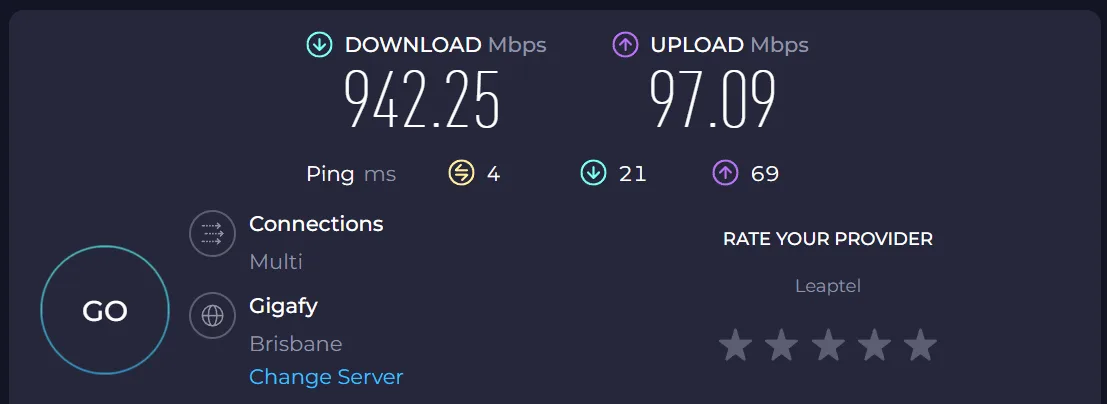
My internet speed is advertised as 1000/100, so why don't I get either speed at its maximum? This is the difference between Bandwidth and Throughput. Speedtest.net is testing my throughput, but part of that is the overhead on each packet, the headers. So I'll NEVER get 1000/100 throughput, but I'm as close as I realistically will get.
Step 2: Click on Change Server and select a server in a different country, not close to you, pick something FAR. Then run the test again.
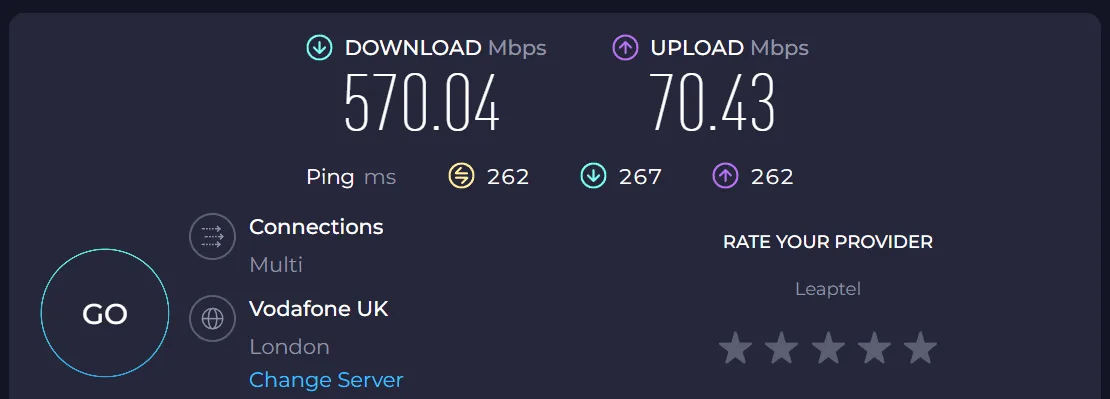
I picked London, which is about as far as I can get from Brisbane, Australia. Notice my Latency and Jitter numbers now. 262 and 267 instead of 4 and 21 that I had before. That's because the data has so much further to go. Getting from my house to Brisbane is walking distance, but from my house to London, well, that's a 30+ hour flight. Data has the same problem; it takes time to travel that far.
Also, notice how my throughput dropped. It's still pretty fast, but I'm getting 570/70 instead of 942/97 as I did in the first test. This is because there are many more hops involved and many more points of congestion. For you to drive to the bottom of your street probably doesn't take long, right? There is no traffic. But drive in rush hour in the morning to your workplace, and you can sit still for ages in some places because of congestion. Your car didn't suddenly forget how to do its top speed; it is capable of doing its maximum speed, it's just not able to do it because of the road congestion. Welcome to Bandwidth and Throughput.
How Throughput Impacts Your Internet Experience
Understanding throughput helps explain common internet performance issues:
- Video streaming: Netflix requires 25 Mbps throughput for 4K content. If your actual throughput drops below this, you'll experience buffering or quality reduction
- File downloads: A 1 GB file should download in about 80 seconds on a 100 Mbps connection, but actual throughput determines real download time
- Video calls: Zoom recommends 1.8 Mbps throughput for HD video calls. Insufficient throughput causes pixelated video and audio dropouts
Optimizing Throughput
While you can't always control throughput, you can take steps to maximize it:
- Use wired connections when possible for more consistent throughput
- Position Wi-Fi devices close to access points to reduce signal interference
- Update network drivers and firmware regularly
- Monitor network usage to identify bandwidth-heavy applications
What's Next
Now that you understand throughput and how it affects your internet experience, the next step is learning about latency and how network delays impact application performance. We'll explore how latency and throughput work together to determine overall network quality.