
What Are Access Points and How Do They Work?
Access points are networking devices that bridge wired and wireless networks, enabling Wi-Fi distribution throughout buildings. They connect to wired infrastructure via Ethernet and provide wireless connectivity to client devices.

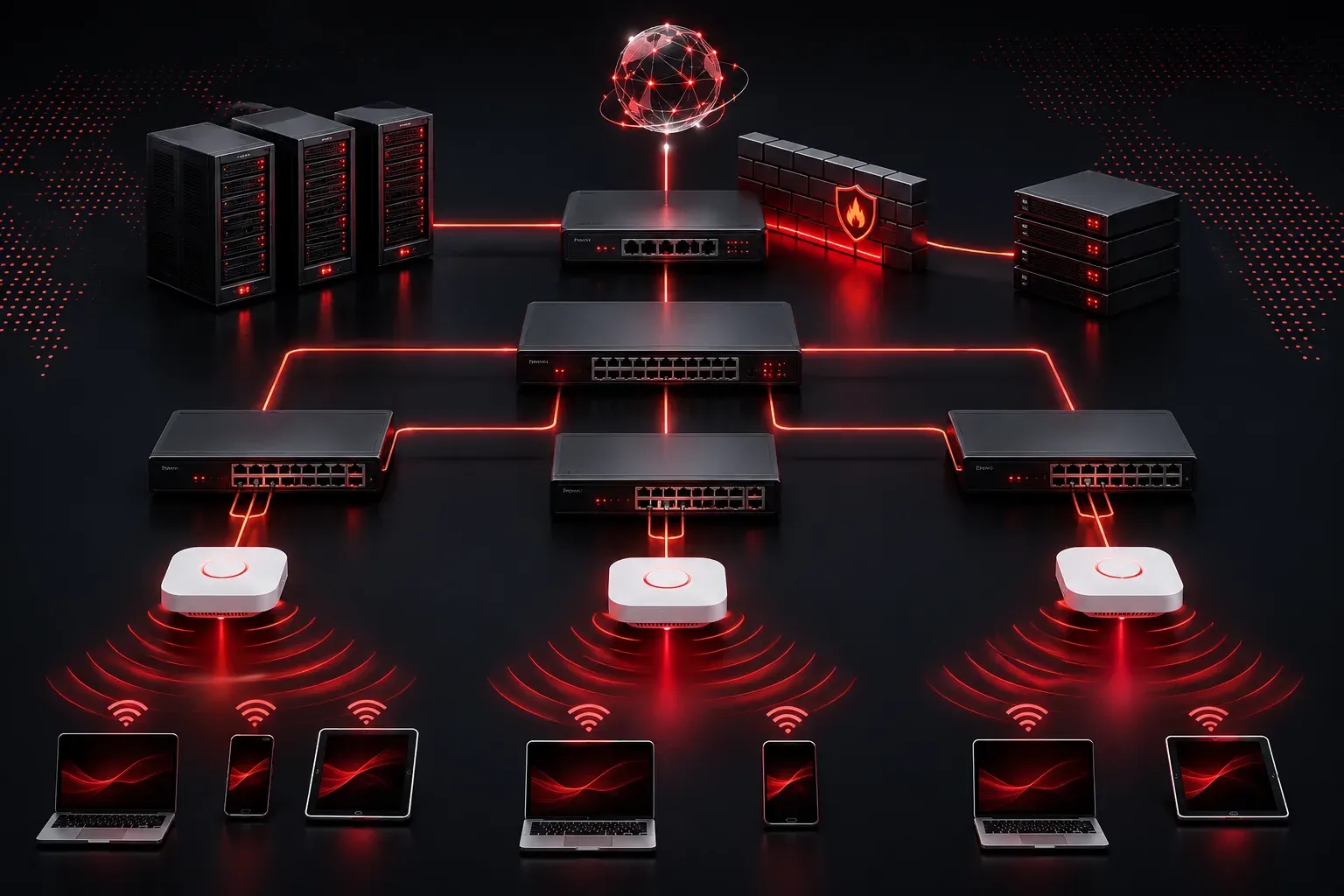
Understanding Access Points in Wireless Networks
If you've ever wondered how Wi-Fi magically appears throughout your office building or home, the answer lies in devices called access points (APs). An access point is a networking device that creates a wireless local area network (WLAN) by connecting wireless devices to a wired network infrastructure.
Think of an access point as a bridge between the wired and wireless worlds. While your router handles internet connectivity and routing decisions, access points focus specifically on Wi-Fi distribution, extending wireless coverage to areas where devices need internet access.
How Access Points Function in Your Network
The primary AP function involves several key processes. First, the access point connects to your existing wired network through an Ethernet cable. This connection provides the pathway for wireless devices to reach the broader network and the internet.
When you connect your laptop or smartphone to Wi-Fi, you're actually connecting to an access point. The AP then forwards your data packets between your wireless device and the wired network infrastructure. This process happens transparently – you simply see a Wi-Fi network name (SSID) and connect to it.
Access Point vs Router: What's the Difference?
Many people confuse access points with routers, but they serve different purposes in a wireless network. A router makes routing decisions and typically includes built-in Wi-Fi capabilities. An access point, however, is specifically designed to extend wireless coverage without performing routing functions.
In enterprise environments, you'll often see multiple access points connected to switches, with a separate router handling internet connectivity. This design allows for better wireless coverage across large areas.
Types of Access Point Deployments
Access points can be deployed in several ways depending on your network requirements:
- Standalone APs: Independent devices that you configure individually
- Controller-based APs: Managed centrally by a wireless LAN controller (WLC)
- Cloud-managed APs: Configured and monitored through cloud-based management platforms
For CCNA studies, you'll primarily encounter controller-based deployments, where a WLC manages multiple access points across your network.
Key Access Point Features and Functions
Modern access points provide several important capabilities beyond basic wireless connectivity:
Multiple SSIDs: A single access point can broadcast multiple wireless networks, allowing you to separate guest traffic from corporate traffic or create different access policies.
Security Features: Access points implement various wireless security protocols like WPA3, providing encryption and authentication for wireless clients.
Quality of Service (QoS): APs can prioritize certain types of traffic, ensuring that voice and video applications receive adequate bandwidth.
Power and Connectivity
Access points typically receive power through Power over Ethernet (PoE), which delivers both data and electrical power through a single Ethernet cable. This simplifies installation since you don't need separate power outlets near each AP location.
The connection between an access point and switch uses standard Ethernet protocols. From the switch's perspective, the AP appears as another network device requiring a switchport configuration.
Understanding Wireless Coverage Patterns
Access points don't provide unlimited wireless coverage. The effective range depends on factors like transmit power, antenna design, physical obstacles, and interference from other wireless devices. This is why larger buildings require multiple access points for comprehensive Wi-Fi distribution.
Network administrators carefully plan AP placement to ensure adequate signal strength throughout the coverage area while minimizing interference between adjacent access points.
What's Next
Now that you understand what access points are and their basic function in wireless networks, the next step is learning about wireless LAN controllers (WLCs) and how they manage multiple access points in enterprise environments. We'll also explore the different wireless standards and how they affect your network design decisions.
Tools and resources for this topic
- CCNA Official Cert Guide (Wendell Odom) — The definitive CCNA study resource. Both volumes cover the 200-301 exam blueprint in full.
- Wendell Odom CCNA Vol 1 — Covers networking fundamentals, switching, and routing basics.
- Wendell Odom CCNA Vol 2 — Covers advanced routing, WAN, infrastructure services, and security.