
XML Schema (XSD) Basics
XML Schema (XSD) is a W3C standard that defines the allowed structure, element order, and data types in an XML document. This post explains simple and complex types, sequence and occurrence controls, and shows how to validate XML against an XSD using Python's lxml library.

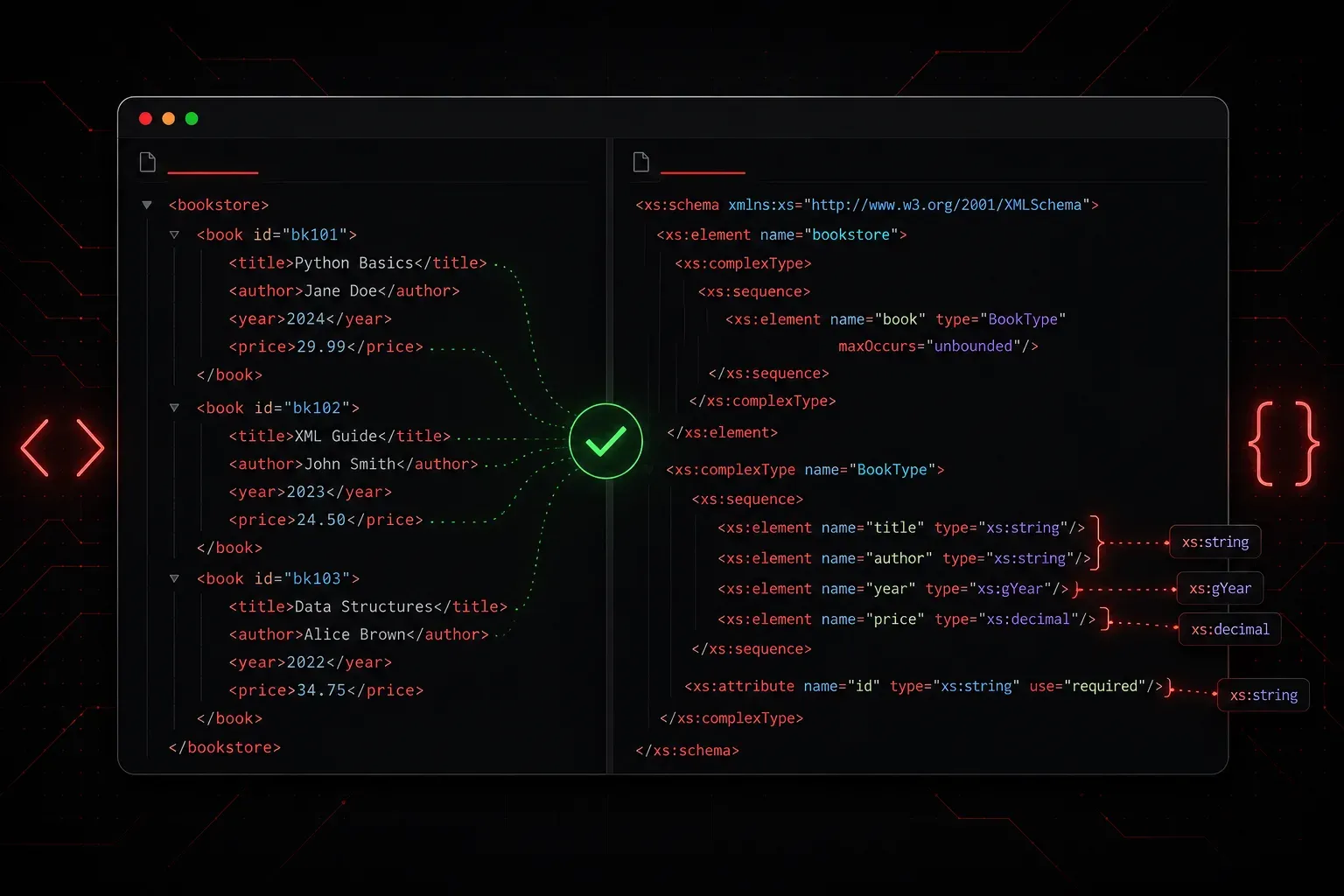
If you are new to XML, here is a quick primer: XML (Extensible Markup Language) is a text-based format for storing and exchanging structured data. You define your own tags to describe your data, and those tags are nested to form a tree structure. If you have been working with XML for a while, you have probably noticed that XML itself does not enforce any rules about what your data should look like. You can put any tags you want in any order. That flexibility is useful, but it also means one malformed or unexpected file can break an entire application. This is where XML Schema (XSD) comes in.
What Is an XSD?
An XML Schema Definition (XSD) is a document that describes the structure, content, and data types allowed in an XML file. Think of it as a contract or blueprint. The XML file is the data; the XSD is the rulebook that says what that data is allowed to look like.
When software reads and processes an XML file, it uses a component called a parser to interpret the document's structure. When that parser validates an XML file against an XSD, it checks things like:
- Are all required elements present?
- Are elements appearing in the correct order?
- Do values match the expected data type (string, integer, date, etc.)?
- Are attribute values within an allowed set?
XSD is the most widely used schema language for XML and is a W3C standard, making it well-supported across programming languages and tools.
A Simple Example
Let's say you are exchanging device inventory data in XML. A typical record might look like this:
<device>
  <hostname>core-sw-01</hostname>
  <ip>192.168.1.1</ip>
  <port_count>48</port_count>
</device>
Without a schema, nothing stops someone from sending you a file where port_count contains the string "forty-eight" instead of an integer, which would likely crash your parser. An XSD prevents this by defining exactly what each element should contain.
Here is a basic XSD that validates the XML above:
<?xml version="1.0" encoding="UTF-8"?>
<xs:schema xmlns:xs="http://www.w3.org/2001/XMLSchema">

  <xs:element name="device">
    <xs:complexType>
      <xs:sequence>
        <xs:element name="hostname" type="xs:string"/>
        <xs:element name="ip"       type="xs:string"/>
        <xs:element name="port_count" type="xs:integer"/>
      </xs:sequence>
    </xs:complexType>
  </xs:element>

</xs:schema>
Breaking Down the Key Concepts
The Schema Namespace
Every XSD file declares the W3C namespace using xmlns:xs="http://www.w3.org/2001/XMLSchema". The xs: prefix is a convention you will see everywhere. It tells the parser that elements like xs:element and xs:string belong to the XSD standard, not your own vocabulary.
Simple vs. Complex Types
Elements that contain only text use a simple type. The built-in simple types include xs:string, xs:integer, xs:decimal, xs:boolean, and xs:date, among many others. Elements that contain child elements or attributes use a complex type, defined with the xs:complexType block.
Sequence vs. Choice
Inside a complex type you control ordering. xs:sequence means child elements must appear in the exact order listed. xs:choice means only one of the listed elements may appear. xs:all allows child elements in any order.
Controlling Occurrences
You can set minimum and maximum occurrence rules on any element using minOccurs and maxOccurs. For example, to make an element optional with up to three occurrences:
<xs:element name="interface" type="xs:string"
            minOccurs="0" maxOccurs="3"/>
Setting maxOccurs="unbounded" removes the upper limit entirely.
Validating XML Against an XSD in Python
The lxml library makes XSD validation straightforward in Python:
from lxml import etree

# Load the schema
with open("device.xsd", "rb") as f:
    schema_doc = etree.parse(f)
schema = etree.XMLSchema(schema_doc)

# Load and validate the XML
with open("device.xml", "rb") as f:
    xml_doc = etree.parse(f)

if schema.validate(xml_doc):
    print("XML is valid.")
else:
    print("Validation errors:")
    for error in schema.error_log:
        print(f"  Line {error.line}: {error.message}")
This pattern is common in scripts and pipelines where you want to validate incoming XML data before processing it further. If the file fails validation, you get a clear error message rather than a cryptic crash later in the pipeline.
When Should You Use XSD?
XSD is a good fit when you are building systems that exchange XML between different teams or organisations, when you need strong data type enforcement, or when you are implementing a standard that already ships with an XSD (many vendor APIs and industry formats do). For quick internal scripts, it may be overkill, but for anything production-facing, the upfront investment in schema design saves hours of debugging.
What's Next
Now that you understand how XSD validates the structure and types of XML data, a natural next step is exploring XPath, which lets you navigate and query XML documents using path expressions. XPath is used heavily in XSLT transformations, web scraping, and XML-aware tooling, so it pairs perfectly with everything you have learned here.