
Network Automation Project: Backup All Configs to Git
Complete network automation project combining Python, Netmiko, and Git to automatically backup device configurations. Script connects to network devices, retrieves running configs, and commits them to version control with timestamps for change tracking.

Network configuration backups are critical for network operations, but manual backups are time-consuming and often forgotten. In this project, we'll build an automated solution that connects to all your network devices, pulls their running configurations, and commits them to a Git repository with proper versioning and timestamps.
This project combines several technologies we've covered: Python for orchestration, Netmiko for device connectivity, and Git for version control. The result is a robust backup system that tracks configuration changes over time and can be scheduled to run automatically.
Project Overview
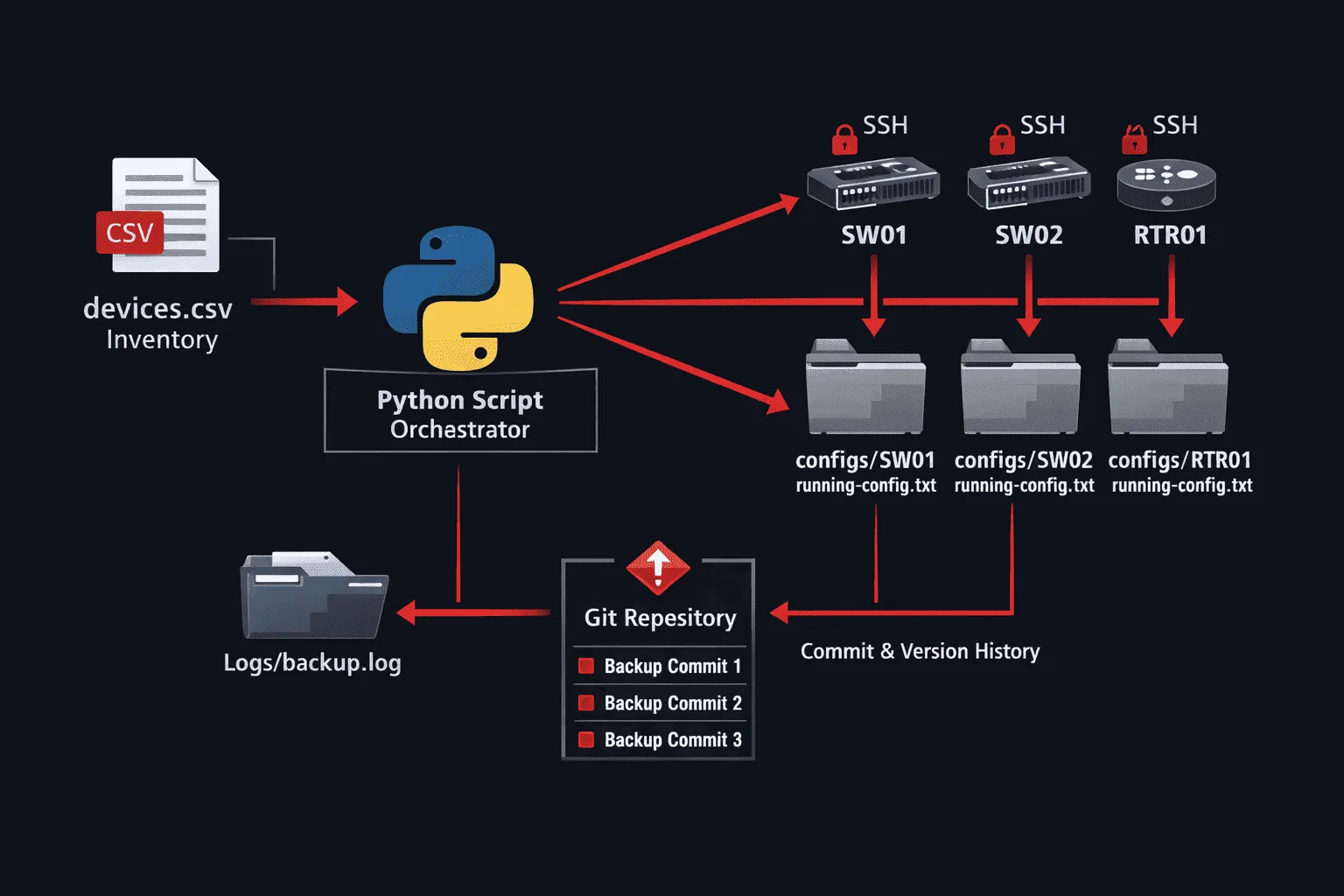
Our automation script will:
- Read device inventory from a CSV file
- Connect to each device using Netmiko
- Retrieve running configurations
- Save configs to organized directory structure
- Commit changes to Git with meaningful timestamps
- Handle errors gracefully and log activities
Setting Up the Environment
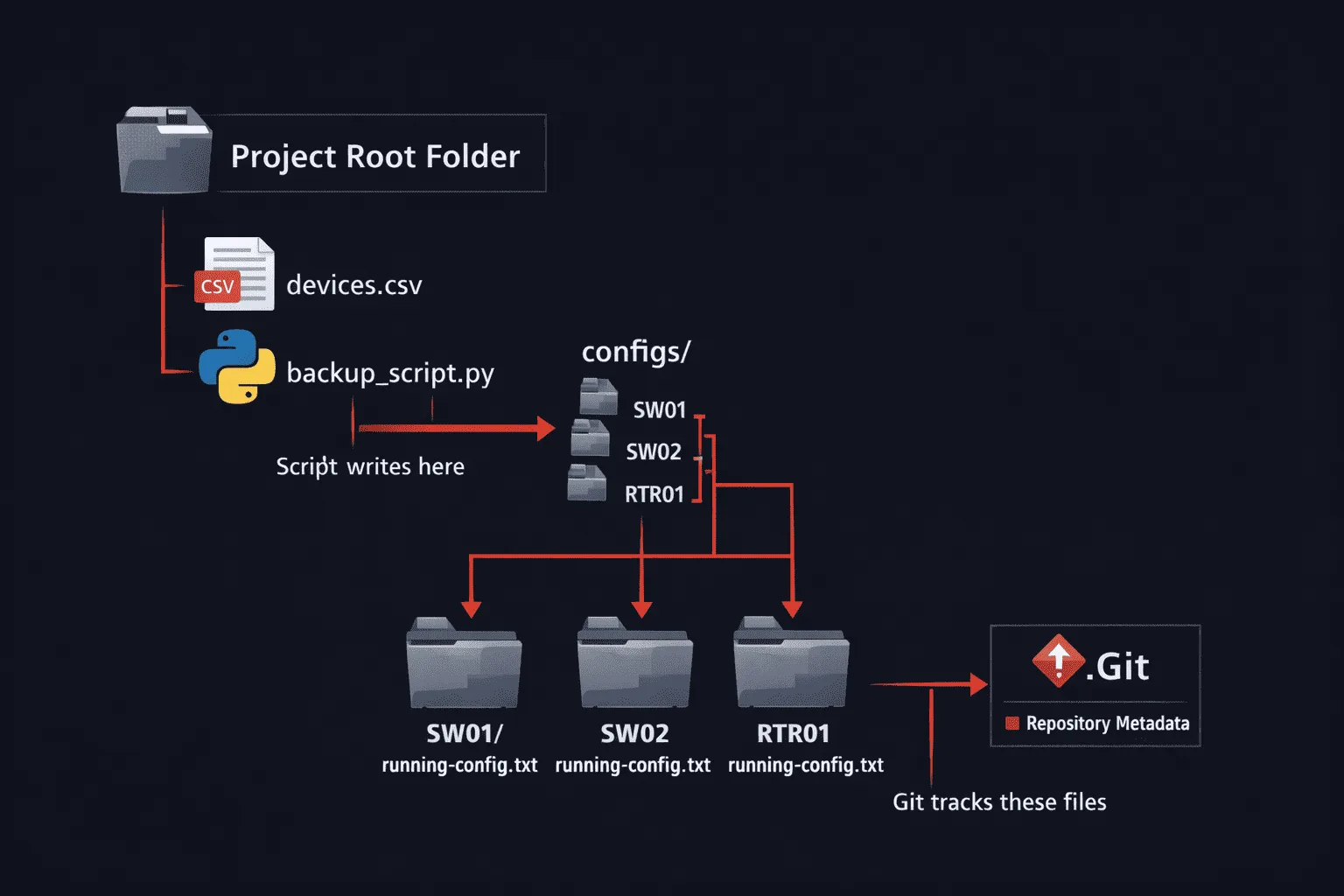
First, create your project directory and initialize the Git repository:
mkdir network-config-backup
cd network-config-backup
git init
mkdir configs logs
touch devices.csv backup_script.py
Install required Python packages:
pip install netmiko gitpython pandas
Device Inventory File
Create a devices.csv file with your network device details:
hostname,ip_address,device_type,username,password
SW01,192.168.1.10,cisco_ios,admin,password123
SW02,192.168.1.11,cisco_ios,admin,password123
RTR01,192.168.1.1,cisco_ios,admin,password123
The Backup Script
Here's our complete backup automation script:
#!/usr/bin/env python3

import os
import csv
import logging
from datetime import datetime
from netmiko import ConnectHandler
from git import Repo
import pandas as pd

# Configure logging
logging.basicConfig(
    level=logging.INFO,
    format='%(asctime)s - %(levelname)s - %(message)s',
    handlers=[
        logging.FileHandler('logs/backup.log'),
        logging.StreamHandler()
    ]
)

def setup_git_repo():
    """Initialize or open existing Git repository"""
    try:
        repo = Repo('.')
        logging.info("Git repository found")
        return repo
    except:
        logging.error("Git repository not found. Run 'git init' first")
        return None

def backup_device_config(device_info):
    """Connect to device and retrieve configuration"""
    try:
        # Establish connection
        connection = ConnectHandler(**device_info)
        logging.info(f"Connected to {device_info['host']}")

        # Get running configuration
        config = connection.send_command('show running-config')

        # Create directory structure: configs/hostname/
        config_dir = f"configs/{device_info['host']}"
        os.makedirs(config_dir, exist_ok=True)

        # Save configuration with timestamp
        timestamp = datetime.now().strftime('%Y%m%d_%H%M%S')
        config_file = f"{config_dir}/running-config.txt"

        with open(config_file, 'w') as f:
            f.write(f"! Configuration backup for {device_info['host']}\n")
            f.write(f"! Backup date: {datetime.now().strftime('%Y-%m-%d %H:%M:%S')}\n")
            f.write("!\n")
            f.write(config)

        connection.disconnect()
        logging.info(f"Configuration saved for {device_info['host']}")
        return True

    except Exception as e:
        logging.error(f"Failed to backup {device_info['host']}: {str(e)}")
        return False

def commit_to_git(repo, message):
    """Add all changes and commit to Git"""
    try:
        # Add all files
        repo.git.add('.')

        # Check if there are changes to commit
        if repo.is_dirty():
            repo.index.commit(message)
            logging.info(f"Changes committed: {message}")
            return True
        else:
            logging.info("No configuration changes detected")
            return False

    except Exception as e:
        logging.error(f"Git commit failed: {str(e)}")
        return False

def main():
    """Main backup orchestration function"""
    logging.info("=== Network Configuration Backup Started ===")

    # Setup Git repository
    repo = setup_git_repo()
    if not repo:
        return

    # Read device inventory
    try:
        devices_df = pd.read_csv('devices.csv')
        logging.info(f"Loaded {len(devices_df)} devices from inventory")
    except Exception as e:
        logging.error(f"Failed to read devices.csv: {str(e)}")
        return

    successful_backups = 0
    failed_backups = 0

    # Process each device
    for _, device_row in devices_df.iterrows():
        device_params = {
            'device_type': device_row['device_type'],
            'host': device_row['ip_address'],
            'username': device_row['username'],
            'password': device_row['password'],
        }

        if backup_device_config(device_params):
            successful_backups += 1
        else:
            failed_backups += 1

    # Commit all changes to Git
    timestamp = datetime.now().strftime('%Y-%m-%d %H:%M:%S')
    commit_message = f"Config backup - {timestamp} - {successful_backups} devices"

    commit_to_git(repo, commit_message)

    # Summary
    logging.info(f"Backup completed: {successful_backups} successful, {failed_backups} failed")
    logging.info("=== Network Configuration Backup Finished ===")

if __name__ == "__main__":
    main()
Running and Scheduling the Backup
Test the script manually first:
python3 backup_script.py
To schedule automatic backups, add a cron job. Edit your crontab:
crontab -e
Add this line to run backups daily at 2 AM:
0 2 * * * cd /path/to/network-config-backup && /usr/bin/python3 backup_script.py
Viewing Configuration History
Git provides powerful tools to track changes over time:
# View commit history
git log --oneline

# See what changed in a specific commit
git show [commit-hash]

# Compare configurations between dates
git diff HEAD~7 HEAD -- configs/SW01/running-config.txt
What's Next
This project creates a solid foundation for config backup git automation. In our next post, we'll enhance this system by adding email notifications when configuration changes are detected, and explore how to integrate with network monitoring tools for more sophisticated change tracking.