
Comparing Cisco AP Modes: Which to Use When?
A comprehensive comparison of Cisco Access Point modes including Local, FlexConnect, Monitor, Rogue Detector, and Bridge modes. Explains when to use each mode and provides practical configuration guidance for CCNA candidates.

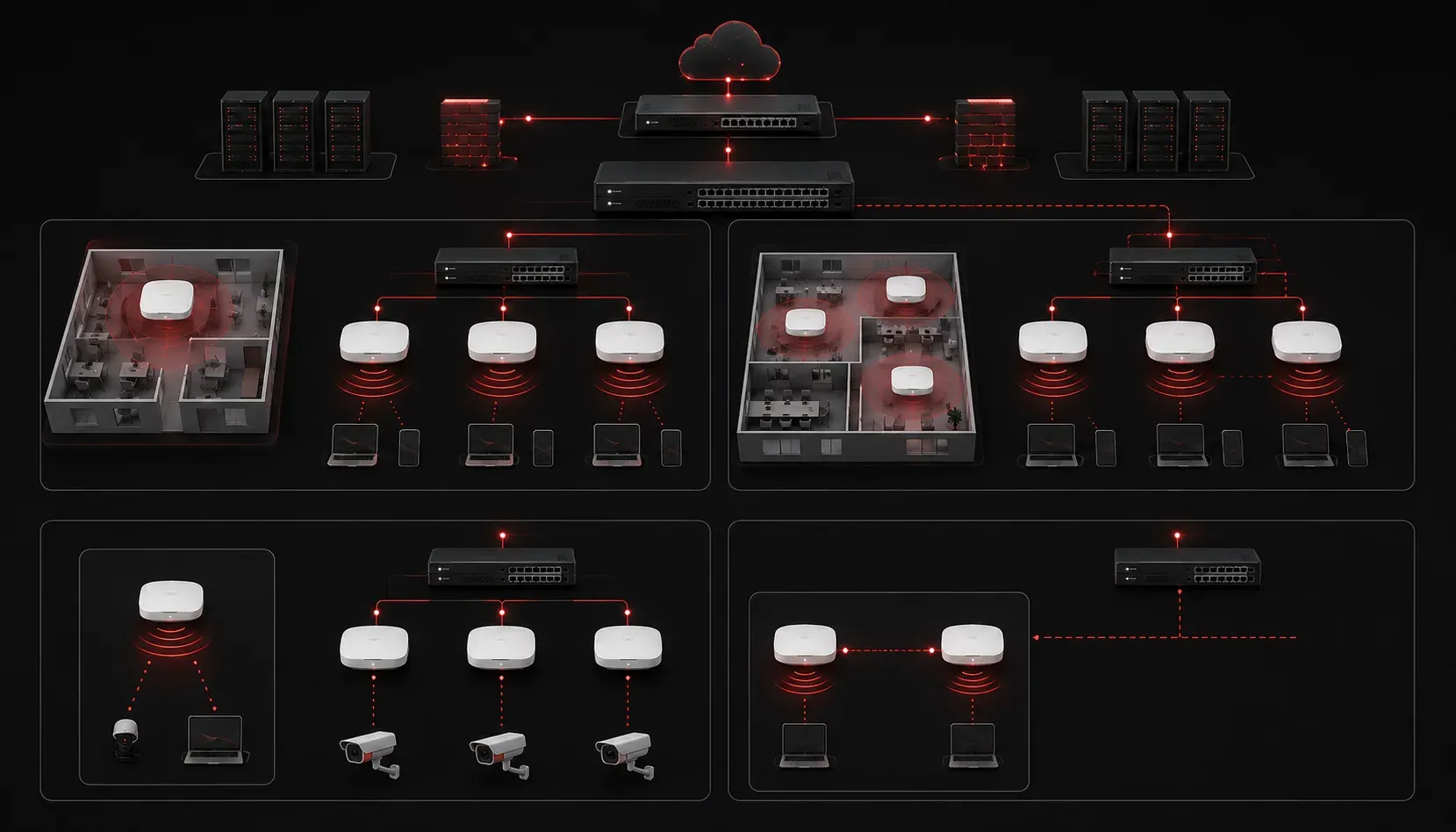
Understanding Cisco AP Mode Options
When configuring Cisco wireless networks, understanding the different Access Point (AP) modes is crucial for building the right network architecture. An Access Point is a networking device that creates a wireless local area network (WLAN), allowing devices like laptops, smartphones, and tablets to connect to a wired network wirelessly.
Each mode serves specific purposes and understanding when to use which mode can make the difference between a well-performing network and one that struggles to meet business needs.
Let's explore a comparison of the primary Cisco AP modes and learn how to make the right choice for your environment.
Local Mode: The Default Choice
Local mode is the default setting for most Cisco APs and serves as the foundation for centralized wireless networks. In this mode, the AP handles data-plane traffic locally while sending control-plane traffic to the Wireless LAN Controller (WLC).
Key characteristics of Local mode:
- Data traffic is bridged locally at the AP
- Control and management traffic goes through the WLC
- Client capacity varies by model (e.g., Cisco 9130 supports up to 200 clients, while enterprise models like 9166 can handle 500+ clients)
- Lowest latency for client data
To configure an AP in Local mode using the WLC GUI, first access the controller's web interface by entering its IP address in a browser. Navigate to Wireless > Access Points > All APs, select your AP, and set the AP Mode to Local.
When to use Local mode: This is your go-to choice for most enterprise deployments that require standard wireless connectivity and centralized management. It's ideal for office buildings, campuses, and retail environments where clients need fast, local data access.
FlexConnect: Bridging Remote Locations
FlexConnect mode addresses the challenges of AP mode differences in remote locations where WAN connectivity to the WLC might be limited or unreliable. This mode allows APs to operate independently when disconnected from the controller.
FlexConnect capabilities include:
- Local switching of data traffic
- Ability to function during WLC outages
- Support for local authentication
- VLAN mapping and ACL enforcement locally
(WLC) > config flexconnect group GROUP_NAME add ap AP_NAME
(WLC) > config ap mode flexconnect AP_NAME
When to use FlexConnect: Perfect for branch offices, remote sites, or any location where reliable WAN connectivity to the WLC cannot be guaranteed. It's also useful when you need to reduce WAN bandwidth usage for data traffic.
Monitor Mode: Dedicated Security
Monitor mode transforms an AP into a dedicated wireless sensor for security monitoring and troubleshooting. The AP doesn't serve clients; instead, it monitors all wireless traffic in its coverage area.
Monitor mode functions:
- Wireless intrusion detection and prevention
- Rogue AP detection
- Spectrum analysis
- Client troubleshooting and location tracking
When choosing AP mode for security-focused deployments, Monitor mode provides comprehensive wireless network visibility without the overhead of serving clients.
Rogue Detector: Network Protection
Rogue Detector mode is specifically designed for security in wired-only environments. APs in this mode don't provide wireless connectivity; instead, they scan for unauthorized wireless devices connected to the wired network.
Key features:
- Detects rogue APs on the wired network
- No radio transmission
- Minimal power consumption
- Integrates with WLC security policies
Bridge Mode: Point-to-Point Connectivity
Bridge mode enables wireless point-to-point or point-to-multipoint connections between buildings or remote locations. This mode is less common in modern deployments but still useful for specific connectivity scenarios.
When considering bridge mode in your Cisco AP settings:
- Connecting buildings without fiber infrastructure
- Temporary network extensions
- Backup connectivity paths
Making the Right Choice
The decision matrix for AP modes depends on several factors:
- Network size and complexity: Local mode for most deployments
- Remote site connectivity: FlexConnect for unreliable WAN links
- Security requirements: Monitor or Rogue Detector modes
- Infrastructure limitations: Bridge mode for point-to-point needs
Most CCNA candidates should focus primarily on understanding Local and FlexConnect modes, as these are the most common in real-world deployments. The security-focused modes (Monitor and Rogue Detector) are important to understand conceptually but are typically implemented in more advanced network designs.
What's Next
Now that you understand the different AP modes, the next step is learning how to configure wireless security protocols and authentication methods. Understanding WPA2, WPA3, and enterprise authentication will build on this foundation to create secure wireless networks that meet modern business requirements.
Tools and resources for this topic
- CCNA Official Cert Guide (Wendell Odom) — The definitive CCNA study resource. Both volumes cover the 200-301 exam blueprint in full.
- Wendell Odom CCNA Vol 1 — Covers networking fundamentals, switching, and routing basics.
- Wendell Odom CCNA Vol 2 — Covers advanced routing, WAN, infrastructure services, and security.