
Hypervisor Type 1 vs Type 2: Key Differences and Use Cases
This post explores the architectural differences between Type 1 and Type 2 hypervisors, examining their performance, security, and configuration implications for enterprise environments. It covers key considerations for choosing between bare-metal and hosted hypervisor solutions in production deplo

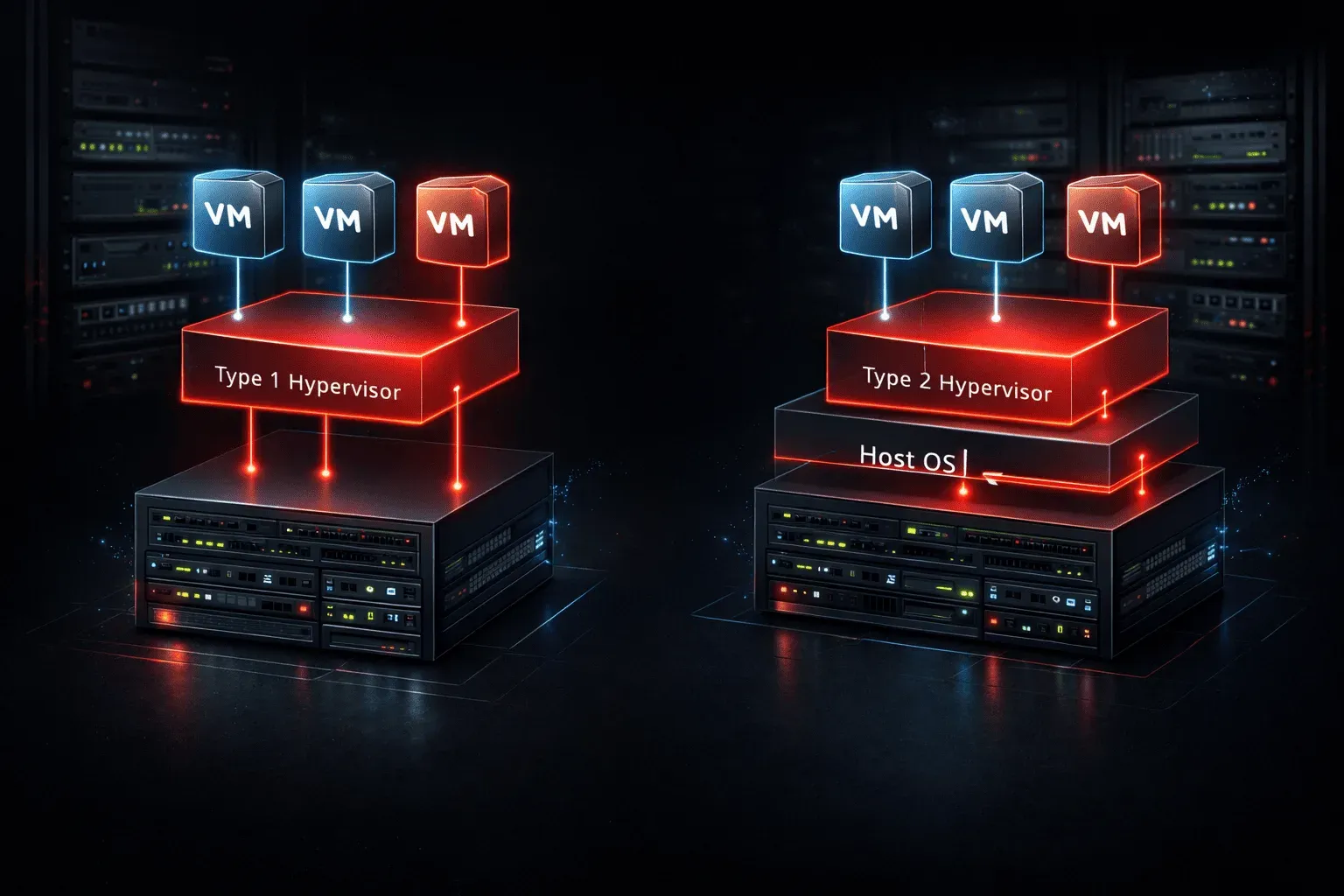
Understanding the fundamental differences between Type 1 and Type 2 hypervisors is crucial for designing robust enterprise virtualization architectures. While both technologies enable virtual machine deployment, their architectural approaches create distinct implications for performance, security, and operational management in production environments.
Architectural Foundations
Type 1 hypervisors, also known as bare-metal hypervisors, run directly on physical hardware without an underlying operating system. This architecture positions the hypervisor as the primary interface between hardware resources and virtual machines. VMware vSphere ESXi, Microsoft Hyper-V Server, and Citrix XenServer represent the dominant enterprise hypervisor solutions in this category.
Type 2 hypervisors operate as applications within a host operating system, creating an additional abstraction layer. VMware Workstation, Oracle VirtualBox, and Parallels Desktop exemplify this approach, where the hypervisor depends on the host OS for hardware resource access.
This architectural distinction fundamentally impacts resource allocation, security boundaries, and performance characteristics across virtualization technologies.
Performance and Resource Management
Type 1 hypervisors deliver superior performance due to direct hardware access. The hypervisor's privileged position eliminates the overhead associated with host OS resource arbitration, enabling near-native performance for CPU-intensive workloads. Memory management operates through hardware-assisted virtualization features like Intel VT-x and AMD-V, providing efficient memory translation and isolation.
# ESXi resource allocation example
vim-cmd vmsvc/getallvms
vim-cmd vmsvc/power.on [vmid]
esxtop # Real-time performance monitoring
Type 2 hypervisors experience performance penalties due to the additional OS layer. Host operating system overhead, device driver interactions, and shared resource contention create measurable latency, particularly for I/O-intensive operations. However, modern Type 2 solutions leverage hardware virtualization extensions to minimize these impacts.
Enterprise hypervisor deployments typically require predictable resource allocation and consistent performance characteristics, making Type 1 architecture the preferred choice for production workloads.
Security Architecture and Isolation
Type 1 hypervisors provide superior security isolation through minimal attack surface exposure. The hypervisor operates in privileged mode with direct hardware control, creating strong boundaries between virtual machines. Security vulnerabilities require hypervisor-level exploitation, which presents significant challenges for attackers.
The hypervisor configuration includes security features like:
- Hardware-enforced memory protection
- Direct I/O device assignment with IOMMU support
- Isolated management interfaces
- Encrypted vMotion and storage communications
Type 2 hypervisors inherit the security posture of their host operating system. Vulnerabilities in the host OS, device drivers, or system services can potentially compromise virtual machine isolation. The expanded attack surface includes all host OS components, requiring comprehensive security hardening beyond hypervisor-specific configurations.
Enterprise Configuration Considerations
Type 1 hypervisor configuration focuses on hardware optimization and cluster management. ESXi deployment involves creating distributed resource clusters with shared storage and network configurations:
# vCenter cluster configuration commands
New-Cluster -Name "Production-Cluster" -Location $datacenter
Add-VMHost -Name "esxi01.domain.com" -Location $cluster
New-DrsRule -Name "Anti-Affinity-Rule" -Cluster $cluster -KeepTogether:$false
Enterprise hypervisor management requires integration with network infrastructure, including distributed switches, storage area networks, and backup systems. Configuration complexity increases with features like vSphere DRS, High Availability, and Fault Tolerance.
Type 2 hypervisors simplify initial configuration but lack enterprise management capabilities. Network configuration relies on host OS settings, limiting advanced features like VLAN tagging, traffic shaping, and distributed networking.
Scalability and Management
Type 1 hypervisors excel in large-scale deployments through centralized management platforms. vCenter Server, System Center Virtual Machine Manager, and XenCenter provide unified interfaces for managing hundreds of hosts and thousands of virtual machines. Features include automated resource balancing, centralized patching, and policy-driven configuration management.
Type 2 hypervisors typically manage individual hosts independently, limiting scalability for enterprise environments. While some solutions offer basic clustering capabilities, they lack the sophisticated resource management and automation features required for data center operations.
Cost and Licensing Implications
Enterprise hypervisor licensing varies significantly between Type 1 solutions. VMware vSphere requires per-CPU licensing with feature differentiation across Standard, Enterprise, and Enterprise Plus editions. Microsoft Hyper-V includes basic functionality with Windows Server licensing, while advanced features require System Center licensing.
Type 2 hypervisors often provide lower-cost entry points, with solutions like VirtualBox offering free basic functionality. However, enterprise features and support typically require commercial licensing, potentially negating initial cost advantages.
Use Case Alignment
Type 1 hypervisors align with production environments requiring high availability, performance, and security. Data centers, private clouds, and mission-critical applications benefit from bare-metal architecture advantages. The hypervisor type 1 vs type 2 decision often centers on production requirements versus development flexibility.
Type 2 hypervisors excel in development, testing, and desktop virtualization scenarios where ease of use outweighs performance considerations. Software developers, QA teams, and training environments frequently leverage Type 2 solutions for their simplicity and host OS integration.
What's Next
Understanding hypervisor architecture differences provides the foundation for exploring specific virtualization technologies implementation. Next, we'll examine vSphere networking components, including distributed switches and port groups, to understand how Type 1 hypervisors integrate with enterprise network infrastructure.
CCNP ENCOR study resources
- CCNP Enterprise Core ENCOR 350-401 and Advanced Routing ENARSI 300-410 Official Cert Guide Library — Both ENCOR and ENARSI books bundled together. The best value for CCNP Enterprise candidates.
- CCNP and CCIE Enterprise Core ENCOR 350-401 Official Cert Guide — The only Cisco-approved study guide for the ENCOR 350-401 exam. Essential for CCNP and CCIE candidates.