
Integrating On-Premises and Cloud Networks: Key Considerations
This post explains how on-premises and cloud networks are integrated into hybrid environments, covering common connection methods like IPsec VPN and dedicated circuits, and key planning considerations including IP addressing, routing, security, and DNS. It ties directly to CCNA exam objective 1.2.f

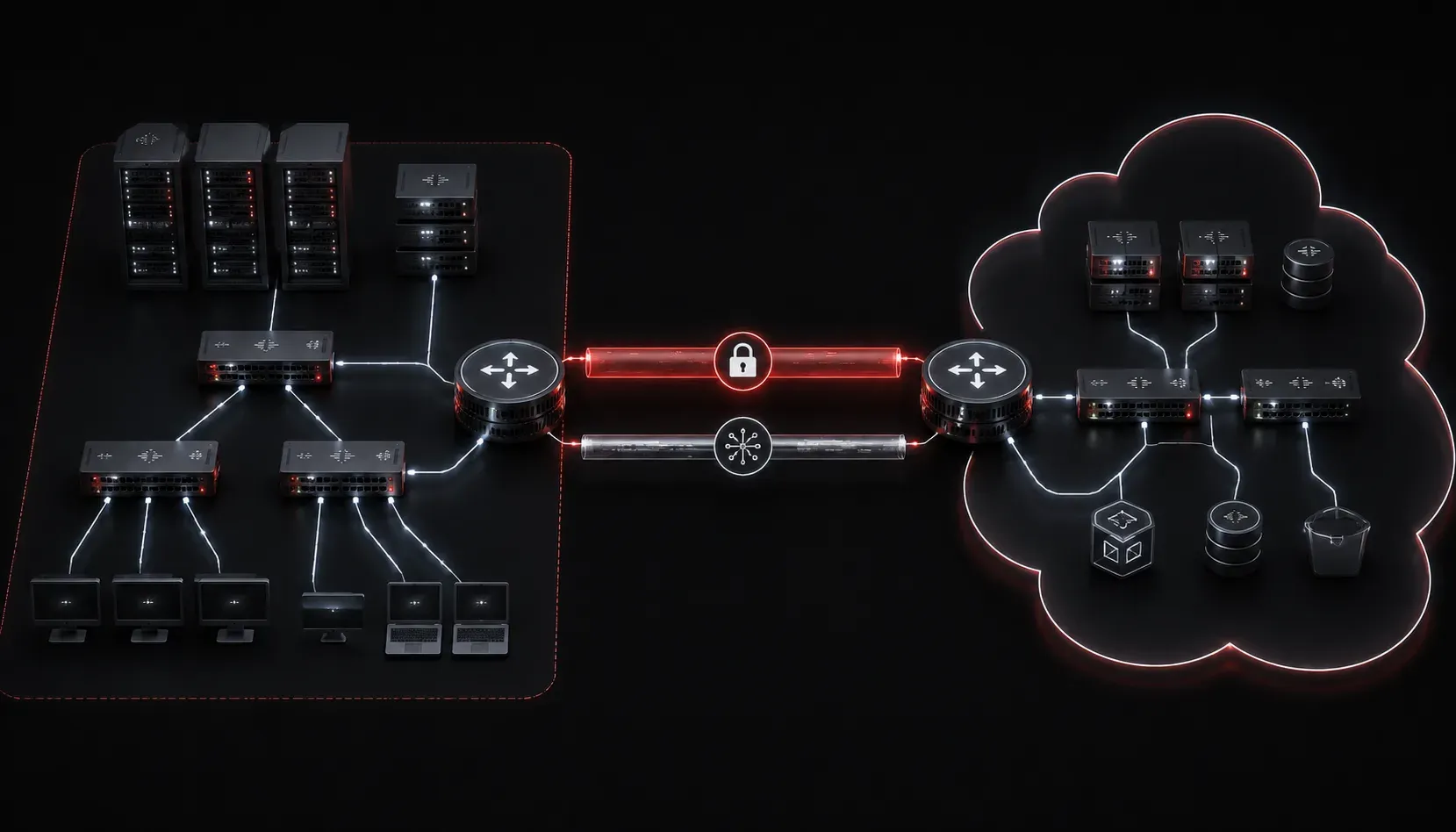
As more organizations move workloads to the cloud, one of the most common networking challenges you will encounter is connecting an existing on-premises network to a cloud environment. This is called a hybrid network, and understanding how it works is increasingly important for network engineers at every level, including those studying for the CCNA.
Exam objective 1.2.f specifically asks you to describe characteristics of network topology architectures, and hybrid or cloud-integrated topologies are very much part of that picture. Let's break down the key concepts you need to know.
What Is On-Premises Cloud Integration?
On-premises cloud integration refers to connecting your local network infrastructure (routers, switches, servers, and firewalls sitting in your data center or office) to resources hosted in a public cloud platform such as AWS, Microsoft Azure, or Google Cloud. Rather than treating them as separate islands, the goal is to make them work together as a single, unified network environment.
This matters for the CCNA because you need to understand that networks are no longer confined to a single physical location. Traffic flows, routing decisions, and security policies now span physical and virtual boundaries.
Common Integration Methods
VPN over the Internet
The most accessible method is an IPsec VPN tunnel over the public internet. Your on-premises router or firewall establishes an encrypted tunnel to a virtual gateway in the cloud. This is cost-effective and quick to set up, but performance depends on your internet connection quality. Latency and jitter can be unpredictable.
On a Cisco router, you might see a crypto map applied to a tunnel interface pointing toward a cloud VPN endpoint:
interface Tunnel0
 ip address 10.0.0.1 255.255.255.252
 tunnel source GigabitEthernet0/0
 tunnel destination 203.0.113.50
 tunnel mode ipsec ipv4
Dedicated Private Connectivity
For production workloads that require consistent performance, organizations use dedicated connections. AWS calls this Direct Connect; Azure calls it ExpressRoute. These services provide a private circuit between your facility and the cloud provider's edge, completely bypassing the public internet. Latency becomes predictable, and bandwidth is guaranteed.
These connections are typically provisioned through a network service provider or colocation facility. From a routing perspective, they use BGP to exchange routes between your on-premises network and the cloud provider.
Key Considerations for Hybrid Networks
When planning on-premises cloud integration, there are several factors you need to think through carefully:
- IP address space: You must avoid overlapping subnets between your on-premises network and your cloud VPC or VNet. If both sides use
192.168.1.0/24, routing will break. Plan your address scheme before you build. - Routing: You need to decide how routes are advertised between environments. Static routes work for simple setups, but BGP is preferred for dynamic, scalable hybrid designs.
- Security and access control: Traffic crossing the boundary between environments must be filtered. Apply security groups, network ACLs on the cloud side, and access control lists on your on-premises routers and firewalls.
- DNS resolution: Resources in the cloud and on-premises need to resolve each other's hostnames. This often requires configuring DNS forwarding rules so that on-premises DNS servers forward cloud domain queries to cloud resolvers, and vice versa.
- Bandwidth and cost: Data transfer in and out of cloud environments is often billed by the gigabyte. Monitor traffic patterns and architect your solution to minimize unnecessary data crossing the boundary.
A Simple Hybrid Topology Example
Imagine your office network uses the 10.10.0.0/16 address space. Your cloud VPC uses 172.16.0.0/16. An IPsec VPN connects the two. Your on-premises router has a static route pointing 172.16.0.0/16 toward the tunnel interface, and the cloud router has a corresponding route back to 10.10.0.0/16. Servers on both sides can communicate as if they were on the same extended network. This is a foundational hybrid network design pattern and a great mental model to build on.
Why This Matters for the CCNA
The CCNA exam expects you to understand that modern network topologies extend beyond the physical data center. You do not need to configure AWS or Azure for the exam itself, but you do need to recognize how cloud integration fits into overall network architecture, how routing and addressing apply across hybrid environments, and what trade-offs exist between VPN and dedicated connectivity options.
What's Next
Now that you have a solid understanding of hybrid network integration, the next step is diving deeper into how routing protocols, particularly BGP, enable dynamic route exchange across these boundaries. We will also explore how software-defined networking (SDN) and SD-WAN simplify managing connectivity across multiple sites and cloud providers. Stay with us as we continue working through the network fundamentals domain together.
For a comprehensive reference as you study, the Cisco Press CCNA 200-301 Official Cert Guide by Wendell Odom covers network topology architectures in depth and is the recommended companion for your CCNA preparation.
Tools and resources for this topic
- Wendell Odom CCNA Vol 1 — Covers networking fundamentals, switching, and routing basics.
- Wendell Odom CCNA Vol 2 — Covers advanced routing, WAN, infrastructure services, and security.