
Comparing IPv6 Unicast, Anycast, and Multicast
This post compares IPv6 unicast, anycast, and multicast addresses, explaining their unique characteristics and practical use cases in network design. It covers configuration examples and shows when to use each address type.

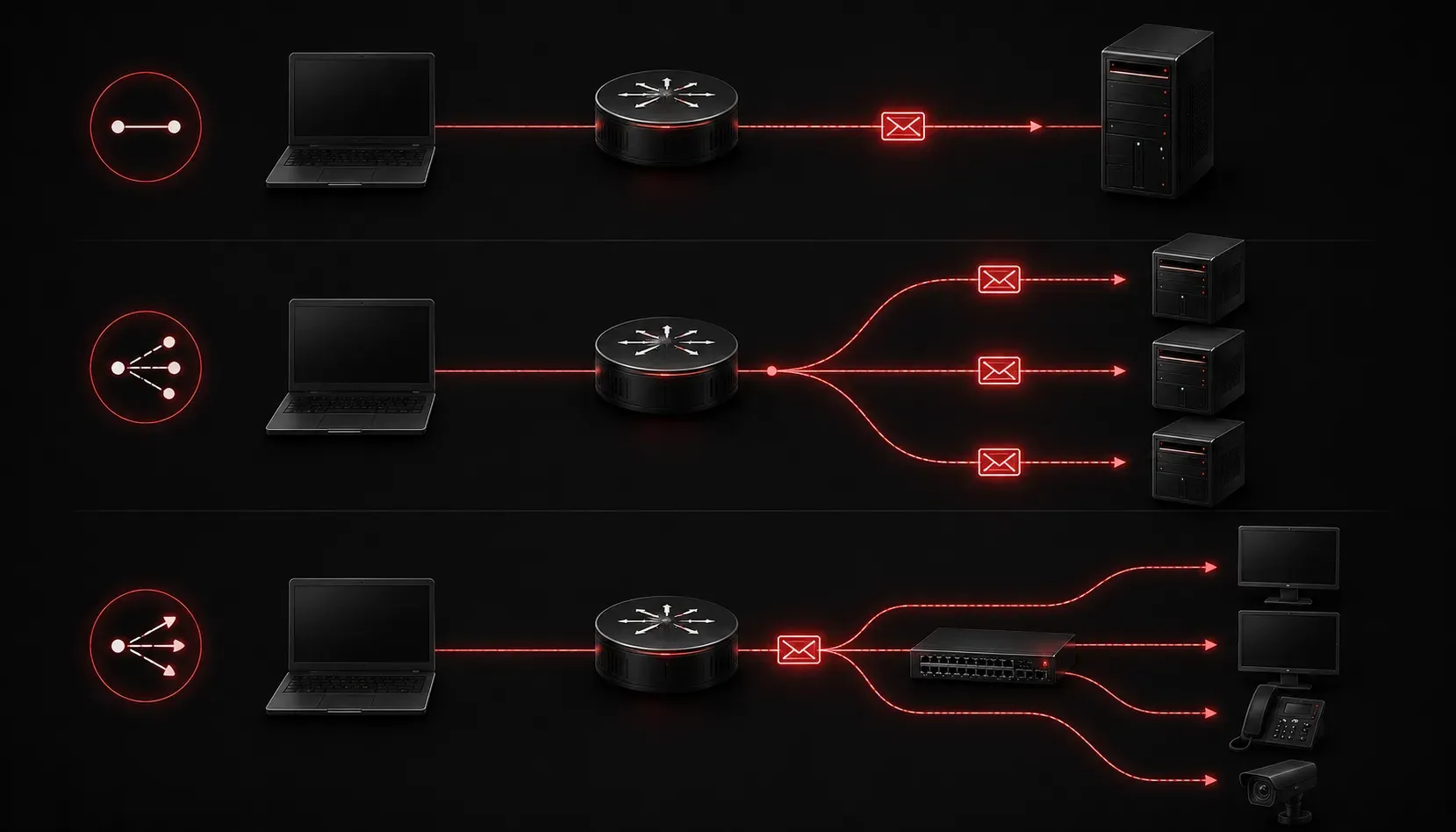
Understanding the different types of IPv6 addresses is crucial for network design and troubleshooting. Unlike IPv4, which primarily uses unicast and multicast, IPv6 introduces three distinct address types: unicast, anycast, and multicast. Each serves a specific purpose in modern networks, and knowing when to use each one will help you design more efficient and scalable networks.
IPv6 Unicast Addresses
Unicast addresses represent the most common type of IPv6 address, establishing one-to-one communication between devices. When you send a packet to a unicast address, it travels from one source to exactly one destination.
IPv6 unicast addresses include:
- Global Unicast Addresses: Routable across the internet (similar to IPv4 public addresses)
- Link-Local Addresses: Used for communication within a single network segment
- Unique Local Addresses: Private addresses for internal networks
Here's how you might configure a global unicast address on a Cisco router:
Router(config)# interface gigabitethernet0/0
Router(config-if)# ipv6 address 2001:db8:1:1::1/64
Router(config-if)# ipv6 enable
You can verify the configuration with:
Router# show ipv6 interface brief
GigabitEthernet0/0 [up/up]
    FE80::1
    2001:DB8:1:1::1
IPv6 Anycast Addresses
Anycast addresses create a one-to-nearest relationship, where multiple devices share the same IPv6 address, but packets are delivered to the closest device based on routing metrics. This is particularly useful for load balancing and providing redundant services.
Common Anycast usage scenarios include:
- DNS servers: Multiple DNS servers share the same Anycast address
- Content delivery networks: Users automatically connect to the nearest server
- Load balancing: Distributing traffic across multiple servers
To configure an Anycast address, you simply assign the same unicast address to multiple interfaces:
Router1(config)# interface loopback0
Router1(config-if)# ipv6 address 2001:db8:100::1/128

Router2(config)# interface loopback0
Router2(config-if)# ipv6 address 2001:db8:100::1/128
The routing protocol will determine which device receives the traffic based on the shortest path.
IPv6 Multicast Addresses
Multicast addresses enable one-to-many communication, where a single packet sent to a multicast address is delivered to all devices that have joined that multicast group. This is much more efficient than sending individual unicast packets to multiple destinations.
IPv6 multicast addresses always begin with FF and include well-known addresses like:
FF02::1- All nodes on the local networkFF02::2- All routers on the local networkFF02::5- All OSPF routersFF02::6- All OSPF designated routers
You can view multicast group memberships with:
Router# show ipv6 mld groups
MLD Connected Group Membership
Group Address                Interface                Uptime    Expires
FF02::1                      GigabitEthernet0/0       00:45:20  never
FF02::2                      GigabitEthernet0/0       00:45:20  never
FF02::5                      GigabitEthernet0/0       00:30:15  never
Key Differences in Practice
The main distinction in this IPv6 address comparison lies in their delivery models:
Unicast provides guaranteed delivery to a specific device, making it ideal for regular host-to-host communication, web browsing, and file transfers.
Anycast delivers packets to the nearest available service, perfect for DNS resolution, CDN services, and load-balancing scenarios where you want automatic failover.
Multicast efficiently delivers packets to multiple interested parties simultaneously, essential for routing protocol updates, video streaming, and network discovery protocols.
What's Next
Now that you understand the fundamental differences between unicast, anycast, and multicast addresses, the next logical step is diving deeper into IPv6 address structure and subnetting. Understanding how to properly subnet IPv6 networks will help you implement these address types effectively in real-world scenarios.
Tools and resources for this topic
- CCNA Official Cert Guide (Wendell Odom) — The definitive CCNA study resource. Both volumes cover the 200-301 exam blueprint in full.
- Wendell Odom CCNA Vol 1 — Covers networking fundamentals, switching, and routing basics.
- Wendell Odom CCNA Vol 2 — Covers advanced routing, WAN, infrastructure services, and security.