
Link Aggregation Groups (LAG): Simplifying Network Connections
Link Aggregation Groups (LAG) combine multiple physical network links into one logical connection, providing both increased bandwidth and network reliability through automatic failover when individual links fail.

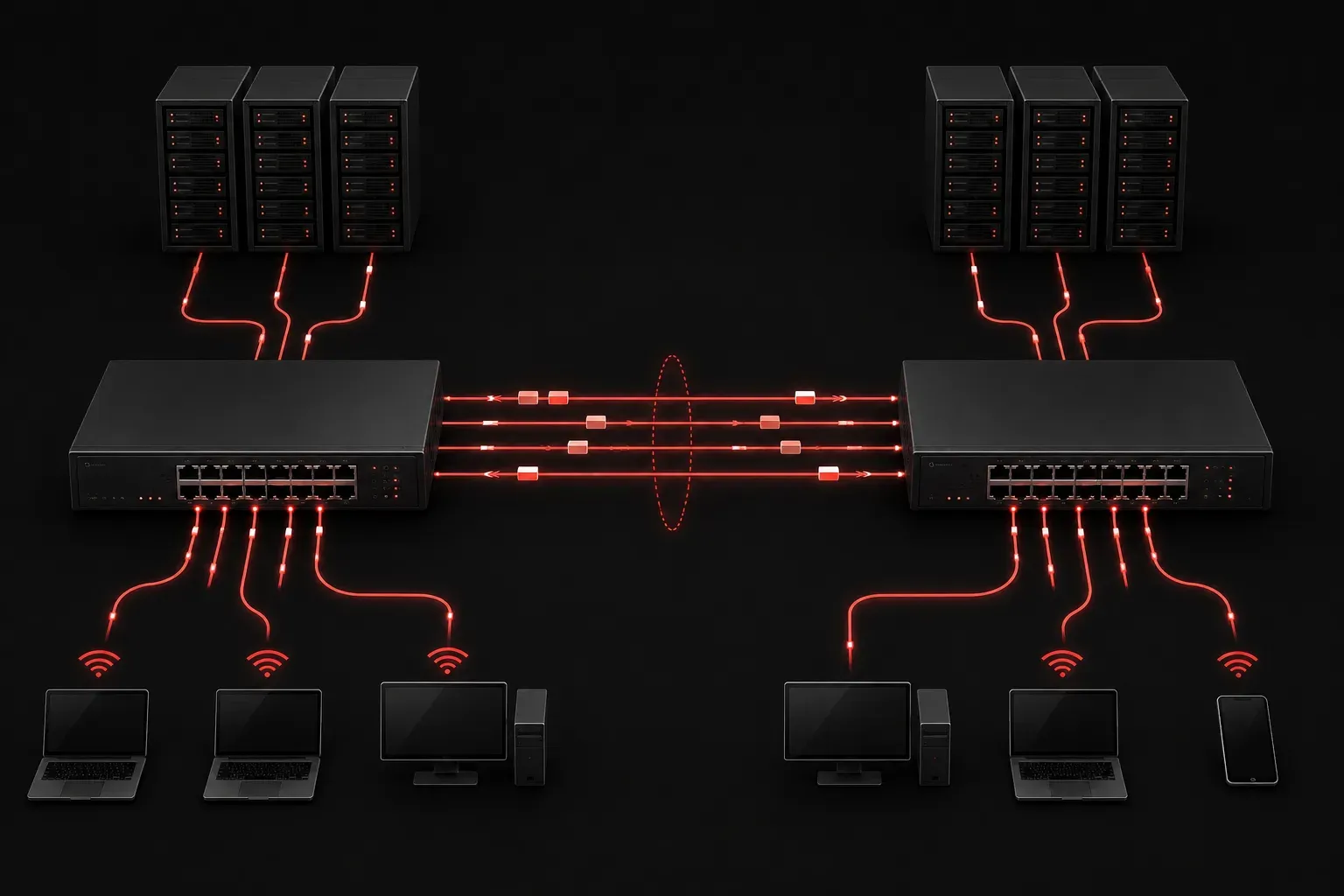
Link Aggregation Groups (LAG) represent one of the most practical solutions for improving both bandwidth and network reliability in modern networks. If you've ever wondered how enterprises handle high-traffic loads while maintaining redundancy, LAG technology provides an elegant answer that every CCNA candidate should understand.
What Are Link Aggregation Groups?
A Link Aggregation Group combines multiple physical network links between two devices into a single logical connection. Think of it like turning multiple lanes of traffic into one superhighway - you get more capacity and if one lane closes, traffic keeps flowing through the others.
When you configure LAG, the network treats these bundled links as a single interface. This means if you have four 1 Gbps links in a LAG, you effectively get up to 4 Gbps of aggregate bandwidth between those devices. However, it's important to understand that individual data flows are still limited to the bandwidth of a single physical link within the group.
The Two Key Benefits: Bandwidth Enhancement and Network Reliability
Bandwidth Enhancement
LAG directly addresses bandwidth limitations by combining multiple links. Instead of being constrained by a single 1 Gbps connection, you can aggregate multiple connections for higher throughput. The bandwidth enhancement is particularly valuable for:
- Server farm connections handling heavy traffic
- Inter-switch links in the network core
- Connections to high-performance storage systems
Network Reliability Through Redundancy
The reliability aspect is equally important. When one link in the LAG fails, traffic automatically redistributes across the remaining active links. This provides seamless failover without manual intervention or network downtime.
Common LAG Protocols
Two primary protocols manage link aggregation:
LACP (Link Aggregation Control Protocol) - The IEEE 802.3ad standard that dynamically negotiates and manages the LAG. LACP actively monitors link status and handles automatic failover.
Static LAG - Manual configuration without dynamic negotiation. While simpler to configure, it lacks the automatic monitoring capabilities of LACP.
Basic LAG Configuration Example
Here's how you might configure a basic LAG on a Cisco switch:
Switch(config)# interface range gigabitethernet0/1-2
Switch(config-if-range)# channel-group 1 mode active
Switch(config-if-range)# exit
Switch(config)# interface port-channel 1
Switch(config-if)# description LAG to Core Switch
The mode active parameter enables LACP on these interfaces, creating Port-Channel 1 as the logical interface representing the LAG.
Load Distribution Methods
LAG doesn't simply split traffic evenly across all links. Instead, it uses hash algorithms to distribute flows:
- Source MAC - Distributes based on source MAC address
- Destination MAC - Uses the destination MAC for distribution
- Source and Destination IP - Combines IP addresses for the hash
- Source and Destination MAC - The most common method combines both MAC addresses
LAG Limitations to Consider
While powerful, LAG has important constraints:
- All links in a LAG must have identical speed and duplex settings
- Links should connect the same pair of devices
- Individual flows cannot exceed the bandwidth of a single link
- Maximum number of links in a LAG varies significantly by vendor and platform (ranging from 2-32 links depending on hardware and software capabilities)
Verification Commands
Monitor your LAG configuration with these essential commands:
Switch# show etherchannel summary
Switch# show interfaces port-channel 1
Switch# show lacp neighbor
These commands reveal LAG status, member interfaces, and LACP negotiation details.
What's Next
Now that you understand LAG fundamentals, the next logical step is exploring Spanning Tree Protocol (STP) and how it interacts with link aggregation to prevent loops while maintaining redundancy. Understanding both technologies together gives you a complete picture of modern network resilience strategies.
Tools and resources for this topic
- CCNA Official Cert Guide (Wendell Odom) — The definitive CCNA study resource. Both volumes cover the 200-301 exam blueprint in full.
- Wendell Odom CCNA Vol 1 — Covers networking fundamentals, switching, and routing basics.
- Wendell Odom CCNA Vol 2 — Covers advanced routing, WAN, infrastructure services, and security.