
Configuring and Troubleshooting OSPF Network Types
Master OSPF network type configuration and troubleshooting for broadcast, point-to-point, NBMA, and point-to-multipoint topologies. Covers neighbor formation issues, DR/BDR election problems, and Frame Relay integration challenges.

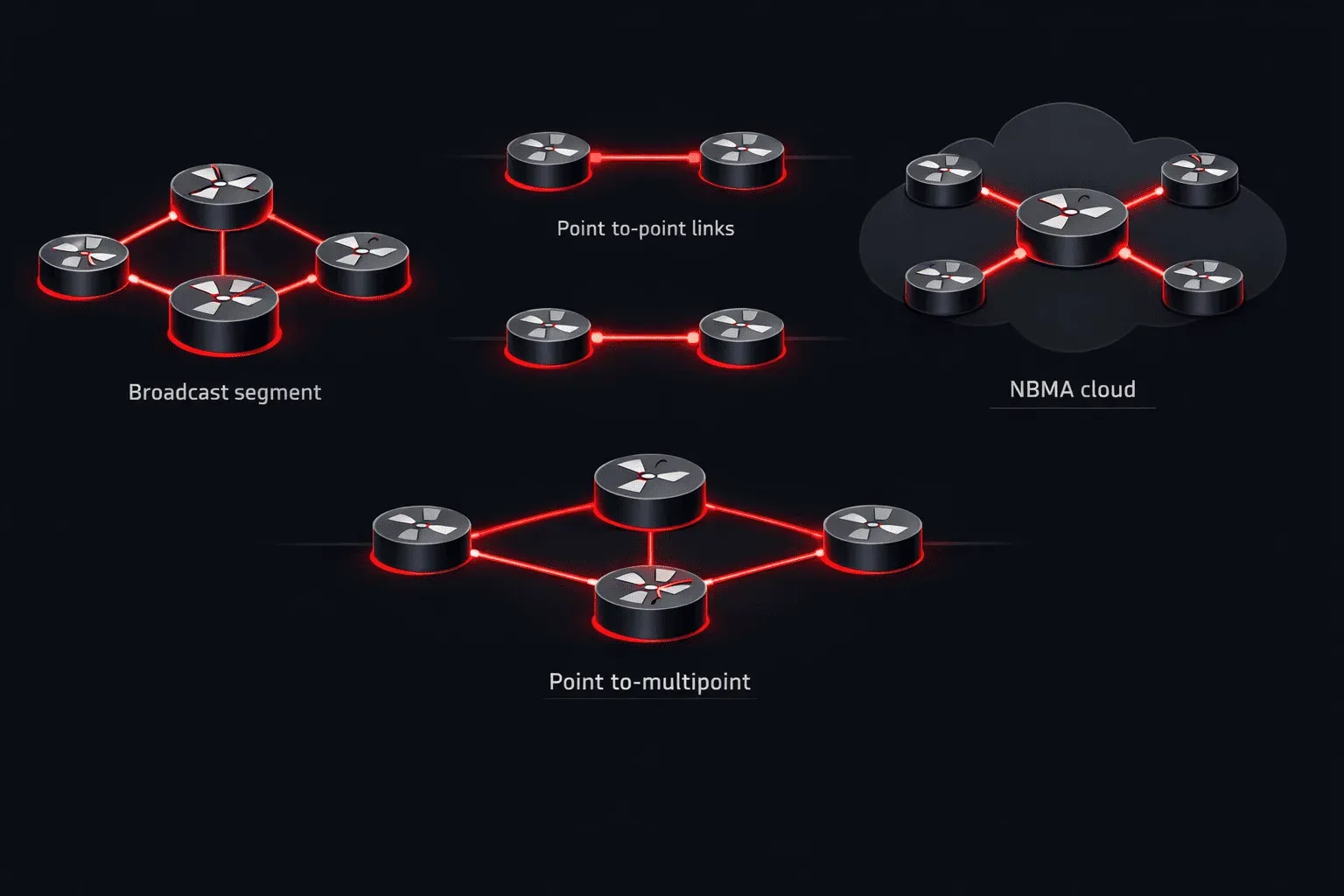
OSPF network types define how routers form adjacencies and exchange routing information on different physical topologies. Getting the network type wrong is a common source of OSPF neighbor problems, routing failures, and performance issues in enterprise networks. This deep dive covers configuration, verification, and troubleshooting of all OSPF network types with real-world scenarios.
Understanding OSPF Network Type Behavior
OSPF automatically selects network types based on interface characteristics, but manual configuration is often required to match your topology. Each network type determines hello/dead timers, DR/BDR election behavior, and how LSAs are flooded.
The five network types and their key characteristics:
- Broadcast: Default on Ethernet interfaces, elects DR/BDR, uses multicast 224.0.0.5/224.0.0.6
- Point-to-Point: Default on serial interfaces, no DR/BDR election, direct neighbor relationship
- Non-Broadcast Multi-Access (NBMA): Manual neighbor configuration, elects DR/BDR
- Point-to-Multipoint: No DR/BDR election, automatic neighbor discovery
- Point-to-Multipoint Non-Broadcast: Manual neighbors, no DR/BDR election
Configuration Examples and Best Practices
Point-to-Point Configuration
Use point-to-point for direct connections between two routers, including Ethernet links in hub-and-spoke topologies:
interface GigabitEthernet0/1
 ip address 10.1.1.1 255.255.255.252
 ip ospf network point-to-point
 ip ospf 1 area 0
Point-to-point eliminates unnecessary DR/BDR election on links with only two routers, reducing convergence time and LSA overhead.
Broadcast Network Configuration
Default on Ethernet segments with multiple routers. Configure DR priority to control election:
interface GigabitEthernet0/0
 ip address 192.168.1.1 255.255.255.0
 ip ospf priority 100
 ip ospf network broadcast
 ip ospf 1 area 0
Set priority to 0 to prevent a router from becoming DR/BDR:
interface GigabitEthernet0/0
 ip ospf priority 0
NBMA Configuration
Required for Frame Relay or MPLS networks without broadcast capability. Neighbors must be manually configured on the DR:
interface Serial0/0
 ip address 10.0.0.1 255.255.255.0
 ip ospf network non-broadcast
 ip ospf priority 100
 frame-relay map ip 10.0.0.2 102 broadcast
 frame-relay map ip 10.0.0.3 103 broadcast

router ospf 1
 network 10.0.0.0 0.0.0.255 area 0
 neighbor 10.0.0.2
 neighbor 10.0.0.3
Point-to-Multipoint Configuration
Ideal for hub-and-spoke topologies where you want automatic neighbor discovery without DR/BDR complexity:
interface Serial0/0
 ip address 10.0.0.1 255.255.255.0
 ip ospf network point-to-multipoint
 frame-relay map ip 10.0.0.2 102 broadcast
 frame-relay map ip 10.0.0.3 103 broadcast
Troubleshooting OSPF Network Type Issues
Common Neighbor Formation Problems
Network type mismatches prevent neighbor adjacency formation. Use show ip ospf interface to verify network types match:
Router1#show ip ospf interface gi0/1
GigabitEthernet0/1 is up, line protocol is up
  Internet Address 10.1.1.1/30, Area 0, Attached via Network Statement
  Process ID 1, Router ID 1.1.1.1, Network Type POINT_TO_POINT, Cost: 1
  Topology-MTID    Cost    Disabled    Shutdown      Topology Name
        0           1         no          no            Base
  Transmit Delay is 1 sec, State POINT_TO_POINT
  Timer intervals configured, Hello 10, Dead 40, Wait 40, Retransmit 5
If Router2 has network type broadcast while Router1 has point-to-point, they won't form adjacency due to hello packet format differences.
DR/BDR Election Issues
Verify DR/BDR election status and troubleshoot priority conflicts:
Router1#show ip ospf neighbor

Neighbor ID     Pri   State           Dead Time   Address         Interface
2.2.2.2           1   FULL/DR         00:00:32    192.168.1.2     GigabitEthernet0/0
3.3.3.3           1   FULL/BDR        00:00:35    192.168.1.3     GigabitEthernet0/0
If the wrong router becomes DR, check priority settings and interface states. Remember that priority 0 means the router cannot become DR/BDR.
Hello Timer Mismatches
Different network types use different hello intervals. Point-to-point and broadcast use 10 seconds, while NBMA uses 30 seconds:
Router1#debug ip ospf hello
OSPF-1 HELLO Gi0/0: Mismatched hello parameters from 192.168.1.2
Dead R 40 C 120, Hello R 10 C 30
This debug shows hello (10) and dead (120) timer mismatch. Configure matching timers:
interface GigabitEthernet0/0
 ip ospf hello-interval 30
 ip ospf dead-interval 120
Advanced Troubleshooting Techniques
Analyzing LSA Propagation
Network type affects how LSAs propagate. On broadcast networks, only DR and BDR exchange LSAs with all routers. Use show ip ospf database to verify LSA synchronization:
Router1#show ip ospf database router 2.2.2.2

            OSPF Router with ID (1.1.1.1) (Process ID 1)

                Router Link States (Area 0)

  LS age: 234
  Options: (No TOS-capability, DC)
  LS Type: Router Links
  Link State ID: 2.2.2.2
  Advertising Router: 2.2.2.2
  LS Seq Number: 80000003
  Checksum: 0x6B7A
  Length: 60
Frame Relay and NBMA Troubleshooting
Verify Frame Relay mappings support OSPF multicast requirements:
Router1#show frame-relay map
Serial0/0 (up): ip 10.0.0.2 dlci 102(0x66,0x1860), dynamic,
              broadcast,, status defined, active
The broadcast keyword is essential for OSPF hello packet delivery. Without it, neighbors won't form.
Performance Optimization
Monitor LSA flooding efficiency based on network type choice:
Router1#show ip ospf statistics
            OSPF Router with ID (1.1.1.1) (Process ID 1)

SPF algorithm executed 5 times
Area 0: SPF algorithm executed 5 times

  SPF calculation time
Delta T   Intra D-Intr  Summ    Ext7    Total Reason
00:15:23    0     0      0       0       0     R,
00:10:45    0     0      0       0       0     R,
Frequent SPF calculations may indicate network type configuration issues causing unnecessary topology changes.
What's Next
With OSPF network types mastered, the next critical topic is understanding OSPF area types and their impact on LSA propagation. We'll explore stub areas, totally stubby areas, and NSSAs to control routing table size and optimize convergence in large enterprise networks.