
Understanding Nonoverlapping Wi-Fi Channels
Learn about nonoverlapping Wi-Fi channels and their critical role in preventing wireless interference. Discover why only channels 1, 6, and 11 work effectively in 2.4 GHz and how proper channel selection improves network performance.

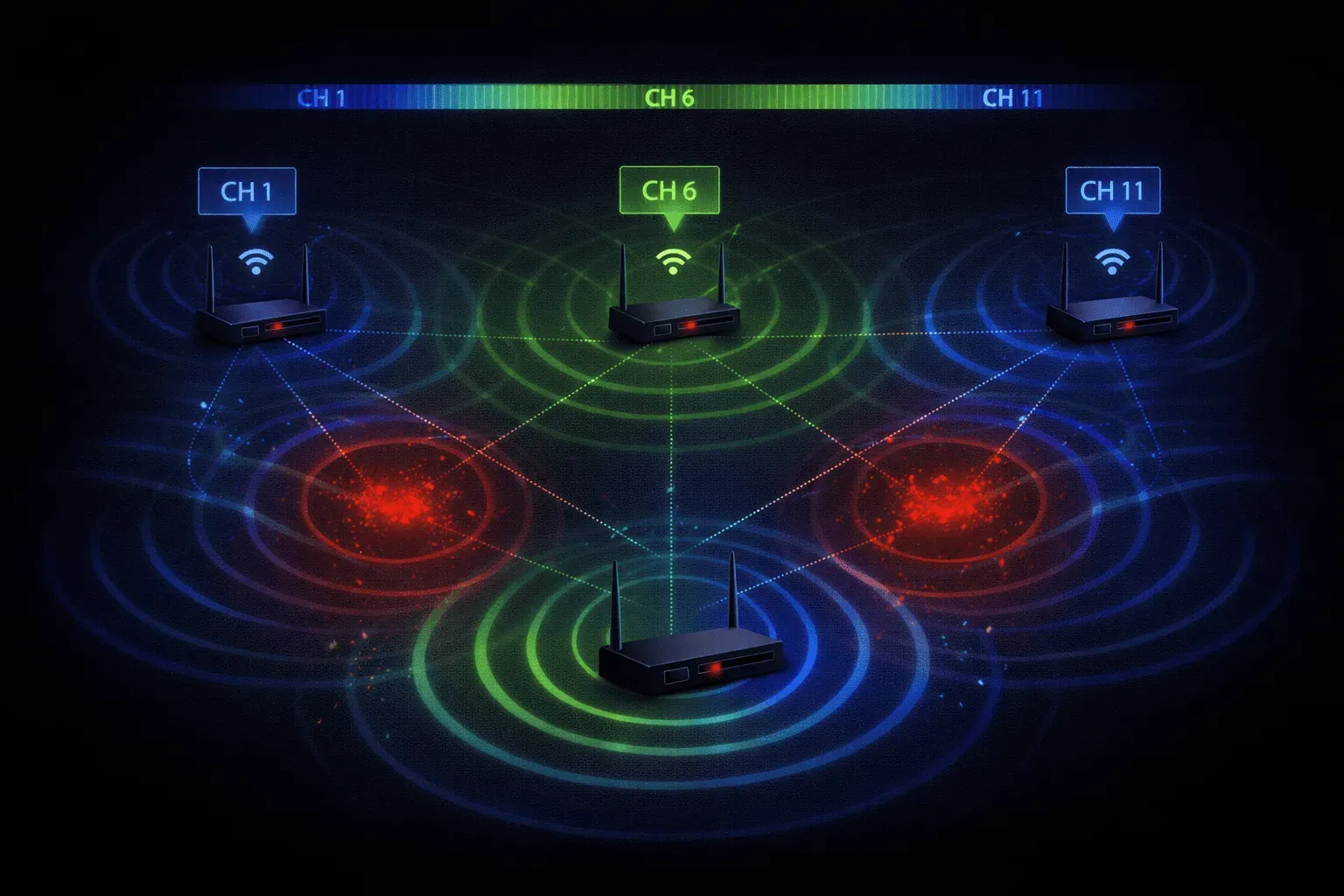
When you're setting up wireless networks, understanding nonoverlapping Wi-Fi channels is crucial for maintaining optimal wireless performance. Think of Wi-Fi channels like lanes on a highway; when vehicles try to use the same lane simultaneously, you get interference and slowdowns. The same principle applies to wireless networks.
What Are Nonoverlapping Wi-Fi Channels?
Nonoverlapping Wi-Fi channels are frequency ranges that don't interfere with each other when used simultaneously. In the 2.4 GHz band, which most people are familiar with, there are 11 available channels in North America, but only three of them are truly nonoverlapping: channels 1, 6, and 11.
Here's why this matters: each 2.4 GHz channel is only 5 MHz apart, but Wi-Fi signals actually use 20 MHz of bandwidth. This means adjacent channels overlap significantly, creating Wi-Fi interference when multiple access points operate on nearby channels.
Why Channel Overlap Creates Problems
When Wi-Fi devices transmit on overlapping channels, they interfere with each other's signals. This interference manifests as:
- Reduced data throughput
- Increased packet retransmissions
- Higher latency
- Unreliable connections
Imagine trying to have a conversation in a crowded restaurant where multiple people are talking loudly at nearby tables. The overlapping conversations make it difficult to understand what's being said; that's essentially what happens with overlapping Wi-Fi channels.
The 1-6-11 Rule for 2.4 GHz
For optimal channel selection in the 2.4 GHz band, network engineers follow the 1-6-11 rule. These channels are spaced 5 channels apart (25 MHz), providing enough separation to avoid interference:
- Channel 1: 2.412 GHz center frequency
- Channel 6: 2.437 GHz center frequency
- Channel 11: 2.462 GHz center frequency
When deploying multiple access points in the same area, alternate between these three channels. For example, configure your first AP on channel 1, the second on channel 6, and the third on channel 11, then repeat the pattern.
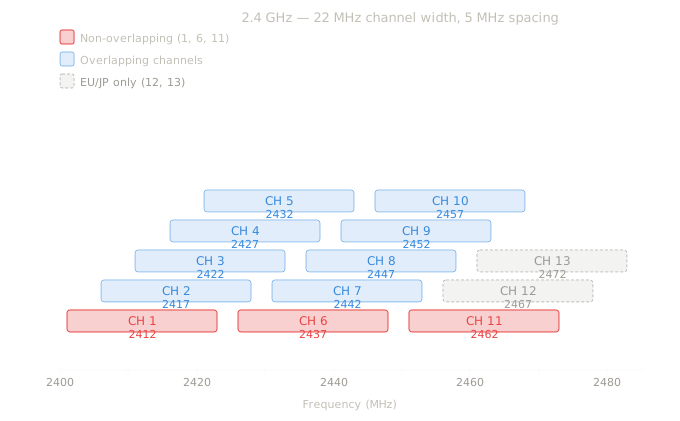
In the diagram above, consider channel 3 as an example. Although its frequency is 2422, remember that each channel is 20MHz wide, which means a large part of its bandwidth is also shared with channel 1 and channel 6 (amongst others). Channel 1 shares bandwidth with channels 2, 3, 4, and 5. It's only at channel 6 where the channels don't overlap at all, and then again at channel 11. THIS is why we only use channels 1, 6, and 11 on 2.4 Ghz networks.
5 GHz Band Advantages
The 5 GHz band offers significant advantages for avoiding interference. Unlike 2.4 GHz, the 5 GHz band has many more nonoverlapping Wi-Fi channels available:
- Up to 25 non-overlapping 20 MHz channels
- Support for 40 MHz, 80 MHz, and 160 MHz channel widths
- Less congestion from consumer devices
- Better performance in high-density environments
Practical Channel Planning
When planning your wireless network, use tools to survey the existing RF environment. Most enterprise wireless controllers provide automatic channel selection features, but understanding the principles helps you make informed decisions.
To check your current channel utilization on a Cisco wireless controller, you can use:
show ap auto-rf 802.11bThis command displays current channel assignments and interference levels for 2.4 GHz radios.
For optimal wireless performance, consider these best practices:
- Use 5 GHz whenever possible for better channel availability
- Stick to channels 1, 6, and 11 for 2.4 GHz deployments
- Reduce 2.4 GHz power levels to minimize interference
- Enable band steering to push capable devices to 5 GHz
What's Next
Now that you understand nonoverlapping channels, the next logical step is learning about RF power management and how to optimize signal strength across your wireless coverage area. We'll explore how proper power planning works hand-in-hand with channel selection to create robust wireless networks.
CCNA study resources
- CCNA Official Cert Guide Library (Wendell Odom) — Both volumes covering the full 200-301 exam blueprint. The definitive CCNA study resource.
- Wendell Odom CCNA Vol 1 — Networking fundamentals, switching, VLANs, STP, and IPv4 routing.
- Wendell Odom CCNA Vol 2 — Advanced routing, WAN, security, automation, and network management.