
Understanding Wireless LAN Controllers: A Beginner's Guide
Learn about Wireless LAN Controllers (WLCs) and their essential role in managing enterprise wireless networks. This guide covers WLC purpose, how they work with access points, and key benefits for network management.

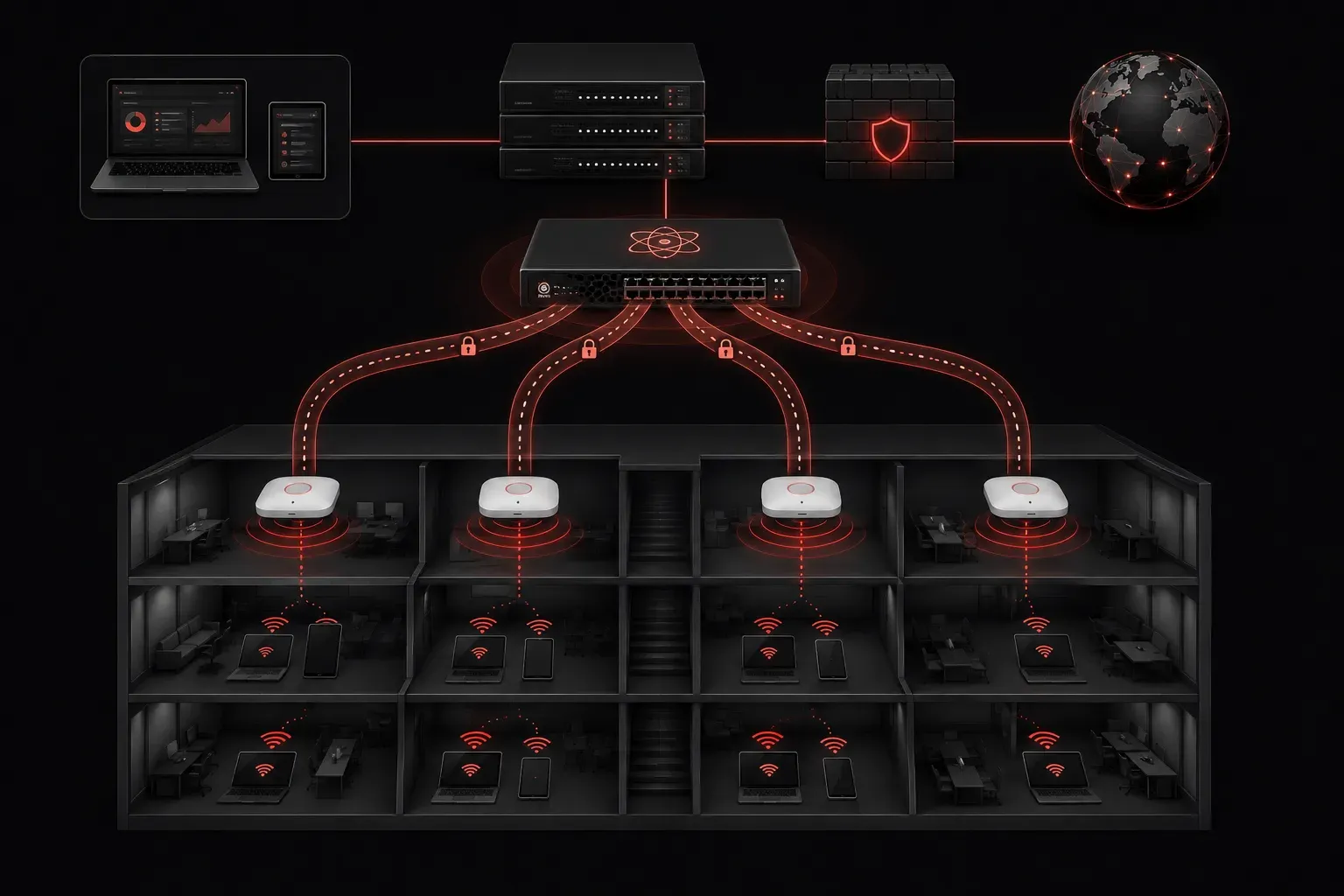
When you're managing a small office with just one or two wireless access points, configuration is pretty straightforward. But what happens when your network grows to dozens or hundreds of access points? This is where Wireless LAN Controllers (WLCs) become essential.
What is a Wireless LAN Controller?
A Wireless LAN Controller is a centralized device that manages multiple wireless access points across your network. Think of it as the "brain" that coordinates all wireless activity, while the access points act as distributed antennas extending wireless coverage throughout your building or campus.
Instead of configuring each access point individually, the WLC allows you to manage your entire wireless infrastructure from a single point of control. This centralized approach is what makes enterprise wireless networks scalable and manageable.
The WLC Purpose: Why Do We Need Them?
The primary WLC purpose is to solve the complexity that comes with managing large wireless deployments. Here's what happens without a controller:
- Each access point requires individual configuration
- Security policies must be applied to every AP separately
- Troubleshooting becomes a nightmare across multiple devices
- Users experience inconsistent wireless performance as they move around
With a WLC in place, you gain centralized control over your entire wireless infrastructure, making network management significantly more efficient.
How WLCs Work with Access Points
In a controller-based wireless network, access points operate in a lightweight mode. They don't make independent decisions about wireless traffic; instead, they forward all wireless frames to the WLC for processing.
This relationship works through a protocol called CAPWAP (Control and Provisioning of Wireless Access Points). Here's the basic flow:
- Access points discover and connect to the WLC
- The WLC pushes configuration and firmware to each AP
- Wireless clients connect to access points
- Access points tunnel all client traffic back to the WLC
- The WLC makes forwarding decisions and applies security policies
CAPWAP Tunnel Example
When you check the status of an access point on a Cisco WLC, you might see output like this:
(Cisco Controller) > show ap summary

AP Name            Slots  AP Model         Ethernet MAC    Status
------------------------------------------------------------------------
AP-Floor1-East     2      AIR-CAP3702I-A   00:1b:d4:12:34:56   Joined
AP-Floor1-West     2      AIR-CAP3702I-A   00:1b:d4:12:34:57   Joined
AP-Floor2-North    2      AIR-CAP3702I-A   00:1b:d4:12:34:58   Joined
The "Joined" status indicates that each access point has successfully established its CAPWAP tunnel with the controller.
Key Benefits of Wireless LAN Controllers
Centralized Configuration
Instead of visiting each access point individually, you configure wireless settings once on the WLC. This includes SSIDs, security policies, and radio power levels.
Seamless Roaming
As users move between access points, the WLC maintains their session state, enabling smooth handoffs without dropping connections.
Advanced Security
Security policies are enforced consistently across all access points. The WLC can implement features like rogue AP detection and wireless intrusion prevention.
Simplified Troubleshooting
With centralized logging and monitoring, you can troubleshoot wireless issues from a single interface rather than checking dozens of individual access points.
WLC Deployment Models
Cisco offers several WLC deployment options:
- Hardware-based controllers: Dedicated appliances for large deployments
- Software-based controllers: Virtual machines for smaller networks
- Cloud-based controllers: Managed through Cisco's cloud platform
- Integrated controllers: Built into some access points for small offices
Each model serves different network sizes and requirements, but they all provide the same fundamental benefit: centralized wireless management.
What's Next
Now that you understand the role of Wireless LAN Controllers in network management, the next step is learning about wireless security protocols like WPA2 and WPA3. These security mechanisms work closely with WLCs to protect your wireless network from unauthorized access and attacks.
Tools and resources for this topic
- CCNA Official Cert Guide (Wendell Odom) — The definitive CCNA study resource. Both volumes cover the 200-301 exam blueprint in full.
- Wendell Odom CCNA Vol 1 — Covers networking fundamentals, switching, and routing basics.
- Wendell Odom CCNA Vol 2 — Covers advanced routing, WAN, infrastructure services, and security.