
What Are Trunk Ports and Why Are They Important?
Trunk ports are switch ports that carry traffic for multiple VLANs simultaneously using VLAN tagging. They're essential for efficient network design, allowing multiple VLANs to communicate across switches through a single physical connection rather than requiring separate cables for each VLAN.

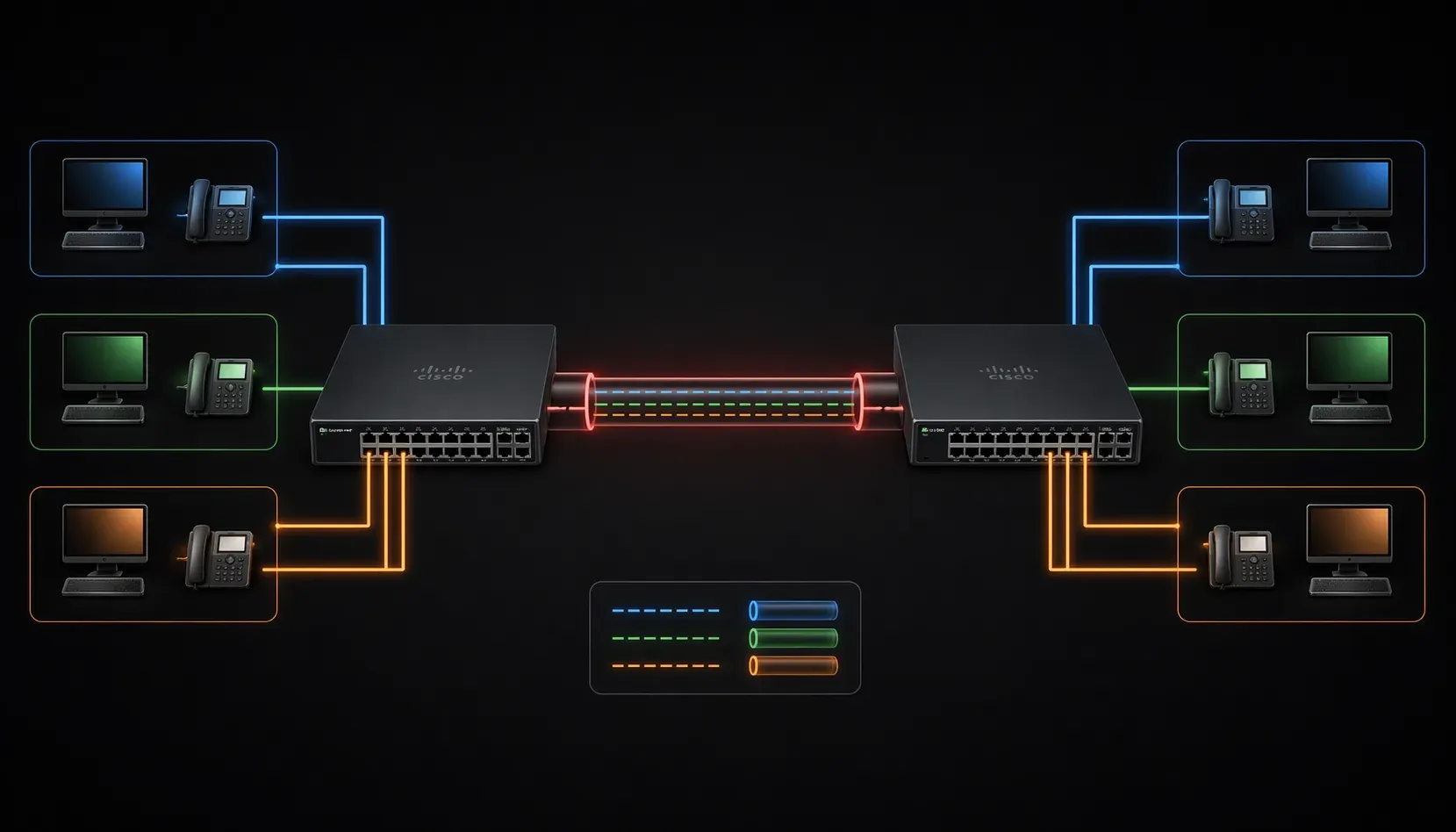
When you're building a network with multiple switches and VLANs, you'll quickly discover that you need a way for VLANs to communicate across different switches. This is where trunk ports become essential. Think of trunk ports as the highways that allow multiple VLANs to travel between switches, rather than having separate roads for each VLAN.
What Is a Trunk Port?
A trunk port is a switch port configured to carry traffic for multiple VLANs simultaneously. Unlike access ports, which belong to only one VLAN, trunk ports can transport frames from many different VLANs across a single physical connection.
When a frame travels through a trunk port, the switch adds a special tag to identify which VLAN the frame belongs to. This process is called VLAN tagging, and it's what allows multiple VLANs to share the same physical link without mixing their traffic.
Why Are Trunk Ports Important in Network Design?
Imagine you have two switches, each with users in VLAN 10 (Sales) and VLAN 20 (Marketing). Without trunk ports, you'd need separate physical cables for each VLAN between the switches. With 10 VLANs, you'd need 10 cables! Trunk ports solve this by allowing all VLANs to share a single connection.
Here are the key benefits of trunk ports:
- Efficient use of switch ports: One trunk port can carry multiple VLANs instead of using one port per VLAN
- Simplified cabling: Fewer physical connections between switches
- Scalability: Easy to add new VLANs without running additional cables
- Cost savings: Fewer switch ports and cables required
How VLAN Communication Works Across Trunk Ports
When a frame needs to travel from one switch to another through a trunk port, this process occurs:
- The sending switch receives a frame on an access port
- The switch identifies which VLAN the frame belongs to
- Before sending the frame out the trunk port, the switch adds a VLAN tag
- The receiving switch reads the VLAN tag and forwards the frame to the correct VLAN
- If the frame exits through an access port, the switch removes the tag
The most common VLAN tagging protocol is IEEE 802.1Q, which adds a 4-byte tag to Ethernet frames. This tag contains the VLAN ID, allowing switches to identify which VLAN each frame belongs to.
Basic Switch Configuration for Trunk Ports
Configuring a trunk port on a Cisco switch is straightforward. Here's the basic switch configuration:
Switch(config)# interface gigabitethernet 0/1
Switch(config-if)# switchport mode trunk
Switch(config-if)# switchport trunk allowed vlan 10,20,30
This configuration sets GigabitEthernet 0/1 as a trunk port that allows VLANs 10, 20, and 30 to pass through. You can verify your trunk configuration with:
Switch# show interfaces trunk
This command displays all trunk ports, their allowed VLANs, and their current status.
Native VLAN Concept
One important concept with trunk ports is the native VLAN. This is the VLAN that carries untagged traffic on a trunk port. By default, this is VLAN 1, but it's a security best practice to change it to an unused VLAN:
Switch(config-if)# switchport trunk native vlan 99
What's Next
Now that you understand trunk ports and their role in VLAN communication, the next step is learning about VLAN Trunking Protocol (VTP). VTP helps manage VLAN information across multiple switches in your network, making VLAN administration much more efficient in larger environments.
Tools and resources for this topic
- CCNA Official Cert Guide (Wendell Odom) — The definitive CCNA study resource. Both volumes cover the 200-301 exam blueprint in full.
- Wendell Odom CCNA Vol 1 — Covers networking fundamentals, switching, and routing basics.
- Wendell Odom CCNA Vol 2 — Covers advanced routing, WAN, infrastructure services, and security.