
What is Network Infrastructure
This post introduces network infrastructure basics for beginners, covering key network components like routers, switches, firewalls, and servers. It uses real-world analogies to explain how network structure is organized and why understanding it is essential for cybersecurity. The post aligns with

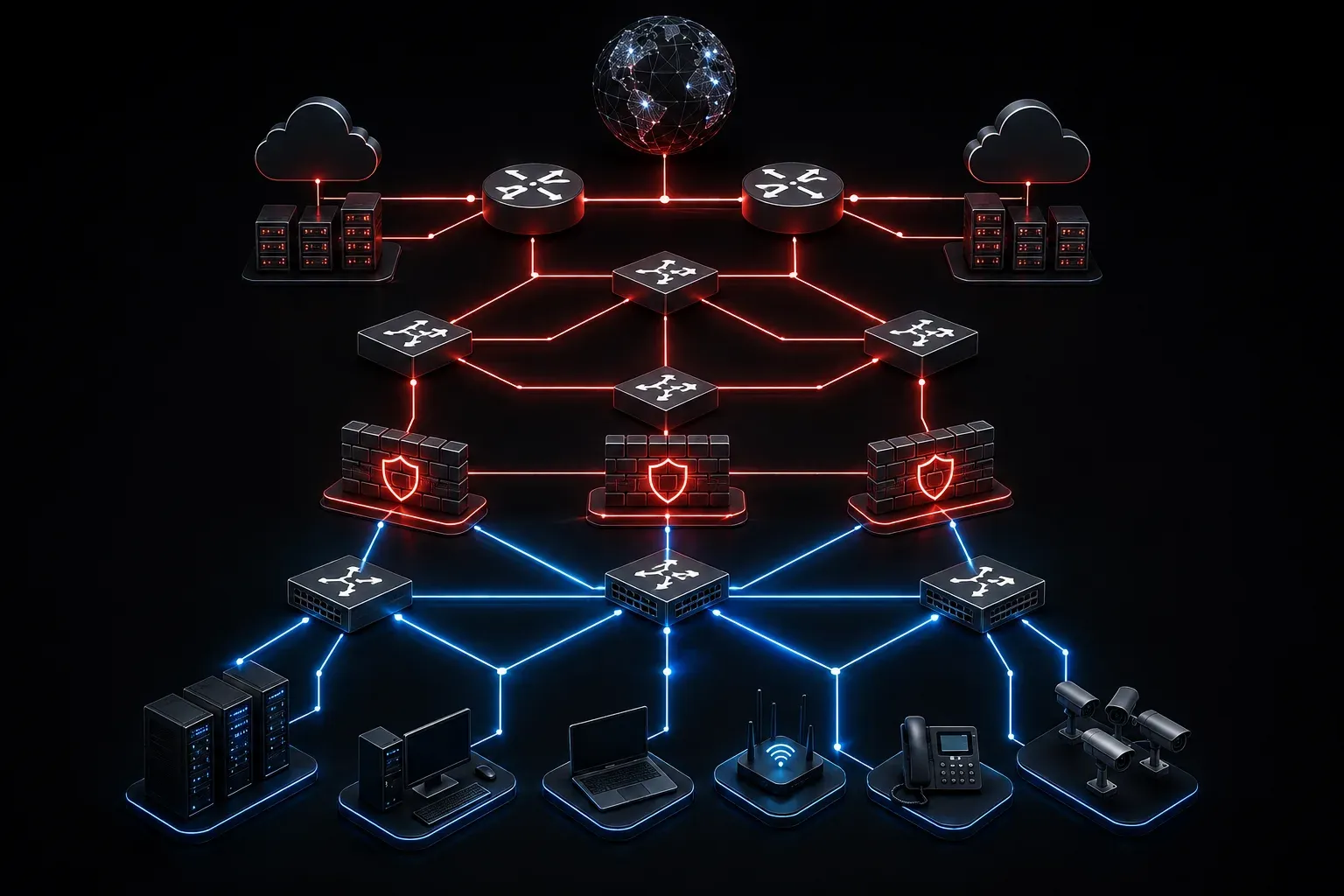
If you've ever wondered how an email travels from your laptop to a colleague across the world in under a second, the answer lies in network infrastructure. Understanding how networks are built and organized is one of the foundational skills for anyone pursuing a career in cybersecurity or IT. Let's break it down in plain language.
What Is Network Infrastructure?
Network infrastructure refers to the collection of hardware, software, and services that enable communication and data sharing across a network. Think of it like the road system in a city. Roads, traffic lights, highways, and signs all work together to move vehicles from one place to another. Network infrastructure does the same thing for data.
Without a properly designed network structure, devices wouldn't be able to talk to each other, access the internet, or share resources like printers and files. Every organization, from a small business to a global enterprise, relies on this foundation.
Core Network Components
When you look at any real-world network, you'll find a common set of building blocks. Here's a beginner guide to the key network components you'll encounter:
Routers
A router connects different networks together and directs traffic between them. When you send data to a website, your router figures out the best path to get that data to its destination. It's the traffic controller of the network.
Switches
A switch connects devices within the same network, such as computers, printers, and servers in an office. While a router connects networks, a switch keeps local traffic organized and efficient. Think of it like the hallways inside a building, moving people between rooms rather than between buildings.
Firewalls
A firewall monitors and controls incoming and outgoing network traffic based on defined security rules. It's the security checkpoint at the entrance to your network, deciding what gets in and what gets blocked. Firewalls are a critical concept in the CCST Cybersecurity exam domain.
Access Points
A wireless access point (WAP) allows wireless devices to connect to a wired network. In your home, your Wi-Fi router doubles as an access point. In a large office, you might have dozens of access points spread across the building.
Servers
A server is a device or software that provides services to other devices on the network. Common examples include web servers (hosting websites), file servers (storing shared files), and DNS servers (translating domain names into IP addresses).
Cables and Connections
Physical connections matter too. You'll commonly see:
- Ethernet cables (Cat5e, Cat6): Used for wired connections between devices
- Fiber optic cables: Used for high-speed, long-distance connections
- Wireless connections (Wi-Fi): Used where running physical cables isn't practical
How Network Structure Is Organized
Networks don't exist as one big blob of connected devices. They are logically and physically organized into zones. A common structure you'll see includes:
- LAN (Local Area Network): A network covering a small area, like a home or office
- WAN (Wide Area Network): A network spanning large geographic areas, like the internet itself
- DMZ (Demilitarized Zone): A segmented part of the network where public-facing servers live, isolated from the internal network for security
- VLAN (Virtual LAN): A logically segmented network within a physical network, used to separate departments or traffic types
Understanding this structure matters deeply in cybersecurity. Attackers look for weaknesses at every layer. Knowing how the network is organized helps you understand where vulnerabilities might exist and how to protect against them.
A Simple Visual Example
Here's a basic representation of how devices connect in a small office network:
Internet
    |
  Router (connects to ISP)
    |
  Firewall (filters traffic)
    |
   Switch (connects internal devices)
   /    \        \
PC1    PC2    File Server
Each layer serves a purpose. Remove any one component, and the network becomes less secure or stops functioning altogether.
Why This Matters for Cybersecurity
Every cybersecurity threat targets the network in some way. Malware spreads across network connections. Attackers probe routers and switches for misconfigurations. Data breaches often start with an unprotected access point or an open firewall rule. Before you can defend a network, you need to understand what you're defending.
Network infrastructure basics aren't just theory. They are the real-world context for almost every security decision you'll make as a professional.
What's Next
Now that you understand how networks are built and what components make them work, the next step is understanding how data actually travels across them. In the next post, we'll explore network protocols and how standards like TCP/IP define the rules of communication between devices. That knowledge will directly connect to how attackers exploit those same protocols and how you can defend against it.