
Common Issues with Manual Summarization in OSPF
Explores common problems with OSPF manual summarization including incomplete subnet coverage, discard route issues, and suboptimal path selection. Provides detailed troubleshooting methodology and configuration examples for network engineers dealing with OSPF routing problems.

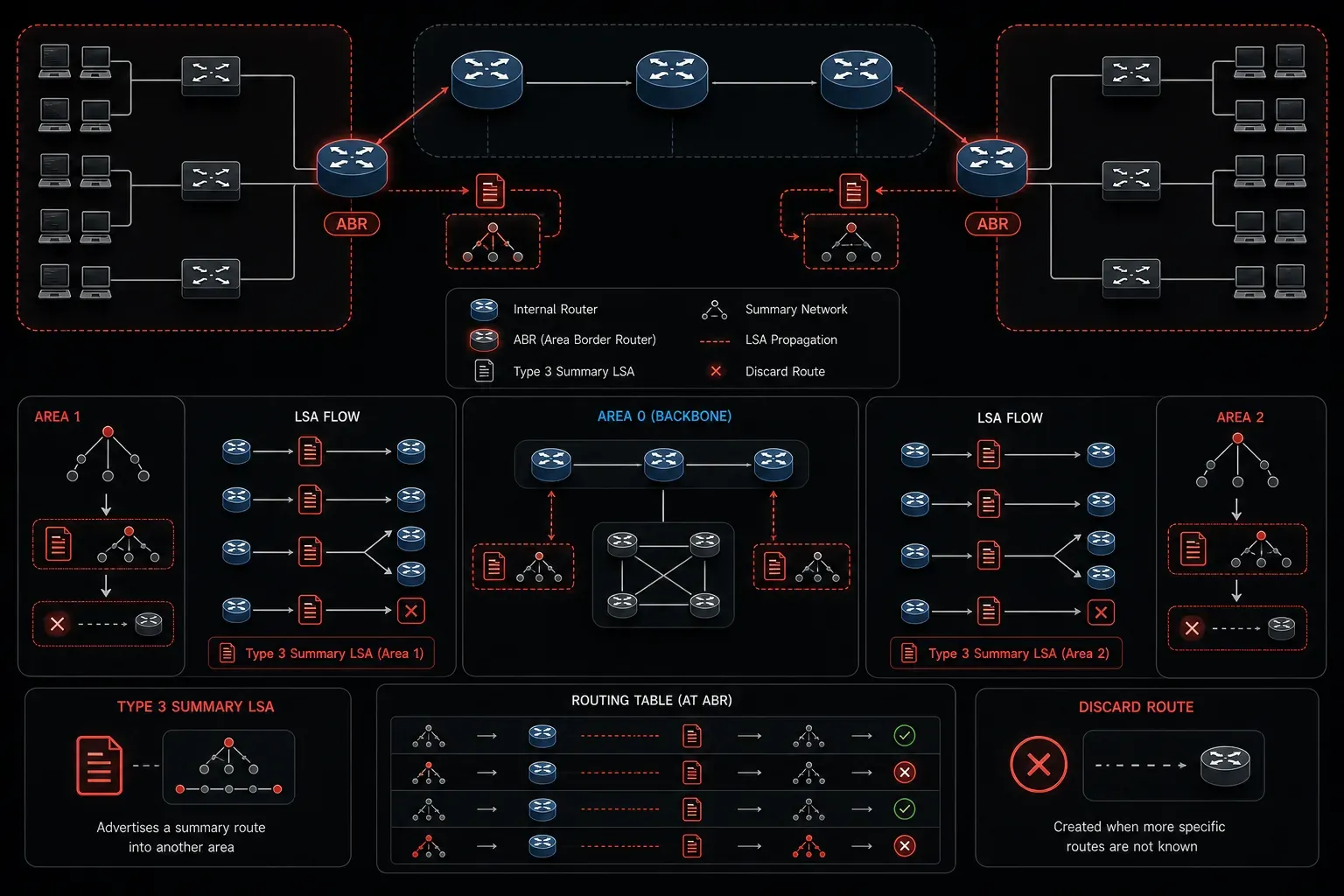
Manual summarization in OSPF can dramatically improve routing table efficiency and reduce LSA flooding, but implementation often introduces subtle issues that can disrupt network connectivity. Unlike automatic summarization, manual route summarization requires precise configuration and understanding of OSPF's hierarchical design principles. When things go wrong, the symptoms can range from suboptimal routing to complete connectivity failures.
Understanding OSPF Manual Summarization Mechanics
Manual summarization in OSPF occurs at Area Border Routers (ABRs) and Autonomous System Boundary Routers (ASBRs). ABRs summarize inter-area routes (Type 3 LSAs) between areas, while ASBRs summarize external routes (Type 5 LSAs) from redistributed protocols. The key distinction is that OSPF automatically installs a discard route for the summary prefix to prevent routing loops.
router ospf 1
 area 1 range 192.168.0.0 255.255.252.0
This configuration on an ABR summarizes all networks in Area 1 that fall within the 192.168.0.0/22 range. However, several common issues can emerge from seemingly straightforward configurations like this.
Issue 1: Incomplete Subnet Coverage
The most frequent OSPF troubleshooting scenario involves partial subnet coverage within the summary range. When the summary prefix doesn't encompass all intended subnets, some networks remain unadvertised, creating connectivity black holes.
Area 1 contains:
192.168.1.0/24
192.168.2.0/24
192.168.5.0/24
192.168.8.0/24

Summary: area 1 range 192.168.0.0 255.255.240.0
Example: Network coverage analysis for summary configuration
In this example, the /20 summary (192.168.0.0 to 192.168.15.255) covers all listed subnets. However, if you mistakenly configured 192.168.0.0 255.255.252.0 (/22), the 192.168.5.0/24 and 192.168.8.0/24 networks would fall outside the summary range and wouldn't be advertised to other areas.
To diagnose this issue, verify the summary configuration and check the OSPF database:
show ip ospf database summary
show ip route ospf | include 192.168
Issue 2: Discard Route Problems
OSPF automatically installs a discard route for summary prefixes with the standard OSPF administrative distance of 110. This prevents routing loops but can cause unexpected packet drops when the summary is too broad or when there are gaps in the summarized address space.
R1#show ip route 192.168.0.0
Routing entry for 192.168.0.0/22
  Known via "ospf 1", distance 110, metric 2
  Tag 0, type inter area
  Last update from 10.1.1.2 on GigabitEthernet0/0, 00:15:23 ago
  Routing Descriptors: none

R2#show ip route 192.168.0.0
Routing entry for 192.168.0.0/22
  Known via "ospf 1", distance 110, metric 1, type discard
Routing table comparison: Regular route vs. discard route
The ABR (R2) shows the discard route, while other routers see the summary as a normal inter-area route. If traffic is sent to an unused address within the summary range (like 192.168.3.50 in our earlier example), the ABR will discard it rather than forward it elsewhere.
Issue 3: Suboptimal Path Selection
Manual summarization can mask the true topology, leading to suboptimal routing decisions. When multiple ABRs advertise the same summary, routers in other areas choose paths based solely on the summary metric, not the specific destination network's actual cost.
Area 0: R1 --- R2 (ABR) --- Area 1
        |
        R3 (ABR) --- Area 2

Both R2 and R3 summarize 192.168.0.0/22
R2 metric: 10
R3 metric: 15
Topology diagram: Multiple ABRs advertising the same summary
Even if a specific subnet in Area 1 is closer via R3, R1 will always choose R2 because of the lower summary metric. Use the cost keyword to manipulate summary metrics:
router ospf 1
 area 1 range 192.168.0.0 255.255.252.0 cost 20
Issue 4: Redistribution and External Summarization
External route summarization at ASBRs presents unique challenges, particularly with redistribution from multiple protocols. Unlike inter-area summarization, external summarization requires the summary-address command:
router ospf 1
 redistribute eigrp 100 subnets
 summary-address 172.16.0.0 255.255.240.0
Common issues include:
- Missing subnets keyword: Without
subnets, only classful networks are redistributed - Metric conflicts: Default metrics may not reflect actual path costs
- Tag inheritance: Summary routes don't inherit route tags from component routes
Troubleshooting Methodology
When diagnosing OSPF manual summarization issues, follow this systematic approach:
- Verify summary configuration: Ensure the summary prefix encompasses all intended networks
- Check OSPF database: Use
show ip ospf database summaryandshow ip ospf database external - Examine routing tables: Look for discard routes on ABRs and summary routes on other routers
- Test connectivity: Ping specific addresses within and outside the summary range
- Analyze LSA propagation: Use
debug ip ospf lsa-generationcautiously in lab environments
show ip ospf border-routers
show ip ospf database summary 192.168.0.0
show ip ospf summary-address
Configuration Best Practices
To avoid common OSPF troubleshooting scenarios with manual summarization:
- Plan address space carefully: Design hierarchical addressing that supports clean summarization boundaries
- Document summary ranges: Maintain clear documentation of what each summary encompasses
- Use area range appropriately: Only summarize at area boundaries where it provides a clear benefit
- Monitor discard routes: Regularly verify that discard routes aren't dropping legitimate traffic
- Test thoroughly: Validate connectivity to all subnets within summary ranges before production deployment
What's Next
Understanding manual summarization issues prepares you for more complex OSPF troubleshooting scenarios. The next logical step is examining OSPF LSA filtering and its impact on area design, where you'll see how LSA manipulation can both solve and create routing problems in multi-area deployments.
Tools and resources for this topic
- CCNP ENARSI 300-410 Official Cert Guide — The definitive ENARSI study resource by Raymond Lacoste. Covers advanced routing, services, and troubleshooting.