
Metrics in Routing: What You Need to Know
Routing metrics are values used by routing protocols to determine the best path to a destination network. This post explains how different protocols like RIP, OSPF, and EIGRP each use unique metrics, and how to interpret those values directly in the Cisco routing table.

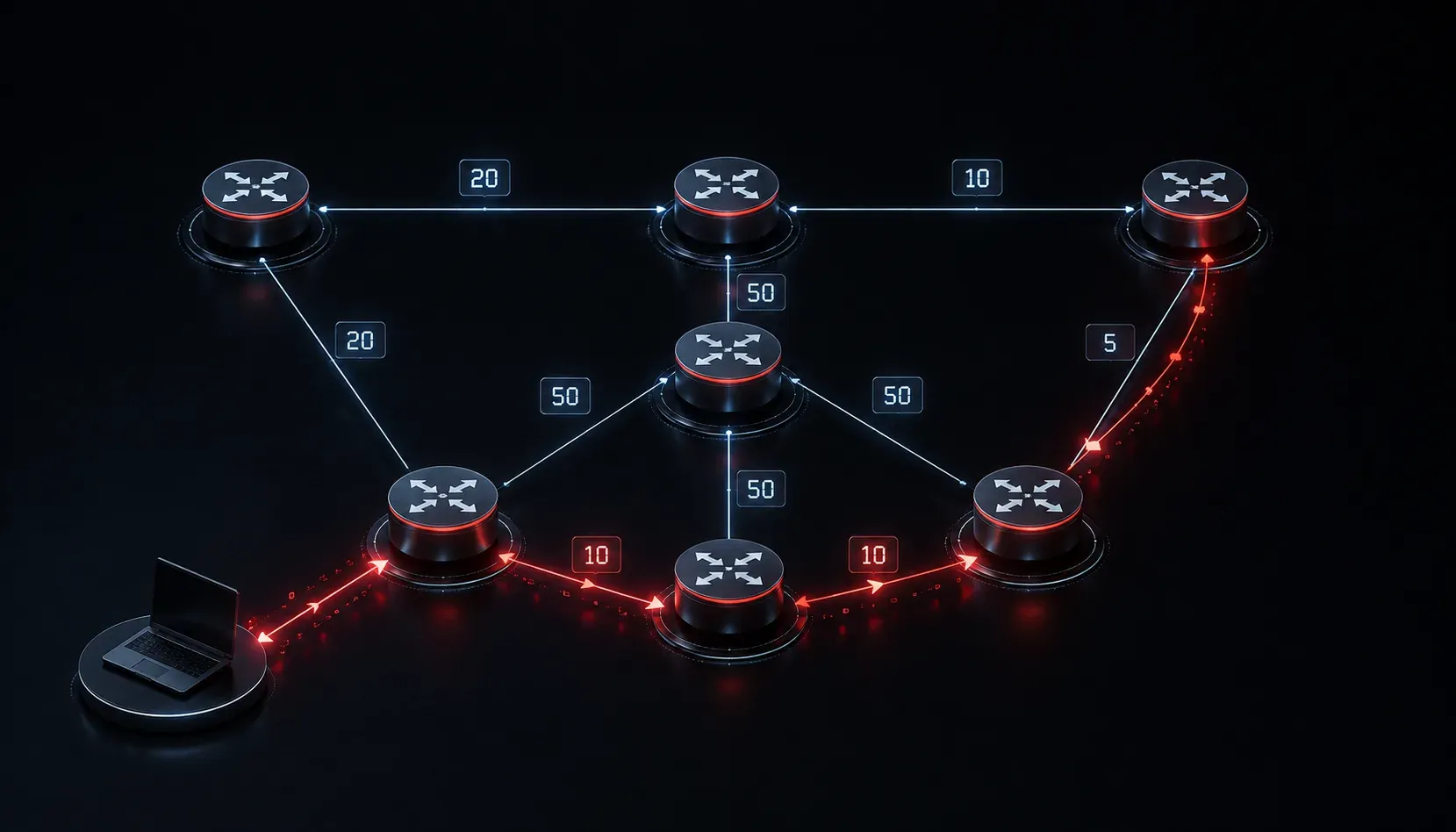
When a router receives a packet, it needs to make a quick decision: which path should this packet take to reach its destination? If there's only one path available, the answer is simple. But what happens when there are multiple paths to the same destination? This is where routing metrics come in.
What Is a Routing Metric?
A routing metric is a value that a routing protocol uses to measure the "cost" of a path to a destination network. Think of it like a GPS system comparing routes: one road might be shorter in distance, another might have less traffic. The GPS uses a combination of factors to recommend the best route. Routers do the same thing using metrics.
The lower the metric value, the more preferred the path (in most cases). When a routing protocol learns about multiple paths to the same destination, it compares their metric values and installs the best one into the routing table.
Metrics Vary by Routing Protocol
Here is the important part: different routing protocols use different metrics. There is no universal "cost" system. Each protocol has its own method of calculating which path is best.
Hop Count (RIP)
RIP (Routing Information Protocol) uses hop count as its metric. A hop is simply each router a packet must pass through to reach the destination. RIP prefers paths with fewer hops, regardless of link speed. A path through three fast gigabit links might lose out to a path through two slow serial links. This is one of the reasons RIP is considered outdated for modern networks.
Bandwidth (OSPF and EIGRP)
OSPF (Open Shortest Path First) calculates its metric, called cost, based on the bandwidth of each link. The formula is:
Cost = Reference Bandwidth / Interface BandwidthBy default, the reference bandwidth is 100 Mbps. So a Fast Ethernet interface (100 Mbps) has a cost of 1, and a Serial interface (1.544 Mbps) would have a cost of around 64. Lower cost means a better path.
EIGRP (Enhanced Interior Gateway Routing Protocol) is more sophisticated. By default, it uses bandwidth and delay combined to calculate its composite metric. It can also factor in reliability, load, and MTU, though these are not used by default.
A Quick Comparison
- RIP: Hop count (max 15 hops)
- OSPF: Cost (based on bandwidth)
- EIGRP: Composite (bandwidth + delay by default)
Seeing Metrics in the Routing Table
You can see the metric for each route directly in the routing table using the show ip route command. Here is an example output on a Cisco router running OSPF:
Router# show ip route
...
O     192.168.10.0/24 [110/65] via 10.0.0.1, 00:12:34, GigabitEthernet0/0
O     192.168.20.0/24 [110/2] via 10.0.0.2, 00:10:05, GigabitEthernet0/1
The values in brackets break down as follows: the first number (110) is the administrative distance, and the second number (65 or 2) is the metric. In this case, OSPF prefers the route to 192.168.20.0/24 because it has a lower cost of 2 compared to 65.
This is what network path selection looks like in practice. The router compares metrics for the same destination and picks the winner.
Why Metrics Matter for Routing Efficiency
Accurate metrics directly impact routing efficiency. If a routing protocol selects a slow or congested path simply because the metric favors it, performance suffers. This is why protocol choice matters in network design. OSPF and EIGRP are far more aware of link quality than RIP, making them better suited for enterprise environments where path quality really counts.
What's Next
Now that you understand how metrics influence path selection within a single routing protocol, the next natural question is: what happens when multiple routing protocols are running on the same router? That's where administrative distance comes in. It determines which protocol's routes get trusted and installed into the routing table. We'll cover that in the next post.
Tools and resources for this topic
- CCNA Official Cert Guide (Wendell Odom) — The definitive CCNA study resource. Both volumes cover the 200-301 exam blueprint in full.
- Wendell Odom CCNA Vol 1 — Covers networking fundamentals, switching, and routing basics.
- Wendell Odom CCNA Vol 2 — Covers advanced routing, WAN, infrastructure services, and security.