
Applying MCP Framework Tools in AI Workflows
This post introduces MCP framework tools, one of the three core primitives of the Model Context Protocol, and explains how they enable AI agents to take real-world actions within agentic workflows. It covers tool definitions, the client-server execution flow, and practical tips for designing effect

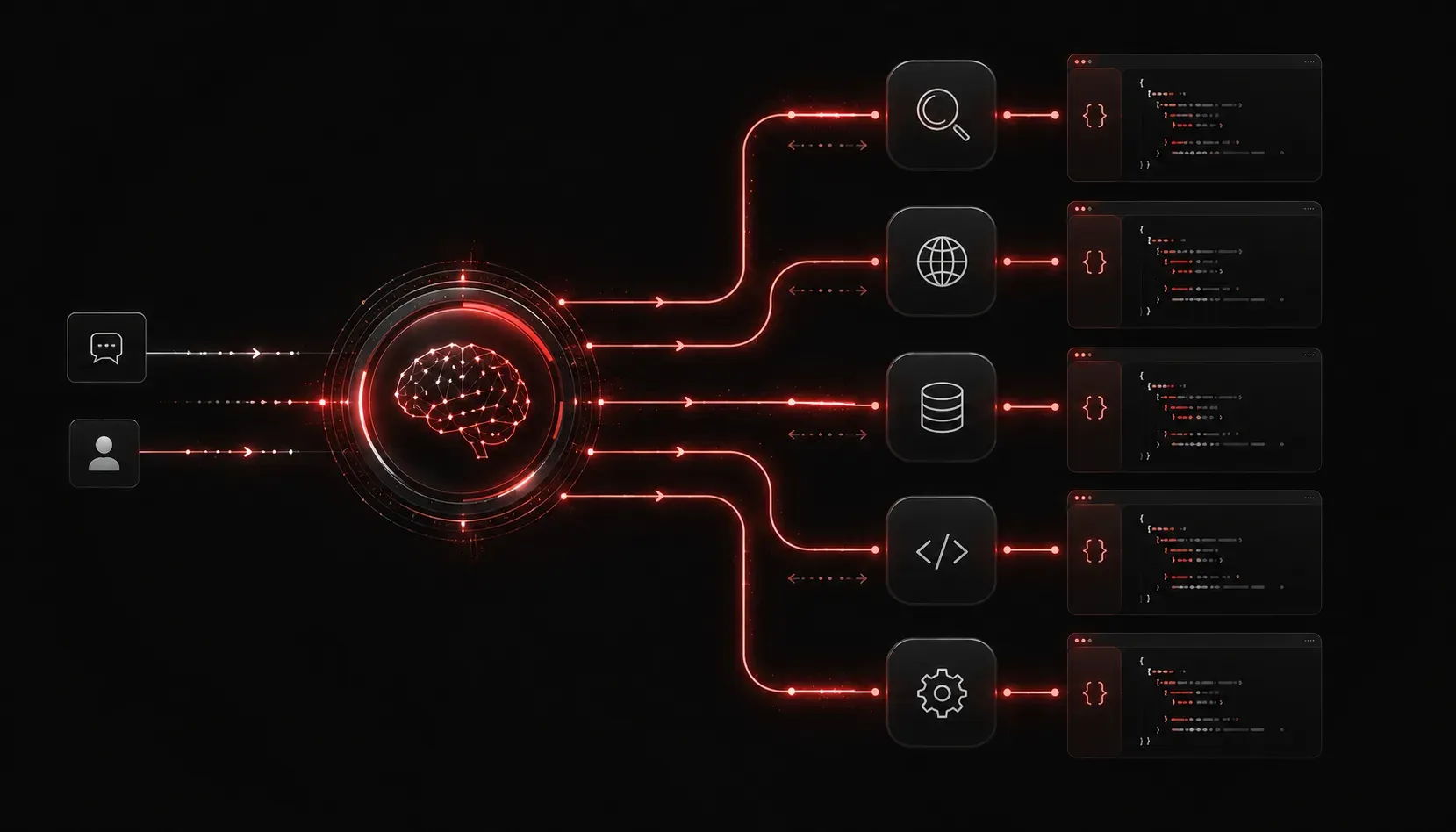
If you've been exploring agentic AI, you've likely heard the term MCP thrown around in discussions about connecting AI models to real-world tools and data. MCP, or the Model Context Protocol, is an open protocol introduced by Anthropic in late 2024 and subsequently published as an open standard. It gives AI agents a consistent way to interact with external systems. In this post, we'll focus specifically on MCP framework tools and how they fit into practical AI workflow integration.
What Are MCP Framework Tools?
In the MCP framework, "tools" are one of three core primitives (alongside resources and prompts). A tool is a callable function that an AI model can invoke to perform an action or retrieve information from an external system. Think of tools as the hands of your AI agent: they let it do things, not just think about things.
Some real-world examples of MCP tools include:
- File system tools: Reading or writing files on a local or remote machine
- Web search tools: Fetching live search results from the internet
- Database tools: Running queries against a SQL or NoSQL database
- API tools: Calling a REST endpoint to retrieve or post data
- Code execution tools: Running a Python script and returning the output
Each tool is defined with a name, a description (so the model knows when to use it), and an input schema that specifies what parameters it accepts. This structure keeps AI operations tools consistent and predictable.
How MCP Tools Work in a Workflow
The MCP architecture follows a client-server model. An MCP server exposes tools, and an MCP client (typically an AI application or agent framework) connects to that server and makes tools available to the language model.
Here's the basic flow during a conversation or agentic task:
- The AI model receives a user request and decides it needs external information or needs to perform an action.
- The model issues a tool call, specifying the tool name and input parameters.
- The MCP client intercepts this tool call and forwards it to the appropriate MCP server.
- The server executes the tool and returns a result.
- The result is passed back to the model, which uses it to continue the conversation or task.
This loop is what makes agentic AI powerful: the model can gather real-time context, take actions, and iterate until a task is complete.
A Simple Tool Definition Example
To make this concrete, here's what a basic MCP tool definition looks like in JSON schema format. This example defines a tool that retrieves the current weather for a given city:
{
  "name": "get_weather",
  "description": "Returns the current weather conditions for a specified city.",
  "inputSchema": {
    "type": "object",
    "properties": {
      "city": {
        "type": "string",
        "description": "The name of the city to get weather for."
      }
    },
    "required": ["city"]
  }
}
When the model encounters a user message like "What's the weather in Austin right now?", it can recognize that get_weather is the right tool to call, pass {"city": "Austin"} as the input, and receive structured weather data back from the server.
Why Tool Design Matters for AI Workflow Integration
Poor tool design is one of the most common reasons agentic workflows fail. If your tool descriptions are vague, models will misuse them or ignore them entirely. A few practical tips for building effective AI operations tools:
- Be specific in descriptions: Tell the model exactly what the tool does and when it should be used.
- Keep inputs simple: The fewer required parameters, the less likely the model is to make a formatting mistake.
- Return structured output: JSON responses are easier for models to parse and reason about than plain text blobs.
- Fail gracefully: Tools should return clear error messages so the model can handle failures intelligently instead of hallucinating a result.
Getting Started with MCP Tools
You don't need to build an MCP server from scratch to start experimenting. Anthropic's MCP documentation site includes a growing registry of pre-built servers covering common use cases like GitHub, file systems, and web browsing. Claude Desktop also supports MCP natively, making it a practical sandbox for testing tool integrations without writing any client code.
If you want to build your own server, the official SDKs for Python and TypeScript are well-documented and provide the fastest path to getting a custom tool live.
What's Next
Now that you understand how MCP tools work and how they plug into AI workflows, the next step is exploring the other two MCP primitives: resources and prompts. Resources let your agent read structured data like files and database records, while prompts allow servers to expose reusable instruction templates. Together, all three primitives give you the building blocks for production-grade agentic systems. Stay tuned for our next post, where we dig into MCP resources and how agents use them for context injection.