
How Paravirtualized Drivers and VirtIO Enhance VM Performance
Paravirtualized drivers and VirtIO enhance Linux VM performance by enabling direct communication between guest OS and hypervisor, eliminating traditional hardware emulation overhead. This results in significantly improved network throughput, disk I/O, and reduced CPU utilization in virtualized envi

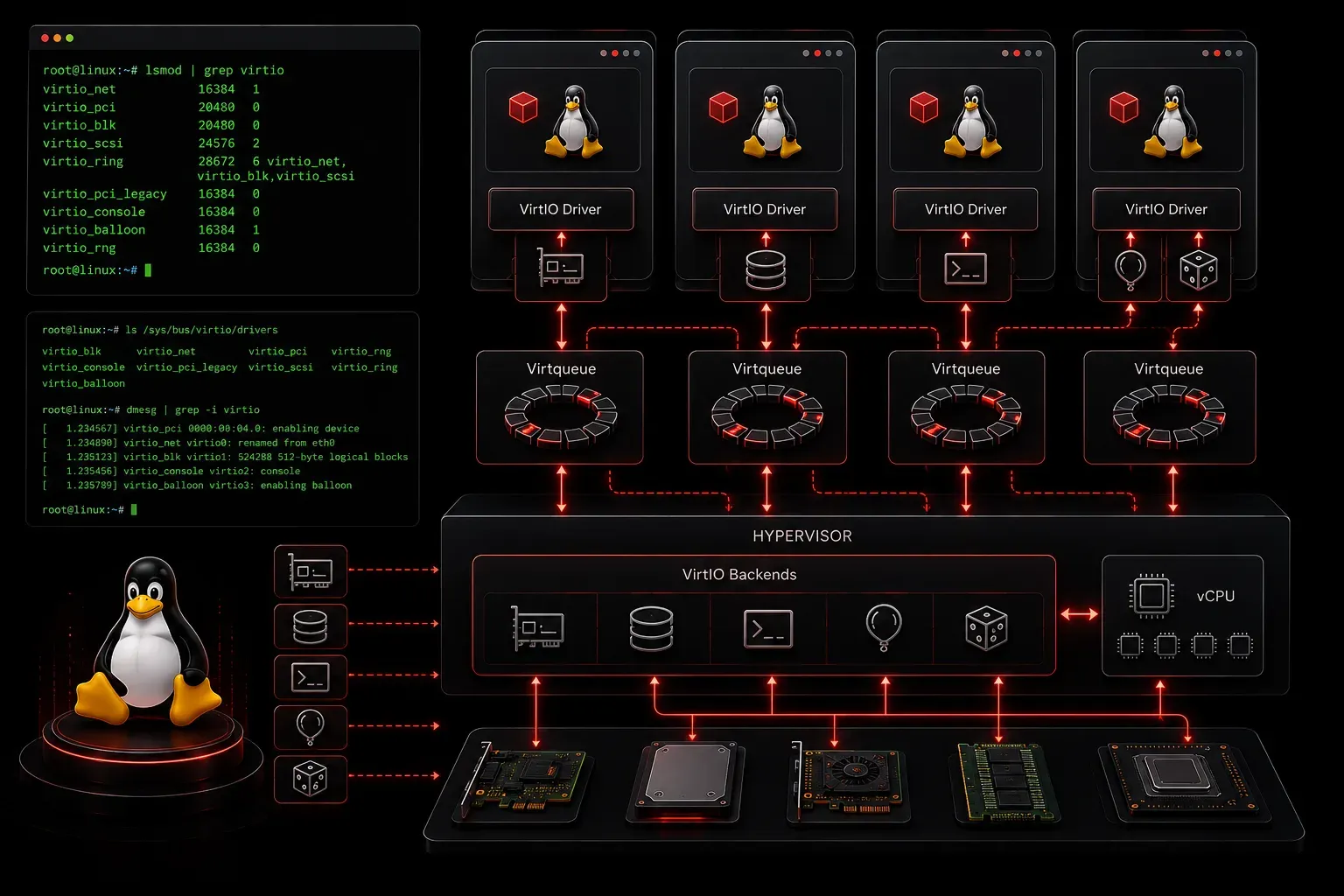
When running virtual machines on Linux, performance can make or break your experience. While traditional virtualization relies on fully emulated hardware, paravirtualized drivers take a smarter approach by allowing the guest operating system to communicate directly with the hypervisor. This collaboration dramatically improves VM performance, especially when combined with the VirtIO framework.
Understanding Paravirtualized Drivers
Traditional virtualization emulates every piece of hardware (network cards, disk controllers, and graphics adapters), creating significant overhead. Paravirtualized drivers eliminate this bottleneck by replacing emulated hardware with optimized communication channels between the guest OS and hypervisor.
Think of it as the difference between playing telephone with multiple people and having a direct conversation. Traditional drivers require the hypervisor to translate every hardware request, while paravirtualized drivers speak the same language as the hypervisor from the start.
What is VirtIO?
VirtIO is the most widely adopted paravirtualization framework for Linux VMs. Developed specifically for virtualized environments, VirtIO provides standardized interfaces for network, storage, and other I/O operations. Major hypervisors, including KVM, QEMU, and Xen, support VirtIO drivers.
VirtIO consists of three main components:
- Frontend drivers – Run inside the guest VM
- Backend drivers – Run in the hypervisor or host system
- Transport layer – Manages communication between frontend and backend
Performance Benefits in Action
To see VirtIO drivers in your Linux system, check what's currently loaded:
lsmod | grep virtioYou'll typically see modules like:
virtio_net             32768  0
virtio_blk             20480  2
virtio_pci             24576  2
virtio_ring            24576  3 virtio_net,virtio_blk,virtio_pci
The performance improvements are substantial:
- Network throughput – VirtIO network drivers can achieve near-native performance, often exceeding 10 Gbps in optimized environments
- Disk I/O – VirtIO block devices eliminate the overhead of SCSI emulation, reducing latency by up to 50%
- CPU utilization – Less processing overhead means more CPU cycles available for your applications
Common VirtIO Driver Types
Modern Linux VMs use several VirtIO drivers:
virtio-net– High-performance network interfacevirtio-blk– Block storage devices (hard drives, SSDs)virtio-scsi– SCSI storage with advanced featuresvirtio-balloon– Dynamic memory managementvirtio-rng– Hardware random number generation
Verifying VirtIO Performance
You can verify that your system is using VirtIO devices by examining the hardware information:
lspci | grep -i virtioThis shows VirtIO devices on the PCI bus:
00:03.0 Ethernet controller: Red Hat, Inc. Virtio network device
00:04.0 SCSI storage controller: Red Hat, Inc. Virtio block device
To check network interface details:
ethtool -i eth0You should see virtio_net as the driver, confirming you're getting the performance benefits of paravirtualized networking.
Why This Matters for Linux+ Certification
Understanding paravirtualized drivers and VirtIO is crucial because virtualization is everywhere in modern Linux environments. Whether you're managing cloud instances, container hosts, or on-premises VMs, recognizing when and why to use these technologies directly impacts system performance and resource utilization.
The Linux+ exam expects you to understand not just that these technologies exist, but how they improve VM performance and when they're appropriate solutions.
What's Next
Now that you understand how paravirtualized drivers enhance VM performance, the next step is to explore container technologies. We'll examine how Linux containers provide lightweight virtualization and their role in modern application deployment strategies.
Tools and resources for this topic
- CompTIA Linux+ Study Guide — Comprehensive Linux+ exam preparation covering system administration, security, and scripting.