
QoS Configuration Verification Techniques for Network Engineers
This guide covers systematic QoS verification techniques for enterprise networks, including interface statistics analysis, DSCP marking validation, bandwidth utilization monitoring, and performance testing methodologies that network engineers use to ensure QoS policies deliver expected results.

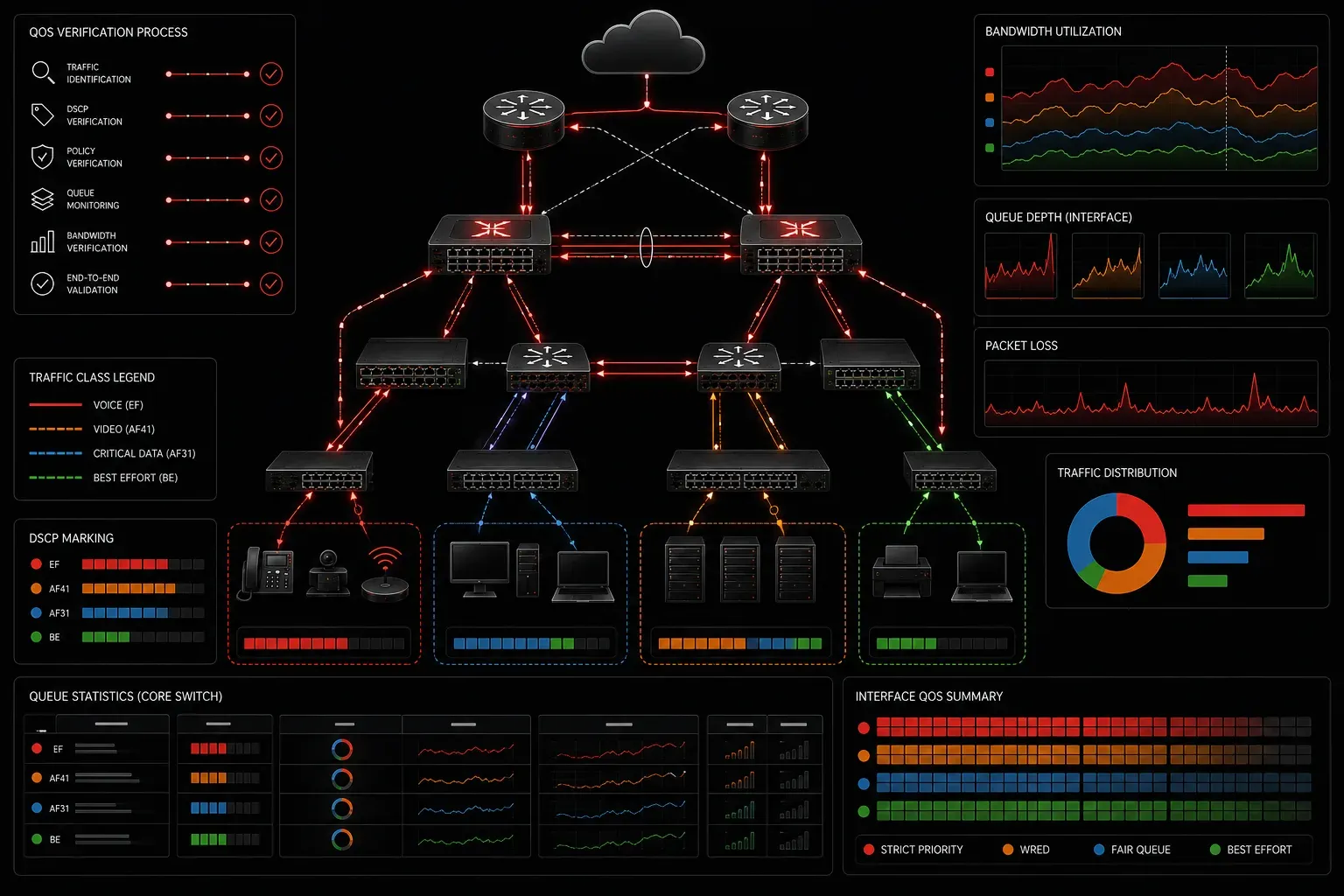
Verifying Quality of Service implementations requires a systematic approach that goes beyond simply checking if configurations are applied. Enterprise networks demand rigorous validation to ensure QoS policies deliver expected performance under varying traffic conditions. This verification process combines real-time monitoring, traffic analysis, and performance testing to confirm that your QoS implementation meets business requirements.
Interface-Level QoS Verification
Start your verification process at the interface level where QoS policies are applied. The show policy-map interface command provides comprehensive statistics about traffic classification, marking, queuing, and dropping behavior.
Router# show policy-map interface GigabitEthernet0/1
 GigabitEthernet0/1

  Service-policy output: ENTERPRISE_QOS

    Class-map: VOICE (match-all)
      0 packets, 0 bytes
      5 minute offered rate 0000 bps, drop rate 0000 bps
      Match: ip dscp ef (46)
      Priority: 10% (100000 kbps), burst bytes 2500000, b/w exceed drops: 0

    Class-map: VIDEO (match-all)
      12847 packets, 18456320 bytes
      5 minute offered rate 2400000 bps, drop rate 0 bps
      Match: ip dscp af41 (34)
      Queueing
        queue limit 64 packets
        (queue depth/total drops/no-buffer drops) 4/0/0
        (pkts output/bytes output) 12847/18456320
        bandwidth 25% (250000 kbps)
This output reveals critical performance indicators. Zero drops in priority queues indicate proper dimensioning, while queue depth statistics show buffer utilization. Pay attention to the offered rate versus configured bandwidth to identify potential bottlenecks.
Analyzing Queue Statistics
Queue depth and drop counters tell the real story of QoS performance. Use show queue for granular queue analysis:
Router# show queue GigabitEthernet0/1
Interface GigabitEthernet0/1 queueing strategy: Class-based queueing

Output queue: 0/40 (size/max)
Total output drops: 0

Queue: 0, Forwarded packets: 145892, Dropped packets: 0
Queue: 1, Forwarded packets: 89234, Dropped packets: 12
Queue: 2, Forwarded packets: 234567, Dropped packets: 0
Monitor these counters over time to establish baselines and identify performance degradation trends. Sudden increases in dropped packets often indicate misconfigured bandwidth allocations or unexpected traffic patterns.
DSCP Marking Verification
Verify that traffic classification and marking operate correctly using debug commands and packet captures. The debug ip packet command with access lists can reveal DSCP marking behavior, but use this command with extreme caution in production environments as it is resource-intensive and can significantly impact router performance:
Router# debug ip packet 101 detail
! WARNING: This command is resource-intensive. Use only during maintenance windows
! or on low-traffic interfaces in production environments.
IP packet debugging is on (detailed) for access list 101

Router# access-list 101 permit ip host 10.1.1.100 host 10.2.2.200

Router# show ip access-lists 101
Extended IP access list 101
    10 permit ip host 10.1.1.100 host 10.2.2.200 (23 matches)
For more comprehensive marking verification, examine the class-map match statistics:
Router# show class-map
 Class Map match-all VOICE (id 1)
   Match ip dscp ef (46)

 Class Map match-all VIDEO (id 2)
   Match ip dscp af41 (34)
   Match ip dscp af42 (36)
   Match ip dscp af43 (38)
End-to-End DSCP Preservation
Verify DSCP markings persist across network boundaries using packet captures at multiple points. The monitor capture feature on modern Cisco platforms provides embedded packet analysis, though be aware that enabling packet capture can impact network performance on high-traffic interfaces:
Router# monitor capture VOICE_TRAFFIC interface GigabitEthernet0/1 both match ipv4 any any
! NOTE: Packet capture may impact performance on high-traffic interfaces
Router# monitor capture VOICE_TRAFFIC start

! Generate test traffic

Router# monitor capture VOICE_TRAFFIC stop
Router# monitor capture VOICE_TRAFFIC export bootflash:voice_capture.pcap
Bandwidth Utilization Analysis
Effective QoS verification requires understanding actual bandwidth consumption versus configured allocations. Use SNMP polling or embedded monitoring to track interface utilization patterns:
Router# show interfaces GigabitEthernet0/1 | include rate
  5 minute input rate 45670000 bits/sec, 8234 packets/sec
  5 minute output rate 89234000 bits/sec, 12456 packets/sec
Compare these utilization figures against your QoS bandwidth allocations. If aggregate traffic approaches interface capacity, priority and bandwidth guarantee mechanisms should engage appropriately.
Real-Time Performance Monitoring
Implement continuous monitoring using IP SLA probes to measure actual application performance. IP SLA is particularly valuable for QoS verification because it generates synthetic traffic with specific DSCP markings, allowing you to measure how QoS policies affect different traffic classes in real-time:
Router# ip sla 100
 icmp-echo 10.2.2.200 source-interface GigabitEthernet0/1
 tos 184
 frequency 10
 timeout 2000
 threshold 100

Router# ip sla schedule 100 life forever start-time now

Router# show ip sla statistics 100
IPSLAs Latest Operation Statistics

IPSLA operation id: 100
        Latest RTT: 24 milliseconds
        Latest operation start time: 14:23:45 UTC Mon Mar 4 2024
        Latest operation return code: OK
        Number of successes: 1445
        Number of failures: 12
        Operation time to live: Forever
By configuring multiple IP SLA probes with different ToS/DSCP markings, you can verify that high-priority traffic (such as voice with EF marking) consistently achieves better performance metrics than lower-priority traffic during congestion periods.
Traffic Shaping and Policing Verification
Validate traffic shaping and policing behaviors under load conditions. The show traffic-shape and show policy-map interface commands reveal shaper queue depths and policer drop statistics:
Router# show traffic-shape statistics
Access Target    Byte   Sustain   Excess    Interval  Increment Adapt
I/F    List      Limit  bits/int  bits/int  (ms)      (bytes)   Active
Gi0/1  -         1000000 12500    12500     125       1562      -

Queue  Depth    Packets   Bytes     Packets   Bytes     Shaping
                Queued    Queued    Dequeued  Dequeued  Active
0      15       234       345672    12456     18934567  yes
Active shaping with queue depth indicates the shaper is managing traffic bursts appropriately. Monitor these statistics during peak traffic periods to ensure shaping parameters align with application requirements.
Congestion Avoidance Verification
Verify WRED and congestion avoidance mechanisms using detailed class statistics. Look for graduated drop behavior rather than tail drops:
Router# show policy-map interface GigabitEthernet0/1 class DATA
  Class-map: DATA (match-all)
    189234 packets, 234567890 bytes
    5 minute offered rate 34560000 bps, drop rate 145000 bps
    Match: not (ip dscp ef)
    Queueing
      queue limit 64 packets
      (queue depth/total drops/no-buffer drops) 23/1456/0
      (pkts output/bytes output) 187778/233211890
      Random detect:
        Exponential weight: 9
        Mean queue depth: 18
        Class    Random drop      Tail drop    Minimum Maximum  Mark
                 pkts/bytes       pkts/bytes   thresh  thresh   prob
        0        1234/1876543     222/334455   20      40       1/10
Performance Testing and Validation
Implement systematic testing using traffic generators or synthetic traffic to validate QoS behavior under controlled conditions. Tools like TRex or hardware-based testers provide precise traffic patterns for comprehensive QoS validation.
Document baseline performance metrics during normal operations, then introduce controlled congestion to verify QoS mechanisms engage properly. This testing approach validates that priority traffic maintains service levels while lower-priority traffic experiences appropriate degradation.
What's Next
With comprehensive QoS verification techniques in your toolkit, the next critical step involves optimizing QoS policies based on your verification results. Understanding how to tune bandwidth allocations, adjust queue parameters, and refine traffic classifications will help you achieve optimal network performance under all operating conditions.
Tools and resources for this topic
- CCNP ENCOR 350-401 Official Cert Guide — The definitive ENCOR study resource by Brad Edgeworth. Covers enterprise infrastructure, virtualisation, and automation.