
Understanding Root Port and Root Bridge in Rapid PVST+
Learn the fundamental spanning tree roles of root bridge and root port in Rapid PVST+, and how they determine optimal network traffic paths in switched environments.

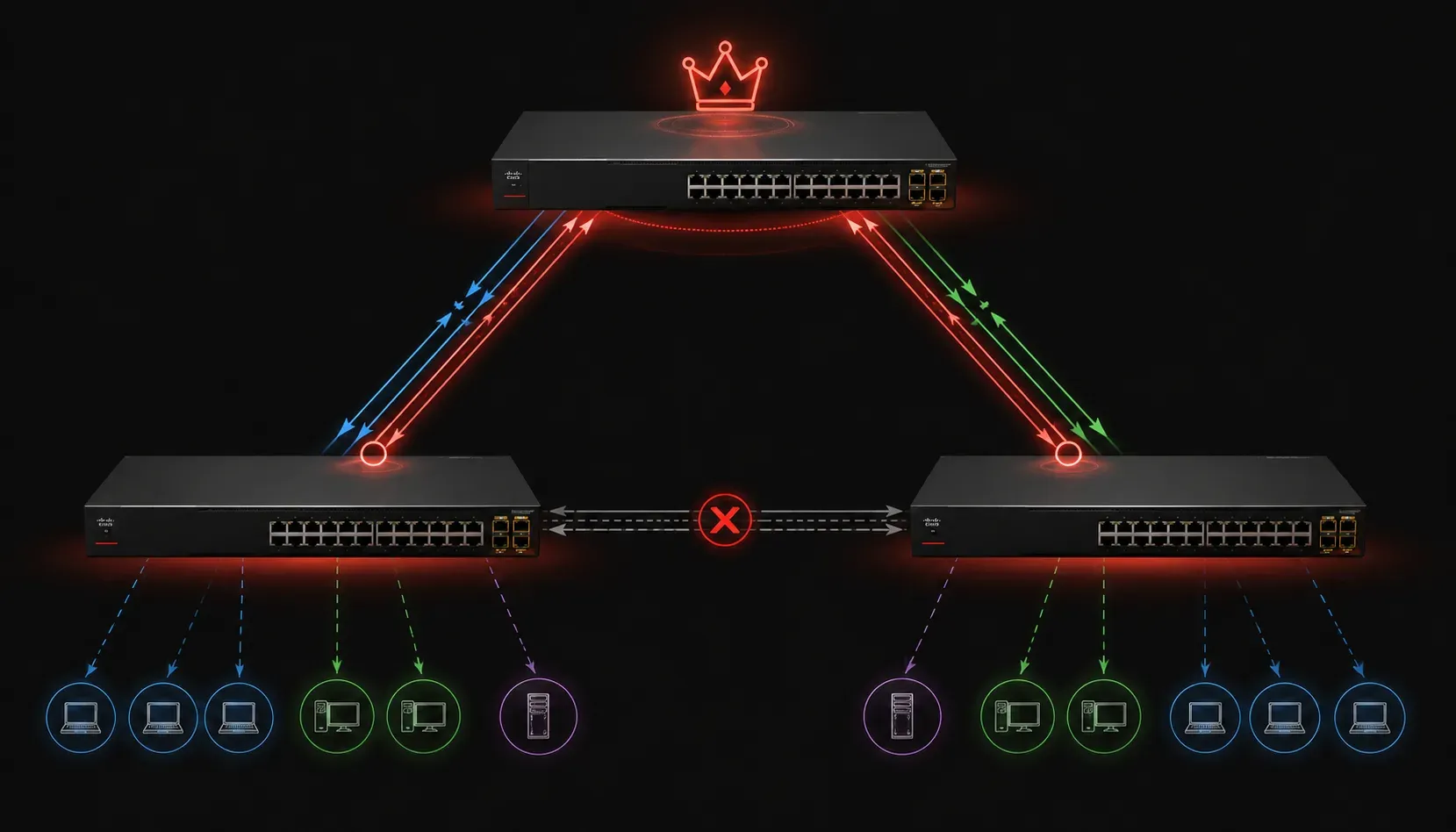
Spanning Tree Protocol (STP) and its modern variant Rapid PVST+ are fundamental to preventing loops in switched networks. At the heart of these protocols are two critical concepts that determine how your network traffic flows: the root bridge and root port. Understanding these spanning tree roles is essential for managing network traffic paths effectively.
Note: Rapid PVST+ is a Cisco proprietary implementation of the IEEE 802.1w standard (Rapid Spanning Tree Protocol or RSTP) that operates on a per-VLAN basis. VLANs (Virtual Local Area Networks) are logical network segments that allow you to partition a physical network into separate broadcast domains for security, performance, and organizational purposes.
What is the Root Bridge?
The root bridge serves as the central reference point for your entire spanning tree topology. Think of it as the "north star" of your network; every other switch calculates the best path back to this root bridge.
During the spanning tree election process, switches compare their Bridge IDs. The Bridge ID consists of two components:
- Bridge Priority: A configurable value (default 32768) that can be set in increments of 4096
- MAC Address: The switch's unique hardware identifier
The switch with the lowest Bridge ID becomes the root bridge for that VLAN. Since all Cisco switches have a default priority of 32768, the switch with the lowest MAC address typically wins the election unless priorities are manually configured.
Switch(config)# spanning-tree vlan 1 priority 4096
Switch(config)# spanning-tree vlan 1 root primary
You can verify which switch is the root bridge using the show spanning-tree command:
Switch# show spanning-tree vlan 1

VLAN0001
  Spanning tree enabled protocol rstp
  Root ID    Priority    4097
             Address     001e.7a3c.4000
             This bridge is the root
Understanding the Root Port
Each non-root switch must select exactly one root port; the interface that provides the best path back to the root bridge. This port becomes the switch's primary connection for reaching the root and forwarding traffic toward it.
The root port selection process follows a specific hierarchy:
- Lowest root path cost: The cumulative cost of all links to reach the root bridge
- Lowest sender Bridge ID: If costs are equal, prefer the path through the switch with the lowest Bridge ID
- Lowest sender Port ID: If Bridge IDs are equal, choose the port with the lowest Port ID
You can identify root ports in the spanning tree output:
Switch# show spanning-tree vlan 1

Interface           Role Sts Cost      Prio.Nbr Type
------------------- ---- --- --------- -------- --------------------------------
Gi0/1               Root FWD 4         128.1    P2p
Gi0/2               Desg FWD 4         128.2    P2p
How Root Ports Affect Network Traffic Paths
The root port directly influences how network traffic paths are established. All traffic destined for other VLANs or subnets typically flows through the root port toward the root bridge, which often hosts the default gateway or connects to routing infrastructure.
When a root port fails, Rapid PVST+ quickly reconverges, selecting a new root port and adjusting network traffic paths accordingly. This process typically completes within seconds, minimizing network disruption.
Rapid PVST+ Behavior
Unlike classic STP, Rapid PVST+ (Cisco's implementation of IEEE 802.1w RSTP) enables much faster convergence when network topology changes occur. When a root port or root bridge becomes unavailable, the protocol can transition alternate ports to forwarding state almost immediately, maintaining optimal network traffic paths.
The key advantage is that Rapid PVST+ runs per-VLAN, allowing different VLANs to have different root bridges and root ports. This enables load balancing across multiple uplinks and provides better network utilization.
Switch# show spanning-tree summary
Switch is in rapid-pvst mode
Root bridge for: VLAN0001, VLAN0010
Extended system ID is enabled
Best Practices for Root Bridge Placement
Position your root bridge strategically, typically on your most powerful, centrally located switch with the highest-bandwidth connections. This ensures optimal network traffic paths and minimizes convergence time during failures.
Avoid letting the root bridge election happen randomly. Always configure your intended root bridge manually using priority settings to ensure predictable network behavior.
What's Next
Now that you understand how root bridges and root ports establish the foundation of your spanning tree topology, the next step is learning about designated ports and alternate ports. These additional spanning tree roles complete the picture of how switches eliminate loops while maintaining redundant paths for network resilience.
Tools and resources for this topic
- CCNA Official Cert Guide (Wendell Odom) — The definitive CCNA study resource. Both volumes cover the 200-301 exam blueprint in full.
- Wendell Odom CCNA Vol 1 — Covers networking fundamentals, switching, and routing basics.
- Wendell Odom CCNA Vol 2 — Covers advanced routing, WAN, infrastructure services, and security.