
Understanding 802.1Q: The Key to VLAN Tagging
802.1Q is the IEEE standard that enables VLAN tagging by inserting 4-byte tags into Ethernet frames. This allows switches to identify which VLAN each frame belongs to as it travels between switches, enabling efficient network traffic management across multiple VLANs.

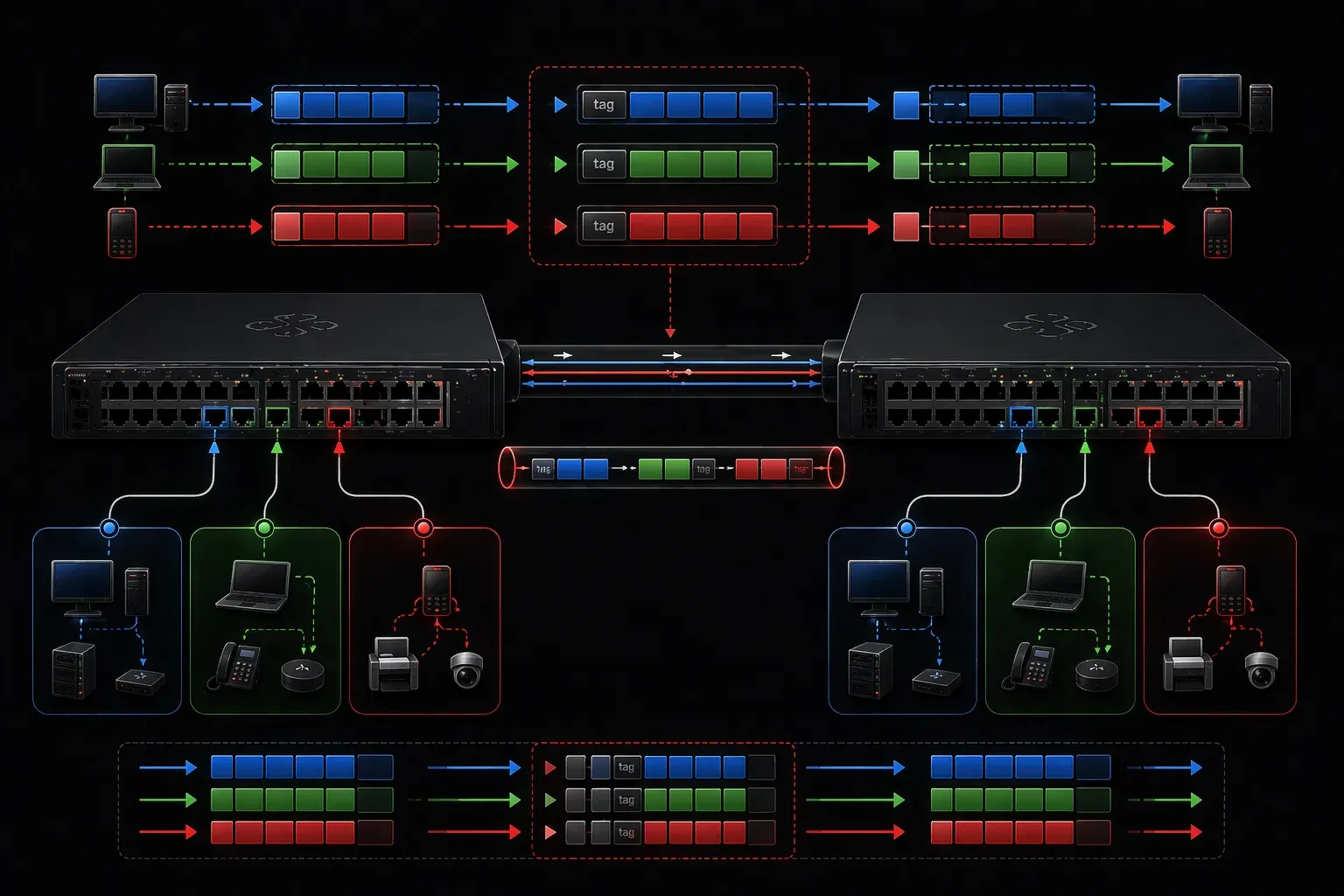
When you're managing a network with multiple VLANs, you need a way to identify which VLAN each frame belongs to as it travels between switches. This is where 802.1Q comes in. 802.1q (or just dot1q for short) is the IEEE standard that makes VLAN tagging possible and enables efficient network traffic management across your entire switched infrastructure.
What is 802.1Q?
802.1Q is an IEEE standard that defines how VLAN information is added to Ethernet frames. Think of it as a labeling system that tells switches exactly which VLAN a frame belongs to. Without this standard, switches would have no way to maintain VLAN separation when frames travel between different switches.
The standard was developed in the late 1990s to address the growing need for network segmentation and efficient VLAN management in enterprise networks. Before 802.1Q, proprietary solutions like Cisco's ISL (Inter-Switch Link) were used, but standardization was needed for multi-vendor interoperability.
The magic happens through a process called VLAN tagging, where a 4-byte tag is inserted into the Ethernet frame header. This tag contains the VLAN ID, allowing switches to make intelligent forwarding decisions based on VLAN membership.
How 802.1Q VLAN Tagging Works
When a frame enters a switch port configured for 802.1Q tagging, the switch examines the frame and adds a VLAN tag if one doesn't already exist. Here's what happens:
- Tag insertion: The switch inserts a 4-byte tag between the source MAC address and the EtherType/Length field
- VLAN ID assignment: The tag includes a 12-bit VLAN ID field (supporting VLANs 1-4094, with VLAN 0 used for priority tagging and VLAN 4095 reserved)
- Frame forwarding: Other switches read this tag to determine which VLAN the frame belongs to
- Tag removal: When the frame reaches its destination access port, the tag is removed before delivery
The 802.1Q Frame Structure
Understanding the frame structure is crucial for grasping how 802.1Q works. When a tag is added, the Ethernet frame is modified as follows:
Original: [Dest MAC][Src MAC][EtherType][Payload][FCS]
Tagged: [Dest MAC][Src MAC][802.1Q Tag][EtherType][Payload][FCS]
The 802.1Q tag contains several important fields:
- Tag Protocol Identifier (TPID): Always 0x8100, identifies this as an 802.1Q frame
- Priority Code Point (PCP): 3 bits for Quality of Service (QoS) marking
- Drop Eligible Indicator (DEI): 1 bit indicating if the frame can be dropped during congestion
- VLAN Identifier (VID): 12 bits containing the VLAN ID (1-4094)
Trunk Ports and Access Ports
Understanding 802.1Q requires knowing the difference between trunk and access ports:
Access Ports
Access ports connect to end devices like computers or phones. They belong to a single VLAN and don't use tags. When a frame enters an access port, the switch knows which VLAN it belongs to based on the port's configuration.
Switch(config)# interface fastethernet 0/1
Switch(config-if)# switchport mode access
Switch(config-if)# switchport access vlan 10
Trunk Ports
Trunk ports connect switches together and can carry traffic for multiple VLANs. These ports use 802.1Q tags to identify which VLAN each frame belongs to.
Switch(config)# interface gigabitethernet 0/1
Switch(config-if)# switchport mode trunk
Switch(config-if)# switchport trunk allowed vlan 10,20,30
Native VLAN Concept
One unique aspect of 802.1Q is the native VLAN. This is the VLAN that sends frames untagged across a trunk link. By default, this is VLAN 1, which serves as the management VLAN and carries control traffic like CDP (Cisco Discovery Protocol) and spanning tree BPDUs.
VLAN 1 is hardcoded as the default native VLAN to ensure backward compatibility with devices that don't support VLAN tagging. However, you can change the native VLAN:
Switch(config-if)# switchport trunk native vlan 99For security reasons, many network administrators change the native VLAN to an unused VLAN ID to prevent VLAN hopping attacks. When changing the native VLAN, ensure both ends of the trunk link use the same native VLAN to avoid connectivity issues.
Verifying 802.1Q Configuration
You can verify your VLAN tagging setup with these commands:
Switch# show interfaces trunk
Switch# show vlan brief
Switch# show interfaces switchport
These commands will show you which interfaces are configured as trunks, which VLANs are allowed, and how your switchports are configured.
Benefits of 802.1Q VLAN Tagging
Implementing 802.1Q provides several advantages for efficient network traffic management:
- VLAN extension: Extend VLANs across multiple switches
- Reduced cabling: One trunk link can carry multiple VLANs
- Simplified management: Centralized VLAN administration
- Better resource utilization: More efficient use of switch ports
What's Next
Now that you understand how 802.1Q enables VLAN tagging, the next step is learning about Inter-VLAN routing. We'll explore how routers and Layer 3 switches enable communication between different VLANs using techniques like router-on-a-stick and switched virtual interfaces (SVIs).
Tools and resources for this topic
- CCNA Official Cert Guide (Wendell Odom) — The definitive CCNA study resource. Both volumes cover the 200-301 exam blueprint in full.
- Wendell Odom CCNA Vol 1 — Covers networking fundamentals, switching, and routing basics.
- Wendell Odom CCNA Vol 2 — Covers advanced routing, WAN, infrastructure services, and security.