
How Access and Trunk Ports Connect WLAN Components
This post explains the differences between access and trunk ports in WLAN deployments, covering when to use each port type and providing practical configuration examples for connecting wireless components to network infrastructure.

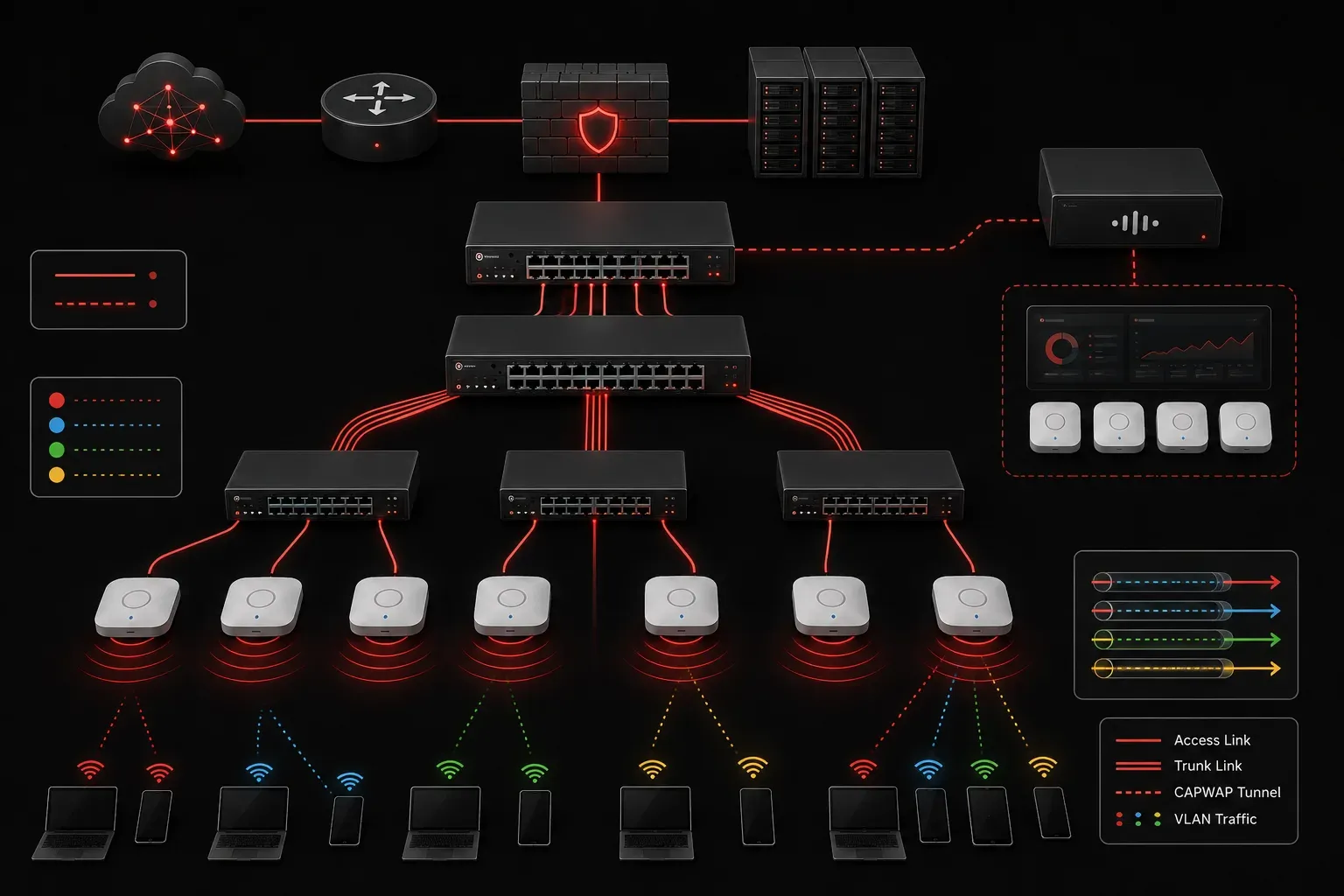
When setting up wireless networks, understanding how access vs trunk ports work is crucial for proper WLAN connections and network communication. These different port roles determine how your wireless access points (APs) and controllers communicate with the rest of your network infrastructure.
Understanding Port Types in WLAN Deployments
In Cisco networking, switch ports operate in two primary modes that directly impact how WLAN components connect to your network infrastructure. Let's examine how each port type functions and when to use them.
Access Ports: Single VLAN Connections
Access ports carry traffic for only one VLAN and are typically used for end-device connections. In WLAN deployments, you'll commonly see access ports used for:
- Lightweight Access Points (LAPs) in centralized WLAN architectures
- Simple wireless bridge connections
- Management interfaces on wireless LAN controllers (WLCs)
When you configure an access port for WLAN connections, the switch strips VLAN tags from outgoing frames and adds the access VLAN tag to incoming untagged frames. Here's the basic configuration:
Switch(config)# interface fastethernet0/1
Switch(config-if)# switchport mode access
Switch(config-if)# switchport access vlan 100
Switch(config-if)# switchport nonegotiate
Trunk Ports: Multiple VLAN Transport
Trunk ports can carry traffic for multiple VLANs simultaneously, making them essential for more complex WLAN deployments. You'll use trunk ports when connecting:
- Autonomous access points that support multiple SSIDs
- Wireless LAN controllers that manage traffic for multiple VLANs
- FlexConnect access points performing local switching
Trunk configuration requires specifying which VLANs are allowed and setting the encapsulation method:
Switch(config)# interface gigabitethernet0/1
Switch(config-if)# switchport mode trunk
Switch(config-if)# switchport trunk allowed vlan 100,200,300
Switch(config-if)# switchport trunk native vlan 99
WLAN-Specific Connection Scenarios
Centralized WLAN Architecture
In a centralized deployment with a Wireless LAN Controller (WLC), your access points typically connect via access ports since the WLC handles all VLAN assignments and traffic forwarding. The LAPs establish CAPWAP (Control and Provisioning of Wireless Access Points) tunnels to the controller; a protocol that manages configuration and data communication between access points and controllers; which then manages client traffic distribution.
FlexConnect Deployment
FlexConnect access points can operate in two distinct switching modes depending on your network requirements:
- Local switching mode: FlexConnect APs perform VLAN switching locally and typically require trunk connections when supporting multiple SSIDs mapped to different VLANs
- Centralized switching mode: All client traffic is tunneled back to the WLC for processing, similar to traditional LAPs, and may only require access port connections
When FlexConnect APs operate in local switching mode with multiple SSIDs, they need to send properly tagged traffic to the switch:
ap(config)# interface gigabitethernet0
ap(config-if)# switchport mode trunk
ap(config-if)# switchport trunk native vlan 1
ap(config-if)# switchport trunk allowed vlan 10,20,30
Best Practices for WLAN Port Configuration
When planning your WLAN infrastructure connections, consider these guidelines:
- Use access ports for lightweight APs in centralized architectures
- Deploy trunk ports for autonomous APs or FlexConnect scenarios with local switching and multiple SSIDs
- Consider access ports for FlexConnect APs in centralized switching mode
- Always configure the native VLAN on trunk ports to match your management VLAN
- Limit allowed VLANs on trunk ports to only those required by your wireless services
Understanding these port roles helps ensure proper network communication between your WLAN components and eliminates common connectivity issues that arise from VLAN mismatches or incorrect port configurations.
What's Next
Now that you understand how access and trunk ports facilitate WLAN connections, the next step is to explore VLAN concepts and how different VLANs segment wireless traffic for security and performance optimization.
Tools and resources for this topic
- CCNA Official Cert Guide (Wendell Odom) — The definitive CCNA study resource. Both volumes cover the 200-301 exam blueprint in full.
- Wendell Odom CCNA Vol 1 — Covers networking fundamentals, switching, and routing basics.
- Wendell Odom CCNA Vol 2 — Covers advanced routing, WAN, infrastructure services, and security.