
Advanced QoS Strategies for Enterprise Networks
This post covers advanced QoS strategies for enterprise networks, including traffic classification and marking, LLQ and CBWFQ queuing, the differences between shaping and policing, DSCP trust boundaries, and how to validate QoS policies using Cisco tools. It provides practical CLI examples througho

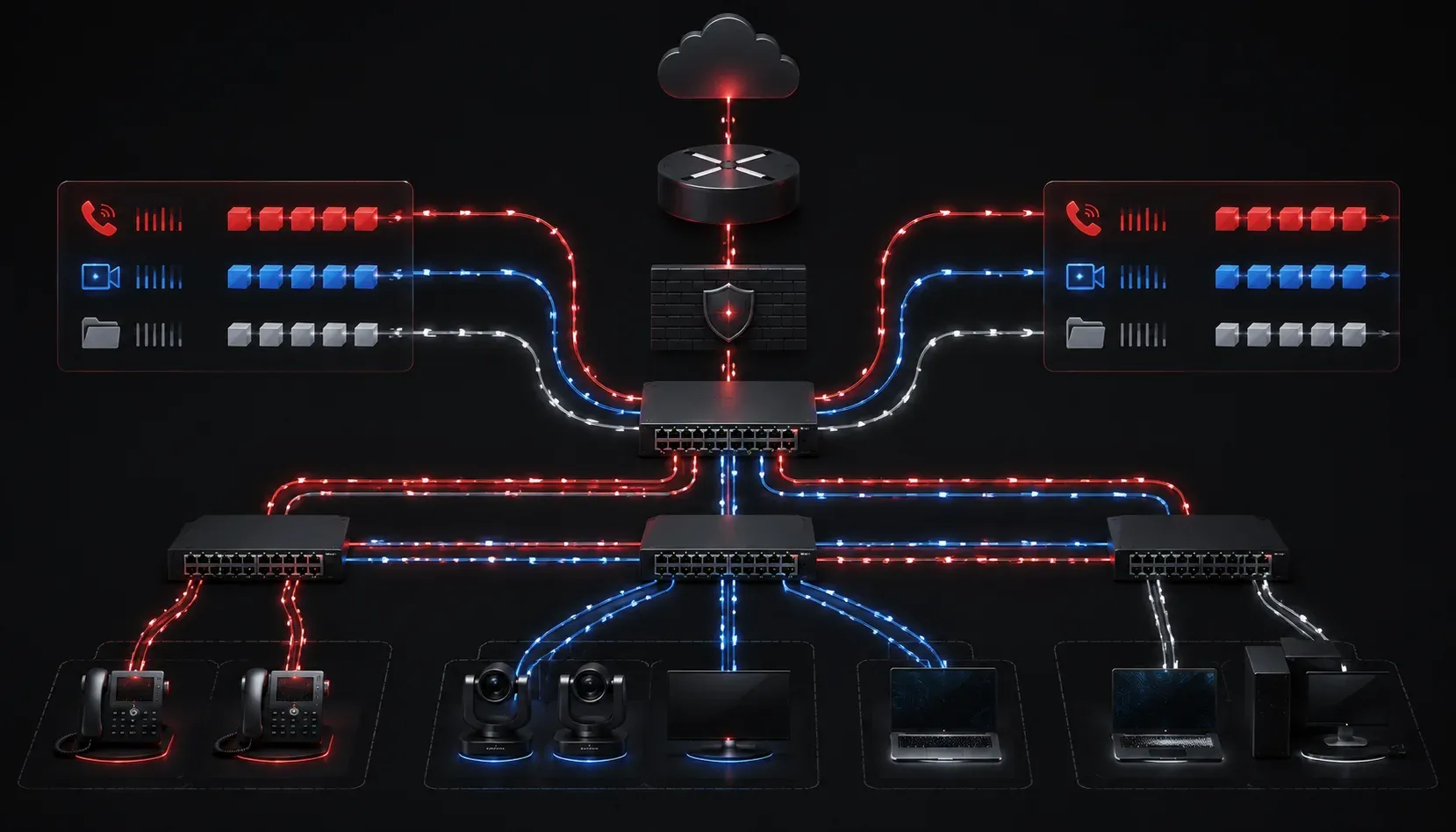
Quality of Service is one of those topics that separates good network engineers from great ones. Anyone can plug in cables and configure basic routing, but knowing how to shape and prioritize traffic under real-world load conditions is a skill that takes deliberate practice. In this post, we'll move beyond the basics and explore advanced QoS strategies that enterprise networks actually rely on to deliver consistent, predictable performance.
Why QoS Matters in Enterprise Networks
Enterprise networks carry a wildly diverse mix of traffic: voice calls, video conferences, database replication, bulk file transfers, and everything in between. Without a defined QoS strategy, all of that traffic competes equally for bandwidth. That means a large file sync can cause jitter on a VoIP call, or a software update can tank the latency of a critical business application.
The goal of any QoS implementation is to ensure that high-priority traffic gets the resources it needs, while lower-priority traffic is managed but not necessarily dropped. Done right, QoS makes your network feel bigger than it is.
Traffic Classification and Marking
Before you can prioritize anything, you need to classify it. Classification is the process of identifying traffic types, and marking is how you stamp that classification into the packet so downstream devices can act on it.
The two most common marking mechanisms are:
- DSCP (Differentiated Services Code Point): a 6-bit field in the IP header that allows 64 possible values. Most enterprise QoS strategies use a standard set of per-hop behaviors based on DSCP values.
- CoS (Class of Service): a 3-bit field in the 802.1Q VLAN tag, used for Layer 2 marking within the LAN.
A common Cisco MQC (Modular QoS CLI) classification example looks like this:
class-map match-all VOICE
 match dscp ef

class-map match-all VIDEO
 match dscp af41

class-map match-all BEST-EFFORT
 match dscp default
Classify traffic as close to the source as possible, and always trust markings from known devices like IP phones, but re-mark traffic from untrusted endpoints like user PCs.
Queuing Strategies
Once traffic is classified, you need a queuing policy to determine how packets are serviced. The two most important queuing mechanisms in modern enterprise QoS are:
Low Latency Queuing (LLQ)
LLQ is the standard for real-time traffic like voice. It creates a strict priority queue that is always serviced first, guaranteeing minimal delay and jitter. The key constraint is policing: you must set a bandwidth limit on the priority queue, otherwise it could starve other traffic during congestion.
policy-map WAN-EDGE-QOS
 class VOICE
  priority 512
 class VIDEO
  bandwidth percent 20
 class BEST-EFFORT
  fair-queue
Class-Based Weighted Fair Queuing (CBWFQ)
CBWFQ assigns guaranteed minimum bandwidth to each traffic class. Classes that are not using their allocation share the remaining bandwidth proportionally. This is ideal for business-critical application traffic that needs consistency but is not sensitive to small latency spikes the way voice is.
Traffic Shaping vs. Traffic Policing
These two terms often get confused, but they behave very differently:
- Traffic shaping: buffers excess traffic and releases it at a defined rate. This smooths out bursts but adds delay. Use shaping on the sending side to match a service provider's committed information rate (CIR).
- Traffic policing: drops or re-marks traffic that exceeds a defined rate immediately. Policing is harsher but adds no delay. Use policing to enforce limits on traffic entering your network.
In practice, you shape outbound traffic toward the WAN and police inbound traffic from untrusted sources.
DSCP Trust Boundaries
One of the most overlooked aspects of enterprise QoS strategy is the trust boundary: the point in the network where you decide to accept or override existing packet markings.
A well-designed trust model works like this:
- Trust DSCP markings from IP phones and managed endpoints at the access layer.
- Re-classify and re-mark traffic from PCs and unknown devices at the access switch.
- Carry those markings consistently through the distribution and core layers.
- Apply queuing and scheduling policies at WAN edge routers where congestion actually occurs.
Failing to establish a clear trust boundary is one of the most common reasons QoS implementations fail in production. Traffic arrives at the edge with inconsistent or untrusted markings, and the whole policy breaks down.
Network Performance Monitoring to Validate QoS
Configuring QoS without validating it is like setting a speed limit and never checking traffic. Use these tools to verify your policies are working:
- Cisco IOS show commands:
show policy-map interfaceis your first stop. It shows per-class packet counts, drops, and queuing statistics in real time. - IP SLA: Cisco's IP SLA feature generates synthetic traffic to measure latency, jitter, and packet loss across the network continuously.
- NetFlow/IPFIX: provides visibility into which applications are consuming bandwidth so you can refine classifications over time.
Router# show policy-map interface GigabitEthernet0/1

 GigabitEthernet0/1

  Service-policy output: WAN-EDGE-QOS

    Class-map: VOICE (match-all)
      5000 packets, 800000 bytes
      5 minute offered rate 64000 bps, drop rate 0 bps
      Match: dscp ef (46)
      Priority: 512 kbps, burst bytes 12800, b/w exceed drops: 0
What's Next
Now that you have a solid understanding of advanced QoS strategies, the logical next step is diving into AutoQoS, Cisco's automated QoS configuration feature. AutoQoS can accelerate deployment on large campus networks by generating baseline QoS policies automatically based on interface type and detected traffic. It's a great tool to understand, both for what it does well and where it falls short compared to a manually tuned policy.