
How to Implement Privacy Controls in AI Workflows
Learn practical methods for implementing privacy controls in AI workflows, including data anonymization, access controls, secure storage, and output monitoring to prevent data exposure and maintain compliance.

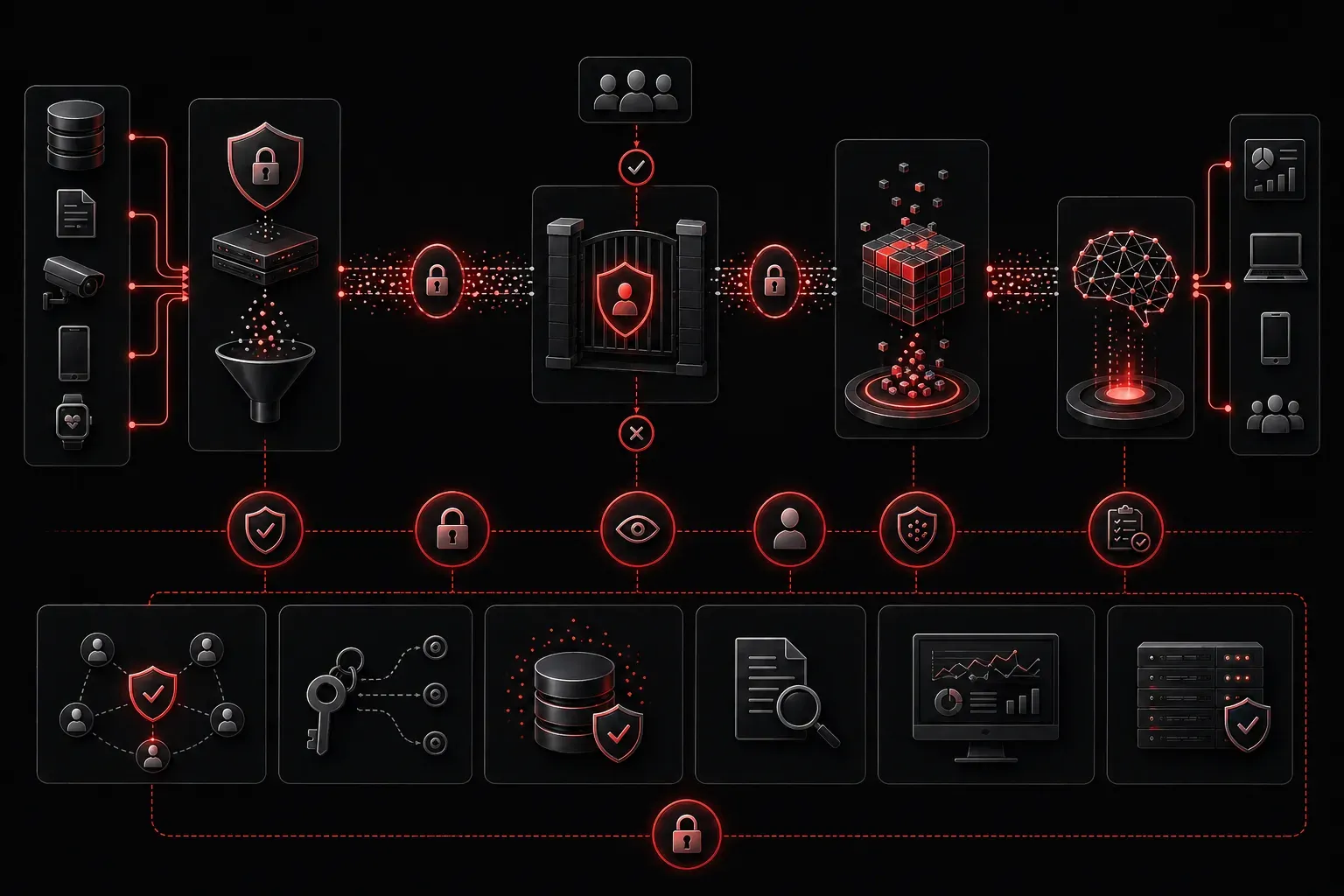
When working with AI systems, protecting sensitive data isn't just good practice; it's essential. Whether you're processing customer information, financial records, or proprietary business data, implementing robust privacy controls AI workflows prevents costly breaches and maintains trust. Let's explore practical methods to secure your AI pipelines from the ground up.
Understanding AI Privacy Risks
AI workflows present unique privacy challenges. Unlike traditional applications, AI systems often require large datasets for training and inference, creating multiple points where sensitive information can be exposed. Common risks include data leakage during model training, unintended information disclosure in outputs, and inadequate access controls on datasets.
The key is implementing data privacy AI measures at every stage of your workflow, not as an afterthought.
Essential Privacy Control Techniques
Data Anonymization and Pseudonymization
Start by removing or masking personally identifiable information (PII) before it enters your AI pipeline. Anonymization permanently removes identifying information, while pseudonymization replaces it with artificial identifiers.
import pandas as pd
from faker import Faker

fake = Faker()

# Pseudonymize customer data
def pseudonymize_customer_data(df):
    df_clean = df.copy()
    df_clean['customer_id'] = df_clean['customer_id'].apply(lambda x: fake.uuid4())
    df_clean['email'] = df_clean['email'].apply(lambda x: fake.email())
    return df_clean

# Apply to your dataset
secure_data = pseudonymize_customer_data(original_data)
Access Control and Data Governance
Implement role-based access controls (RBAC) to ensure only authorized personnel can access sensitive datasets. Create clear data governance policies that define who can access what data and under which circumstances.
- Use service accounts with minimal required permissions
- Implement audit logging for all data access
- Regularly review and rotate access credentials
- Establish data retention policies with automatic deletion schedules
Secure Data Storage and Transmission
Encrypt data both at rest and in transit. Use industry-standard encryption protocols and ensure your cloud storage solutions meet compliance requirements.
# Example using AWS S3 with server-side encryption
import boto3

s3_client = boto3.client('s3')

# Upload with encryption
s3_client.put_object(
    Bucket='your-secure-bucket',
    Key='training-data.csv',
    Body=encrypted_data,
    ServerSideEncryption='AES256'
)
Implementing Secure AI Workflows
Environment Isolation
Create isolated environments for different stages of your AI pipeline. Development, testing, and production environments should have separate data access controls and network isolation.
Use containerization to ensure consistent AI data protection across environments:
# Docker container with security hardening
FROM python:3.9-slim

# Create non-root user
RUN useradd -m -u 1000 aiuser
USER aiuser

# Copy only necessary files
COPY requirements.txt /app/
COPY src/ /app/src/

WORKDIR /app
RUN pip install --no-cache-dir -r requirements.txt

# Run with limited privileges
CMD ["python", "src/main.py"]
Output Filtering and Monitoring
Implement automated scanning to detect potential PII or sensitive information in AI outputs before they're released. This creates a final safety net in your secure AI workflows.
import re

def scan_output_for_pii(text):
    """Basic PII detection in AI outputs"""
    patterns = {
        'ssn': r'\b\d{3}-\d{2}-\d{4}\b',
        'email': r'\b[A-Za-z0-9._%+-]+@[A-Za-z0-9.-]+\.[A-Z|a-z]{2,}\b',
        'phone': r'\b\d{3}-\d{3}-\d{4}\b'
    }

    detected_pii = {}
    for pii_type, pattern in patterns.items():
        matches = re.findall(pattern, text)
        if matches:
            detected_pii[pii_type] = len(matches)

    return detected_pii

# Check AI output before release
pii_found = scan_output_for_pii(ai_response)
if pii_found:
    print(f"Warning: Potential PII detected: {pii_found}")
Continuous Monitoring and Compliance
Privacy protection is an ongoing process. Implement continuous monitoring to detect unusual data access patterns, failed authentication attempts, or potential data breaches. Regular audits ensure your privacy controls remain effective as your AI workflows evolve.
Document your privacy measures thoroughly. This documentation proves compliance with regulations like GDPR, CCPA, or industry-specific standards, and helps your team maintain consistent security practices.
What's Next
With these foundational privacy controls in place, you're ready to explore advanced topics like differential privacy techniques and federated learning approaches that provide additional layers of protection while maintaining model effectiveness. Our next post will cover implementing automated compliance monitoring systems that can detect and respond to privacy violations in real-time.