
Comparing Iterative, Chained, and Few-Shot Prompting
A comprehensive comparison of three essential AI prompting techniques: iterative prompting for refinement through repetition, chained prompting for breaking down complex tasks, and few-shot prompting for learning from examples. Includes practical examples and guidance on when to use each approach.

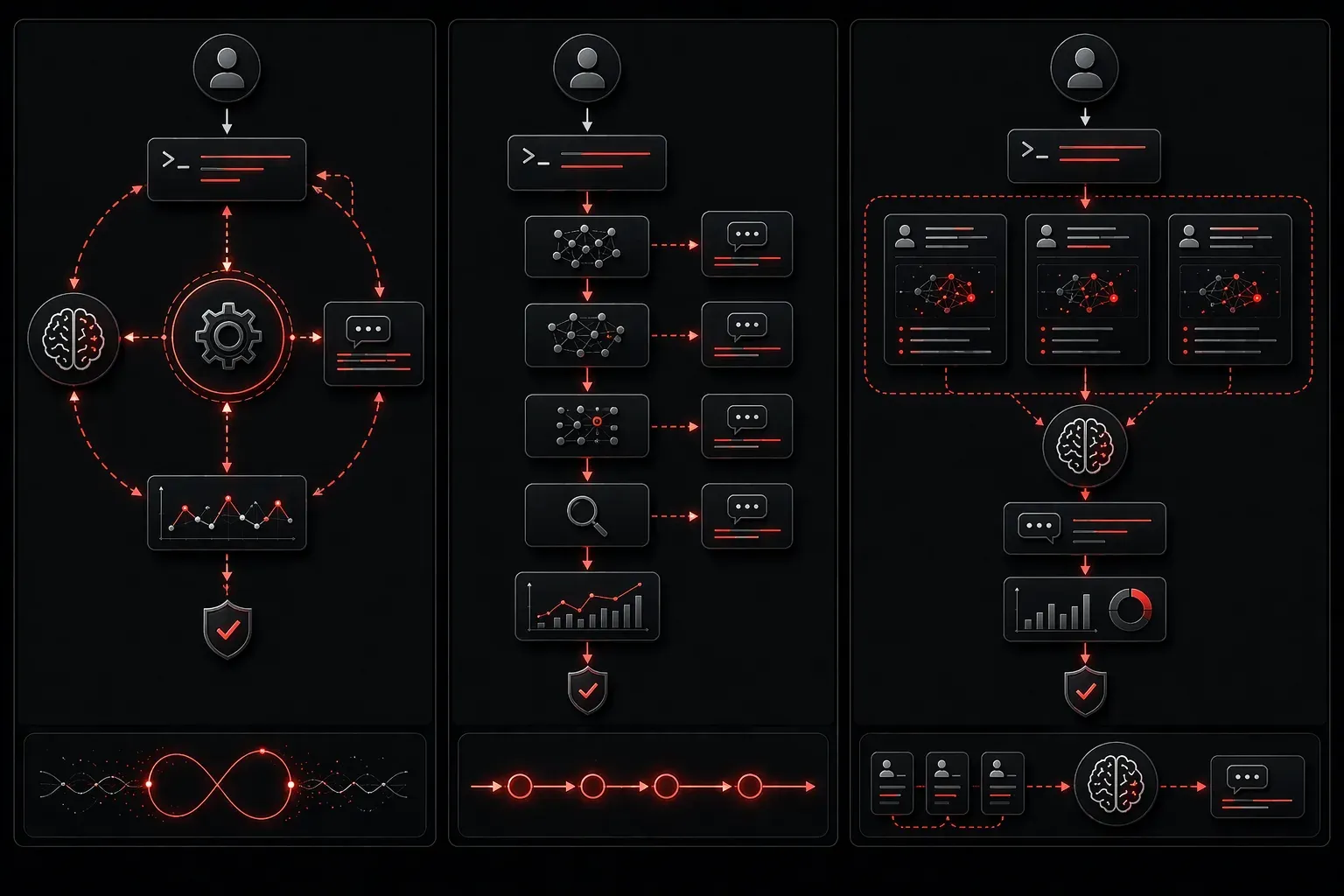
Understanding different prompting techniques is crucial for getting the best results from AI models like GPT, Claude, and other large language models. Three fundamental approaches (iterative, chained, and few-shot prompting) each serve different purposes and excel in specific scenarios. Let's explore how these techniques work and when to use each one.
Iterative Prompting: Refining Through Repetition
Iterative prompting involves continuously refining your prompt based on the AI's output until you achieve the desired result. Think of it as having a conversation where you adjust your request based on what you receive.
How it works:
- Start with a basic prompt
- Analyze the AI's response
- Modify your prompt to address shortcomings
- Repeat until satisfied
Example for network configuration documentation:
Prompt 1: "Document this OSPF configuration"
Result: Basic explanation without troubleshooting context

Prompt 2: "Document this OSPF configuration including common issues and verification commands"
Result: Better, but missing best practices

Prompt 3: "Document this OSPF configuration with troubleshooting steps, verification commands, and Cisco best practices for enterprise networks"
Result: Comprehensive technical documentation!
Iterative prompting works well for both creative tasks and technical outputs where you need to fine-tune accuracy, completeness, or specific technical details. It's particularly effective for refining code, improving technical documentation, and optimizing network automation scripts.
Chained Prompting: Breaking Down Complex Tasks
Chained prompting divides complex tasks into smaller, sequential steps. Each prompt builds on the previous output, creating a logical flow toward your final goal.
Example workflow for network automation script development:
Chain 1: "Analyze the requirements for automating VLAN configuration across 50 switches"
Chain 2: "Create a pseudocode outline for the VLAN automation script based on these requirements: [paste requirements]"
Chain 3: "Convert this pseudocode to Python using Netmiko library: [paste pseudocode]"
Chain 4: "Add error handling and logging to this script: [paste code]"
Chain 5: "Create unit tests for this network automation script: [paste final code]"
This technique excels when you need:
- Multi-step problem solving in network design
- Complex technical analysis requiring different perspectives
- Quality control at each development stage
- Clear reasoning paths for troubleshooting workflows
Chained prompting is particularly powerful for network design, troubleshooting complex issues, developing automation workflows, and creating comprehensive technical documentation — all relevant areas for the Cisco AI Technical Practitioner (AITECH) exam.
Few-Shot Prompting: Learning from Examples
Few-shot prompting provides the AI with examples of the desired input-output format before asking it to perform the same task. This technique is fundamental to how modern language models like GPT-3 and GPT-4 learn patterns and is extensively used in AI-assisted coding and technical tasks.
Structure:
Example 1: [Input] → [Expected Output]
Example 2: [Input] → [Expected Output]
Example 3: [Input] → [Expected Output]

Now do this: [Your actual input]
Practical example for network device log analysis:
Analyze these network log entries and classify the issue type:

"%LINK-3-UPDOWN: Interface GigabitEthernet0/1, changed state to down" → Physical Layer Issue
"%OSPF-5-ADJCHG: Process 1, Nbr 192.168.1.2 on GigabitEthernet0/2 from FULL to DOWN" → Routing Protocol Issue
"%SYS-2-MALLOCFAIL: Memory allocation of 65536 bytes failed" → Memory Issue

Now analyze: "%BGP-3-NOTIFICATION: sent to neighbor 10.1.1.1 3/5 (Connection rejected) 2 bytes"
Few-shot prompting is ideal for:
- Establishing consistent formatting for technical documentation
- Teaching specific classification tasks (like log analysis or network issue categorization)
- Maintaining code style consistency across automation projects
- Creating standardized troubleshooting procedures
When to Use Each Technique
Use iterative prompting when: You're developing network automation scripts, fine-tuning technical documentation, refining troubleshooting procedures, or don't have a clear specification initially.
Use chained prompting when: You're designing complex network architectures, developing multi-step automation workflows, creating comprehensive technical assessments, or need transparent reasoning for troubleshooting processes.
Use few-shot prompting when: You need consistent formatting for technical reports, want to teach the AI specific network patterns, have clear examples of desired technical output, or are working with standardized procedures.
Many advanced practitioners combine these techniques for maximum effectiveness. For example, you might use few-shot examples to establish the format for network device configurations, then apply chained prompting to break down complex network designs, followed by iterative refinement of the final automation scripts.
What's Next
Now that you understand these fundamental prompting techniques, the next step is learning how to engineer effective system prompts that establish consistent behavior patterns across all your interactions with AI models — a crucial skill for the Cisco AI Technical Practitioner certification and professional AI-assisted network engineering workflows.