
Trunk Ports vs Access Ports: What's the Difference?
This post explains the fundamental differences between trunk ports and access ports in network switches. Access ports serve single VLANs and connect end devices, while trunk ports carry multiple VLANs and connect network infrastructure.

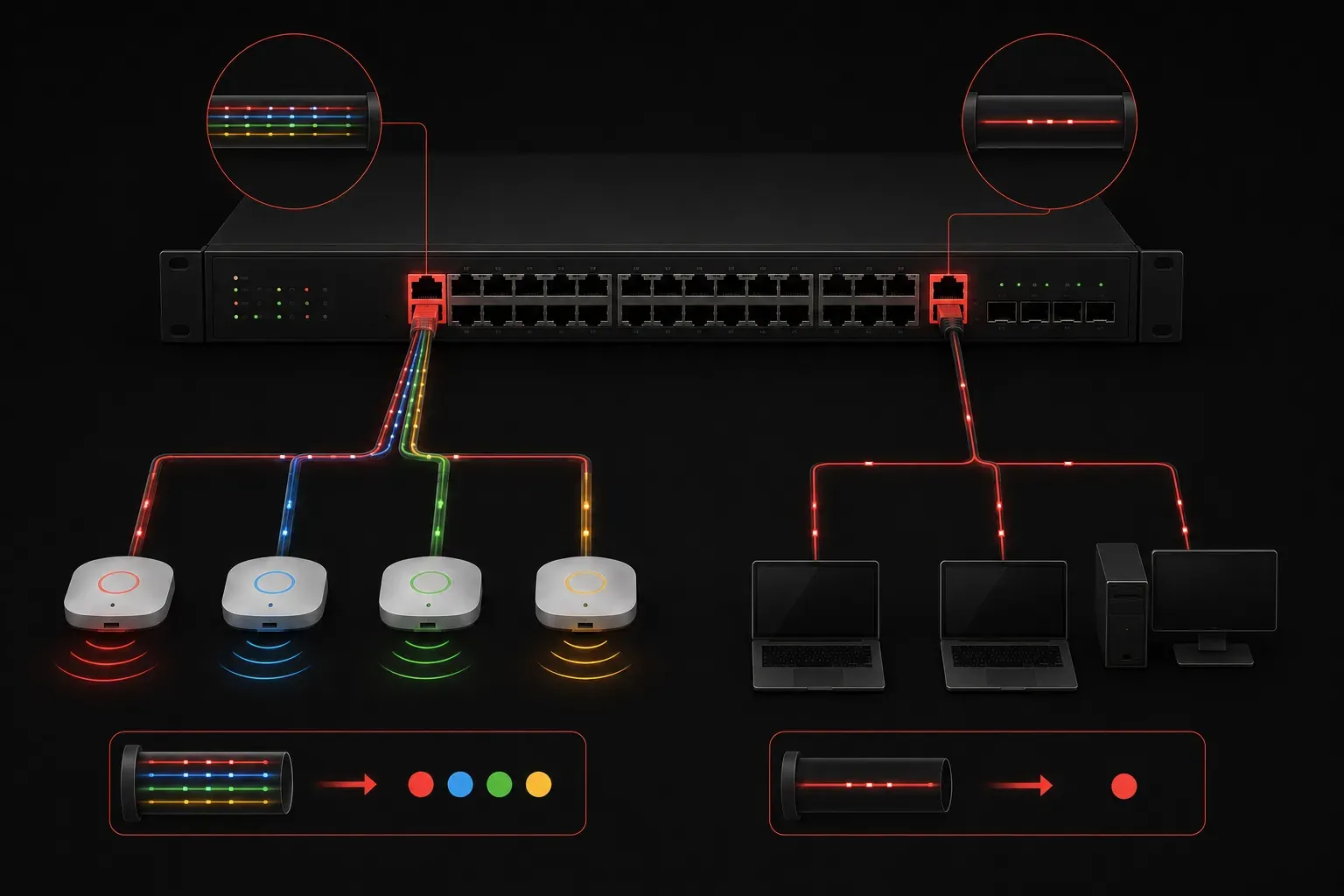
When you're setting up a network with multiple switches and VLANs, understanding the difference between trunk ports and access ports is crucial. These two port types serve completely different purposes, and knowing when to use each one will make or break your network design.
What Are Access Ports?
An access port is the simplest type of switch port. It belongs to exactly one VLAN and connects end devices like computers, printers, or phones to the network. Think of an access port as a dedicated pathway for a single VLAN's traffic.
Here's how to configure an access port:
Switch(config)# interface fastethernet 0/1
Switch(config-if)# switchport mode access
Switch(config-if)# switchport access vlan 10
Key characteristics of access ports:
- Carries traffic for only one VLAN
- Removes VLAN tags from frames before sending to end devices
- Associates untagged frames received from end devices with the configured VLAN
- End devices don't need to understand VLAN tagging
What Are Trunk Ports?
A trunk port is designed to carry traffic for multiple VLANs simultaneously. These ports connect switches to other switches or to devices that need access to multiple VLANs, like routers or servers running virtualization.
Configuring a trunk port looks like this:
Switch(config)# interface fastethernet 0/24
Switch(config-if)# switchport mode trunk
Switch(config-if)# switchport trunk allowed vlan 10,20,30
Switch(config-if)# switchport trunk native vlan 1
Essential features of trunk ports:
- Carries traffic for multiple VLANs on a single physical link
- Uses 802.1Q tagging protocol to insert VLAN identifiers into Ethernet frames
- Maintains VLAN separation even when multiple VLANs share the same cable
- Connected devices must understand VLAN tagging
- Includes a native VLAN for untagged traffic (important to configure consistently across trunk links)
Key Network Differences
The fundamental network differences between these port types come down to their scope and function:
Traffic Handling: Access ports handle untagged traffic for a single VLAN, while trunk ports handle tagged traffic for multiple VLANs using 802.1Q encapsulation. When a frame leaves an access port, any VLAN tags are stripped off. When a frame travels through a trunk port, it keeps its VLAN tag (except for native VLAN traffic) so the receiving device knows which VLAN it belongs to.
Scalability: Access ports limit you to one VLAN per physical port. Trunk ports allow dozens of VLANs to share a single physical connection, dramatically reducing the number of cables needed between switches.
Device Compatibility: Most end devices expect untagged traffic, making access ports the natural choice. Only network infrastructure devices and VLAN-aware servers typically connect to trunk ports.
Common Use Cases
Access Port Use Cases:
- Connecting user workstations to the network
- Linking printers, IP phones, and other end devices
- Providing network access to devices in a single department or function
Trunk Port Use Cases:
- Connecting switches together (inter-switch links)
- Linking switches to routers for inter-VLAN routing
- Connecting to servers that need access to multiple VLANs
- Uplinks to wireless access points serving multiple SSIDs
Quick Comparison Summary
When you compare ports in your network design, remember this simple rule: access ports are for end devices that belong to one VLAN, while trunk ports are for infrastructure connections that need to carry multiple VLANs.
To verify your port configuration, use these commands:
Switch# show interfaces switchport
Switch# show vlan brief
Understanding these network differences will help you design more efficient networks and troubleshoot connectivity issues more effectively.
What's Next
Now that you understand the basic differences between trunk and access ports, the next logical step is learning about VLAN Trunking Protocol (VTP) and how it manages VLAN information across multiple switches in your network.
Tools and resources for this topic
- CCNA Official Cert Guide (Wendell Odom) — The definitive CCNA study resource. Both volumes cover the 200-301 exam blueprint in full.
- Wendell Odom CCNA Vol 1 — Covers networking fundamentals, switching, and routing basics.
- Wendell Odom CCNA Vol 2 — Covers advanced routing, WAN, infrastructure services, and security.