
Configuring and Verifying Spanning Tree Protocols: RSTP and MST
Comprehensive guide to configuring and verifying RSTP and MST in enterprise networks, covering advanced configuration techniques, verification commands, and troubleshooting methodologies for network stability.

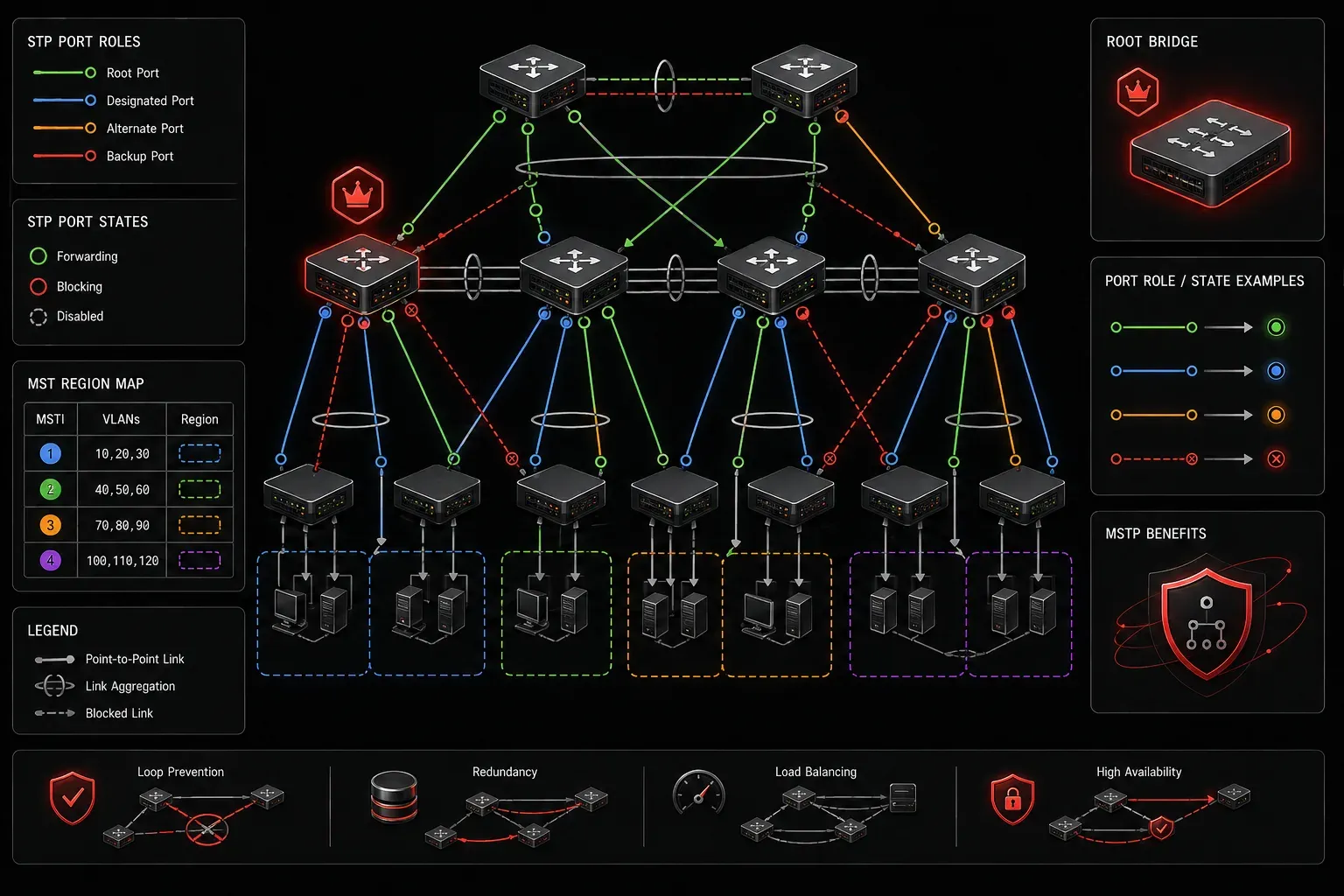
Spanning Tree Protocol evolution has brought us from the original IEEE 802.1D to modern implementations that dramatically improve network convergence and stability. For enterprise networks, understanding RSTP (802.1w) and MST (802.1s) configuration isn't just about passing the ENCOR exam; it's about building resilient Layer 2 infrastructures that can handle real-world demands.
RSTP Configuration Fundamentals
Rapid Spanning Tree Protocol addresses the convergence limitations of legacy STP by introducing new port states and roles. The key improvement lies in how RSTP handles topology changes, reducing convergence time from 30-50 seconds to typically under 6 seconds.
Enable RSTP globally on your switches using:
Switch(config)# spanning-tree mode rapid-pvstThe critical difference in RSTP configuration lies in understanding the enhanced port roles. Beyond the traditional root, designated, and blocked ports, RSTP introduces alternate and backup ports. Alternate ports provide alternate paths to the root bridge, while backup ports are connected to the same collision domain as another switch port.
Configure edge ports for end-user connections to eliminate unnecessary topology change notifications:
Switch(config-if)# spanning-tree portfast
Switch(config-if)# spanning-tree bpduguard enable
For trunk ports connecting switches, enable rapid transition:
Switch(config-if)# spanning-tree link-type point-to-pointMST Configuration for Enterprise Scalability
Multiple Spanning Tree Protocol shines in environments with numerous VLANs where Per-VLAN Spanning Tree creates CPU and memory overhead. MST maps multiple VLANs to spanning tree instances, dramatically reducing the number of spanning tree calculations required.
The MST configuration process requires consistency across all switches in the MST region. Begin with the MST configuration mode:
Switch(config)# spanning-tree mst configuration
Switch(config-mst)# name REGION_NAME
Switch(config-mst)# revision 1
Switch(config-mst)# instance 1 vlan 10,20,30
Switch(config-mst)# instance 2 vlan 40,50,60
Switch(config-mst)# show pending
Switch(config-mst)# exit
Switch(config)# spanning-tree mode mst
The show pending command is crucial; it displays your configuration before committing. MST region boundaries are determined by three parameters: the configuration name, the revision number, and the VLAN-to-instance mapping. All switches within a region must have identical values for these parameters.
Configure root bridge priorities per instance to control traffic flow:
Switch(config)# spanning-tree mst 1 priority 4096
Switch(config)# spanning-tree mst 2 priority 8192
Advanced RSTP and MST Verification
Effective STP verification goes beyond basic show spanning-tree commands. Start with topology overview:
Switch# show spanning-tree summary
Switch Mode: MST
Root bridge for: none
EtherChannel misconfig guard: Disabled
Extended system ID: Enabled
Portfast Default: Disabled
PortFast BPDU Guard: Enabled
Portfast BPDU Filter: Disabled
Loopguard Default: Disabled
TCNP guard: Disabled
Pathcost method used: Short
For MST-specific verification, examine the regional configuration:
Switch# show spanning-tree mst configuration
Name: REGION_NAME
Revision: 1
Instance  Vlans mapped
--------  -----
0         1-9,11-19,21-29,31-39,41-49,51-59,61-4094
1         10,20,30
2         40,50,60
Verify per-instance root bridge selection and port roles:
Switch# show spanning-tree mst 1 detailThis command reveals critical information including the regional root bridge, port costs, and any inconsistencies that could cause topology problems.
Troubleshooting Common STP Issues
Network stability depends on identifying and resolving STP anomalies quickly. The most common issues involve inconsistent MST configurations, root bridge flapping, and convergence delays.
Check for MST region boundary issues:
Switch# show spanning-tree mst interface fastethernet 0/1 detailIf switches show different regional roots for the same instance, you have a configuration mismatch. Use show spanning-tree mst configuration digest on both switches; the digest values must match for switches to be in the same region.
Monitor topology changes that can indicate instability:
Switch# show spanning-tree summary totals
Root bridge changes: 0
Topology change count: 2
Topology change last: 00:02:15
Excessive topology changes often indicate flapping links, duplex mismatches, or improperly configured edge ports.
Best Practices for Production Deployment
Successful RSTP and MST deployments require careful planning. Always configure root bridges deterministically rather than relying on default bridge priorities. Place primary and secondary root bridges on high-end distribution layer switches with redundant power and cooling.
For MST implementations, limit instances to necessary groupings. Each instance consumes CPU cycles and memory. A common approach groups VLANs by function: data VLANs in one instance, voice VLANs in another, and management VLANs in a third.
Enable STP protection features on access ports:
Switch(config-if)# spanning-tree portfast
Switch(config-if)# spanning-tree bpduguard enable
Switch(config-if)# spanning-tree bpdufilter enable
BPDU Guard prevents loops when unauthorized switches connect to access ports. BPDU Filter eliminates unnecessary BPDU processing on confirmed edge ports.
What's Next
With RSTP and MST configuration mastered, the next step is implementing advanced Layer 2 technologies like VXLAN and understanding their interaction with spanning tree protocols. These overlay technologies build upon the stable foundation that proper STP configuration provides.
Tools and resources for this topic
- CCNP ENCOR 350-401 Official Cert Guide — The definitive ENCOR study resource by Brad Edgeworth. Covers enterprise infrastructure, virtualisation, and automation.