
Choosing the Right Network Architecture for Your Needs
A practical guide for beginners on selecting network architecture, comparing client-server vs peer-to-peer models based on specific business needs, size, security requirements, and budget constraints. Provides a clear decision framework for network planning.

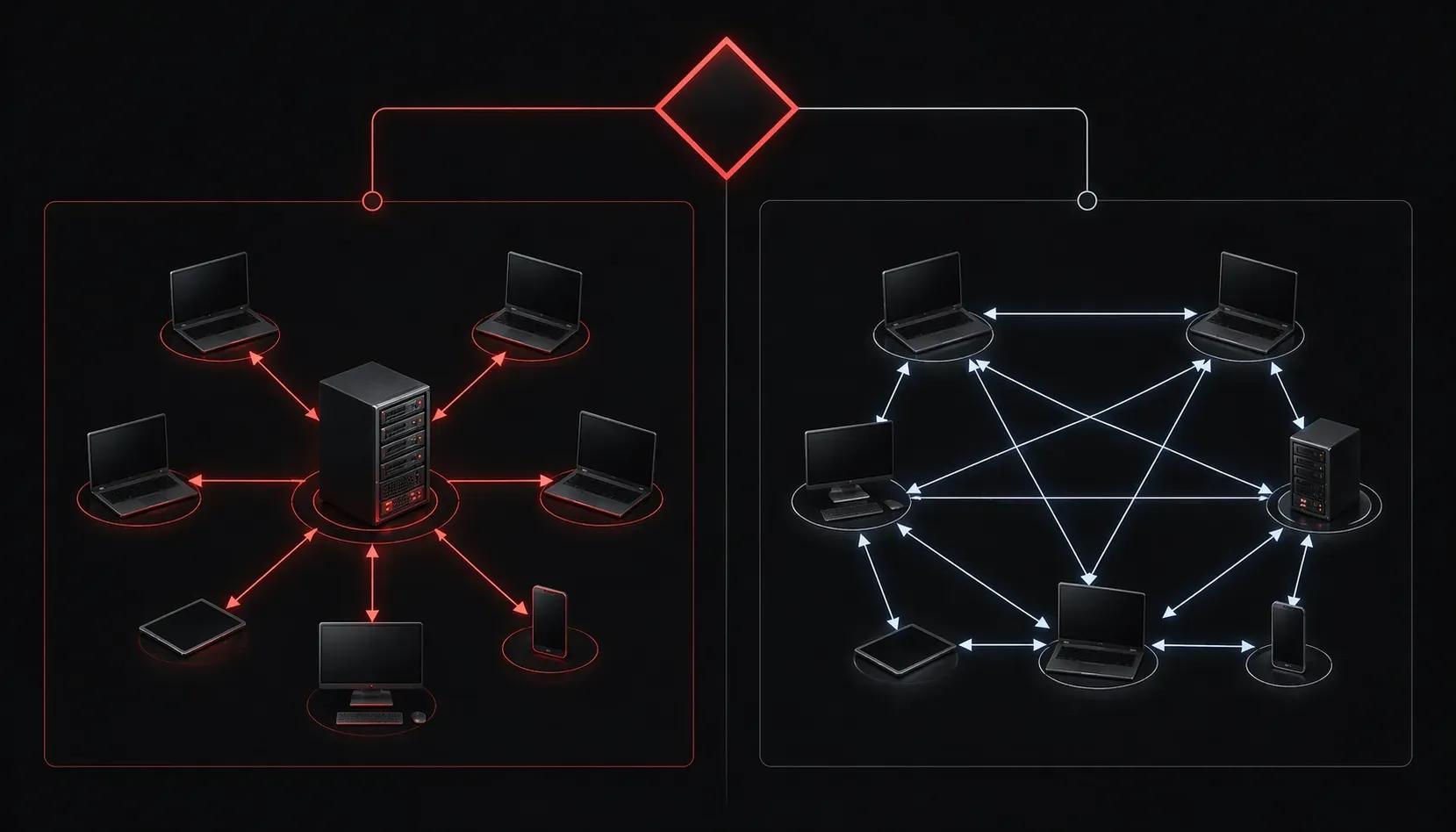
When you're setting up a network, whether it's for a small office or your home lab, one of the first decisions you'll face is choosing the right architecture. This choice will impact everything from performance to security to maintenance costs. Let's walk through how to select network architecture that fits your specific needs.
Understanding Your Core Options
Network architecture selection typically boils down to two main approaches: client-server and peer-to-peer. Each serves different purposes and environments.
Client-Server Architecture
In a client-server model, dedicated servers provide resources and services to client devices. Think of it like a restaurant where servers (the network servers) take orders and deliver food to customers (client devices) who sit at tables.
Best for:
- Businesses with 10+ users
- Environments requiring centralized data storage
- Networks needing strict security controls
- Applications requiring high availability
Key advantages:
- Centralized administration and backup
- Better security through access controls
- Scalable performance with dedicated hardware
- Professional-grade reliability
Real-world example: A 50-employee accounting firm uses a client-server architecture with a dedicated file server for financial documents, an email server, and a database server for their accounting software. This setup provides centralized backup, user authentication, and ensures compliance with financial data regulations.
Peer-to-Peer Architecture
In peer-to-peer networks, each device can act as both client and server, sharing resources directly with other devices. It's like a potluck dinner where everyone brings something to share.
Best for:
- Small offices (fewer than 10 users)
- Home networks
- Temporary or project-based setups
- Budget-conscious environments
Key advantages:
- Lower initial costs (no dedicated servers)
- Simple setup and maintenance
- Flexibility in resource sharing
- No central server as a single point of failure
Important consideration: While peer-to-peer networks don't have a central server that can fail and bring down the entire network, each individual device can still be a point of failure for the specific resources it shares. If a computer sharing a printer goes offline, that printer becomes unavailable to other users.
Real-world example: A small 5-person design studio uses peer-to-peer networking where each designer's workstation shares their local printer and project folders. When one designer is out of the office, their shared resources become unavailable, but the rest of the network continues functioning normally.
Network Planning: Key Decision Factors
When you're doing network planning, consider these critical factors to guide your architecture selection:
Size and Growth Projections
Start by counting current users and devices, then project growth over the next 2-3 years. A client-server architecture becomes more cost-effective as you scale beyond 10-15 users, while peer-to-peer works well for smaller, stable groups.
Security Requirements
Ask yourself: Do you handle sensitive data? Do you need user authentication and access controls? Client-server architectures provide better security through centralized user management and access controls. In peer-to-peer networks, each device manages its own security, which can create vulnerabilities.
Performance Needs
Consider your applications' demands. Database applications, file servers, and resource-intensive programs typically perform better in client-server environments where dedicated hardware handles the workload. For basic file sharing and simple applications, peer-to-peer often suffices.
Budget Constraints
Calculate both initial setup costs and ongoing maintenance. While peer-to-peer has lower upfront costs, client-server networks often provide better long-term value through reduced troubleshooting time and improved productivity.
Making the Right Choice
Here's a practical decision framework:
Choose Client-Server if you have:
- More than 10 regular users
- Critical business applications
- Compliance or security requirements
- Need for centralized backup and management
- Budget for dedicated server hardware
Choose Peer-to-Peer if you have:
- Fewer than 10 users
- Simple file and printer sharing needs
- Limited budget
- Temporary or flexible requirements
- Users comfortable managing their own resources
Hybrid Approaches
Don't forget that you can combine both approaches. Many small businesses start with peer-to-peer for basic connectivity, then add dedicated servers for specific functions like file storage or email as they grow. This hybrid approach lets you scale gradually while managing costs.
Case study: A growing marketing agency started with 6 employees using peer-to-peer file sharing. As they expanded to 15 employees, they kept peer-to-peer for printer sharing but added a dedicated file server for client projects and a centralized backup solution. This hybrid approach saved costs while improving data security and reliability.
What's Next
Once you've selected your network architecture, the next step is understanding how devices communicate within that architecture. In our next post, we'll explore network topologies and how physical and logical layouts impact your network's performance and reliability.
Tools and resources for this topic
- CompTIA Network+ Study Guide — Comprehensive N10-009 exam preparation covering all five domains.